61
5
Taking Photographs
P, S, A, and M Modes
Time (T)
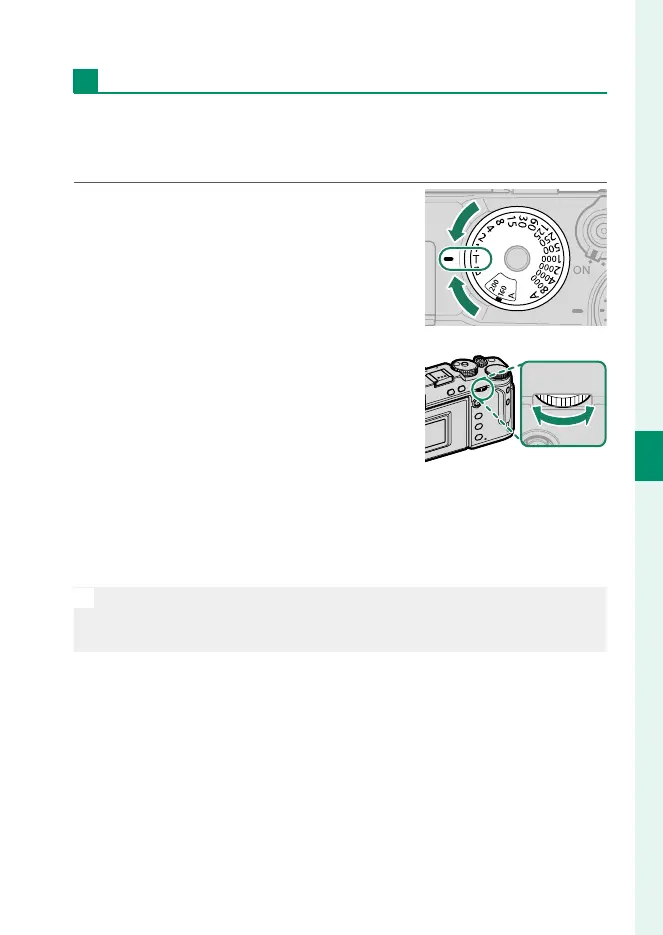
Choose a shutter speed of T (time) for long time-exposures.
Use of a tripod is recommended to prevent the camera moving
during the exposure.
1
Set shutter speed to T.
2
Rotate the rear command dial to
choose a shutter speed.
3
Press the shutter button all the way down to take a picture
at the selected shutter speed. At speeds of 1 s or slower, a
count-down timer will be displayed while the exposure is in
progress.
N
To reduce “noise” (mottling) in long time-exposures, select ON for
H IMAGE QUALITY SETTING> LONG EXPOSURE NR. Note that this
may increase the time needed to record images after shooting.



 To Next Page