Getting s tarted
Connecting the device
Please observe the safety information in "Important notes", Page 7.
CE conformance and optimum pict ure quality are guaranteed only i f
you use the data cables supplied.
► Sw itch off the monitor and the computer.
► D isconnect the power plug
from the computer.
Connecting cables to the monitor
The supplied data c able
s have two 15-pin D-SUB connectors or two 2 4-pin DVI
connectors and a 2 0-pin
DisplayPort conne ctor (not included in delivery scope) for
connection to the monit
or and to the computer.
Information on the c o
mputer connections and interfaces is contained in the
operating manual fo
r the computer.
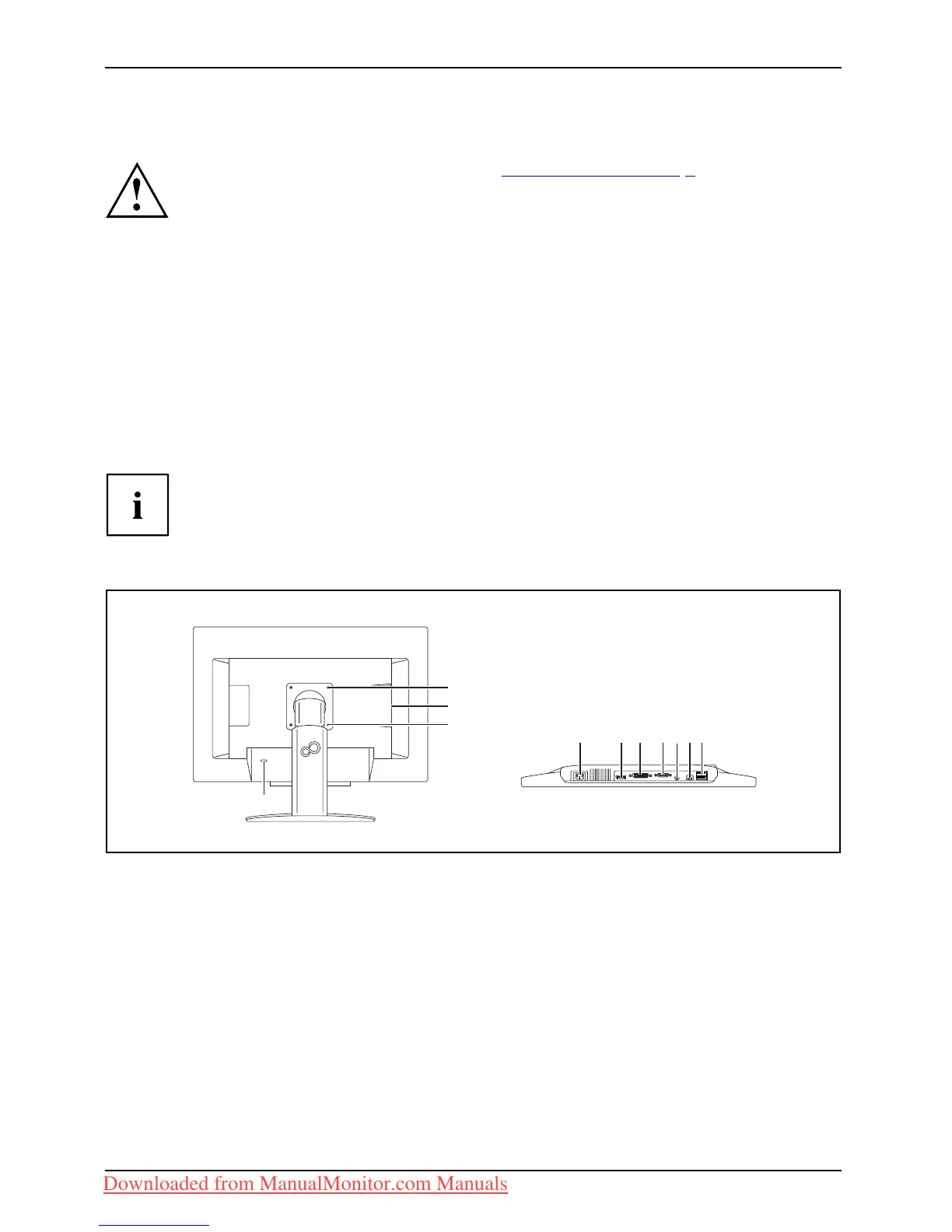
A lock ( Kensingto n L
ock) can be mo unted in the security slot to protect the monitor
against theft. A Ke
nsington lock is not supplied with the monitor.
B22W-6 LED
1
1
4 56 78
910
2
3
1=Holesforfixing swivel arm or wa ll bracket
2 = Security slot for the "Kensington Lock"
3 = USB-IN sockets
4 = Power connector
5 = DisplayPort socket (DIGITAL)
6 = DVI-D connector (DIGITAL)
7 = D-SUB socket ( ANALOG)
8 = AUDIO-IN socket
9 = USB-IN soc k ets
10 = USB-OUT socket
16 Fujitsu Technology Solutions
Downloaded from ManualMonitor.com Manuals



 To Next Page
 Loading...








