Operation
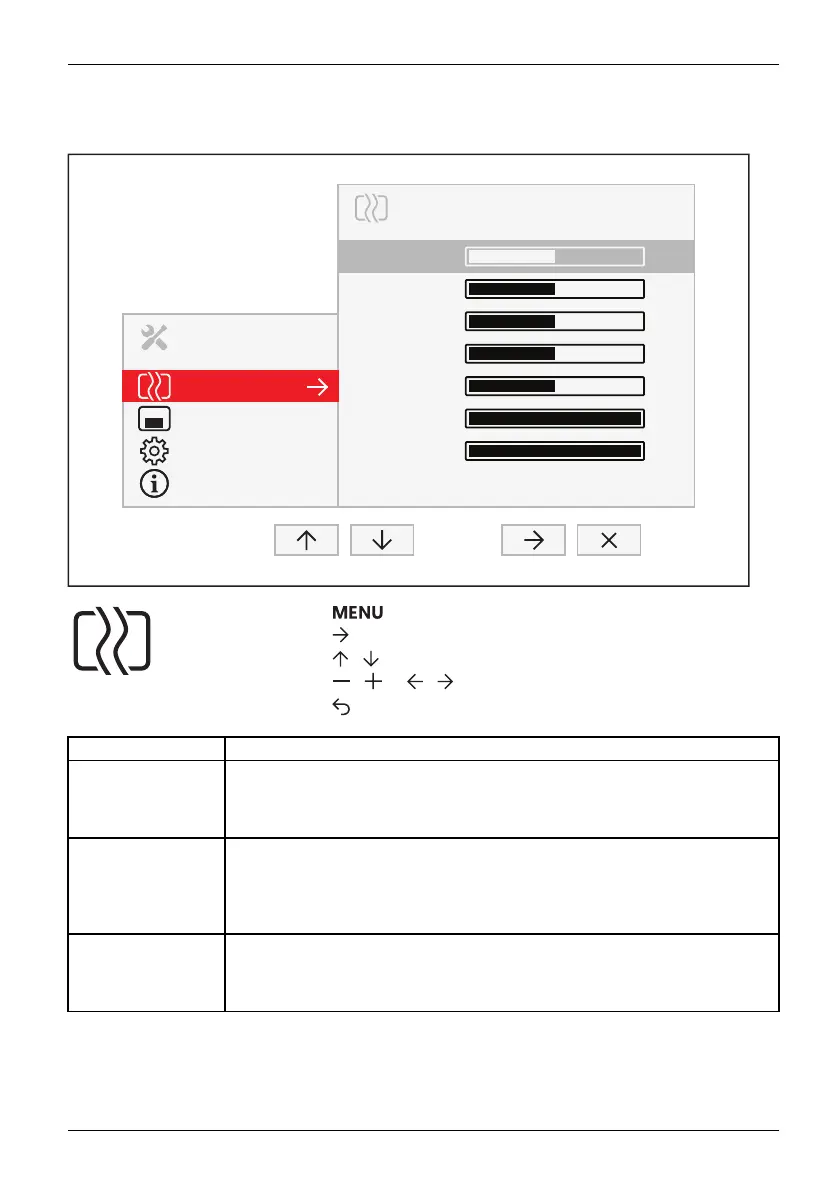
Setting s creen display
MENU
IMAGE
Image
OSD
Advanced
Information
Phase
Clock
H-Position
V-Position
Sharpness
Saturation
Hue
Expansion Full Screen
50
50
50
50
50
100
100
► Press the buttontocallupthemainmenu.
► Press the butt
on to switch to the Image submenu.
► Press the
/ button to mark a fun ction in the subme nu.
► Press the
/ or
/ button to make the desired setting.
► Press the
button to save the settings and return to the main menu.
Function Description
Phase
Eliminate picture disturbance
With this functio n yo u fine-tune your monitor to eliminate picture disturbance.
This setting o nly appears with an analogue video signal (e.g. VGA).
Clock
Set synchroni sati on
With this function you adjust the picture width to eliminate vertical picture
disturbances.
This setting o nly appears with an analogue video signal (e.g. VGA).
H-position
Adjust the horizontal position
With this function you move the picture to the left or to th e right.
This setting o nly appears with an analogue video signal (e.g. VGA).
Fujitsu 21









 To Next Page