PR-LN4 Software Guide
3.2 OPERATING PROCEDURE
3.2.1 STARTING
Start the LAN Settings Tool once the installation is complete. The following describes how to start the tool.
If the [User Account Control] dialog box is displayed, click [Allow] or [Yes].
1. Click the PR-LN4 setting tool.
For Windows 10, Server 2016 and Server 2016 :
Click [Fujitsu Dot Matrix Printer Utility]
-> [Settings Tool]
from All apps
(*1)
in the Windows Start menu.
For Windows 8 and later :
Click the [Settings Tool] tile in the Apps view
(*2)
.
For Windows 7 and earlier:
Click [Fujitsu Dot Matrix Printer Utility]
-> [Printer LAN Tool]
-> [Settings Tool]
from All Programs
(*1)
in the Windows Start menu.
*1) Refer to [All Programs] in "1.5 HOW TO USE THIS
MANUAL" for details on how to display this screen in
each operating system.
*2) In the case of Windows 8, software can be started from the
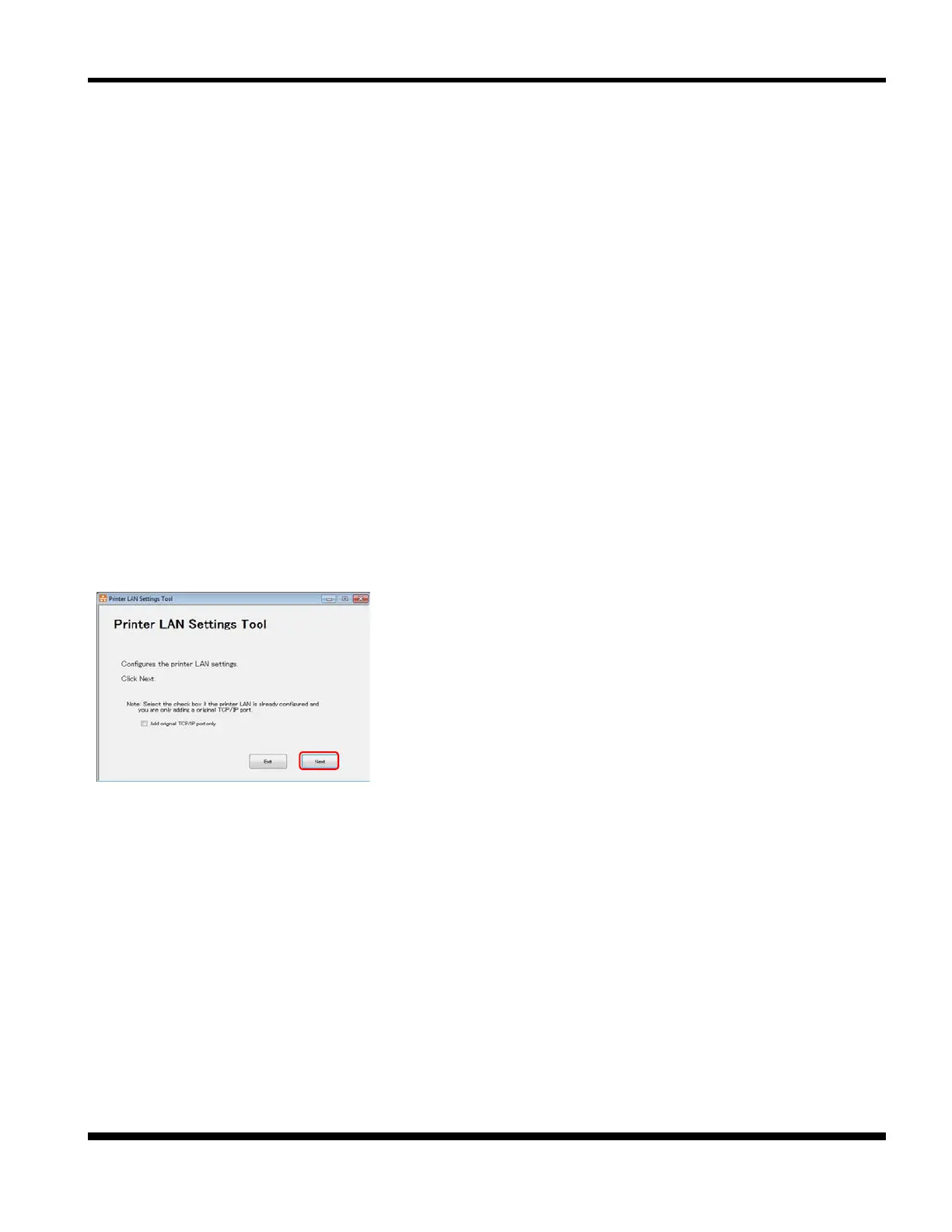
2. The main screen of the tool is displayed.
*1) Refer to "3.2.2 PR-LN4 SETTINGS" and "3.2.3 ADDING AN
ORIGINAL TCP/IP PORT " for details on how to perform each
of the operations.



 To Next Page