PR-LN4 Software Guide
CHAPTER 4 PRINTING USING THE
REGULAR OPERATING
SYSTEM PRINT CLIENT
This section describes how to print using the regular operating system print client function.
*1) Install the printer driver in advance on the computer you are using.
*2) Printing by IPP port with operating system standard is not supported.
4.1 ON WINDOWS VISTA AND LATER
Since the following description is given using the screens from Windows 7, the screens may differ if you are using
other Windows operating system.
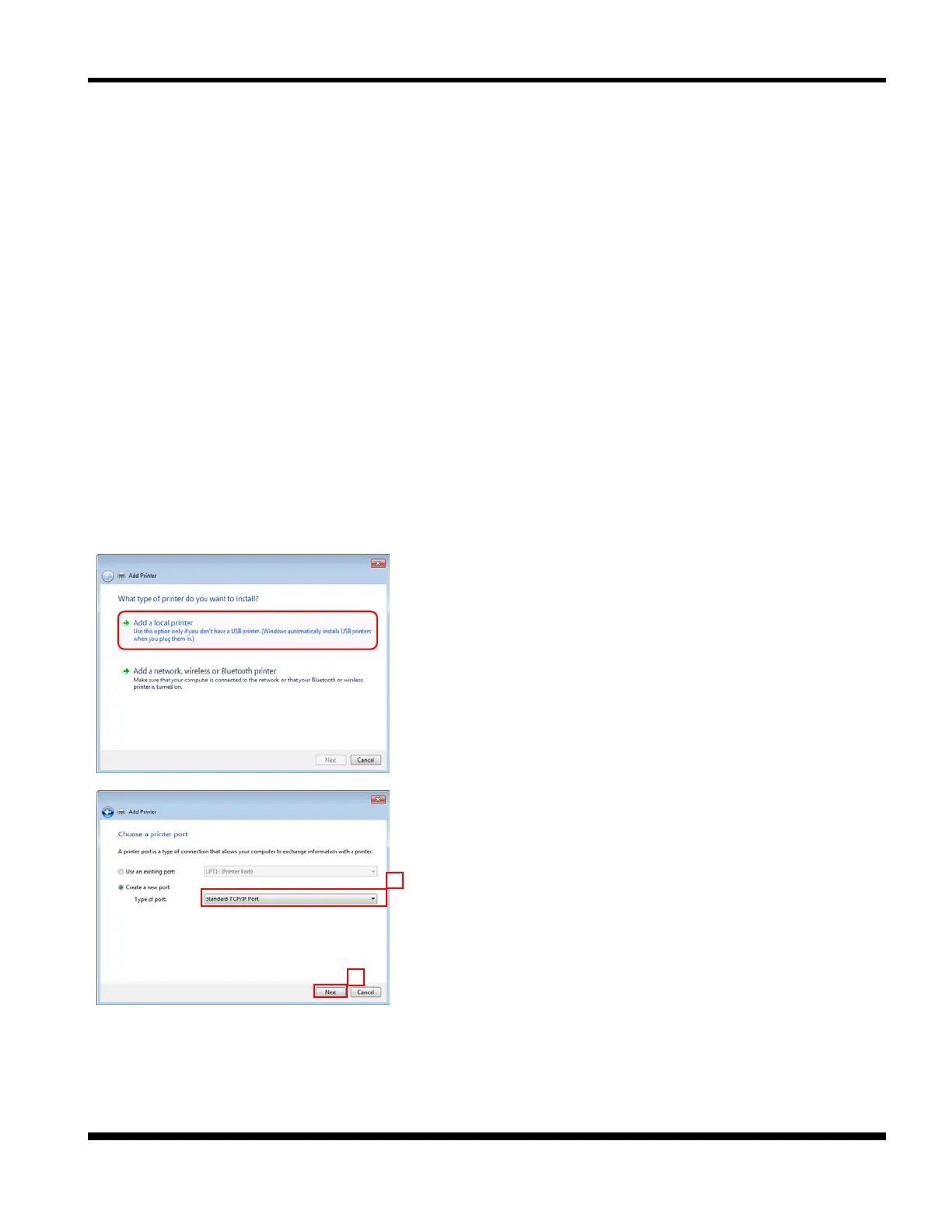
Then, select the [Add a local printer].
*1) Refer to [Add a printer] in "1.5 HOW TO USE THIS
MANUAL" for details on how to display this screen
in each operating system.
*2) If you are using Windows 8 and later, after click [Add
a printer], select "The printer that I want isn’t listed"
and select [Add a local printer or network printer with
manual settings] check box.
2. Select the [Create a new port] option, and select [Standard
TCP/IP Port] as the type.
Click [Next].



 To Next Page