PR-LN4 Software Guide
3.2.2 PR-LN4 SETTINGS
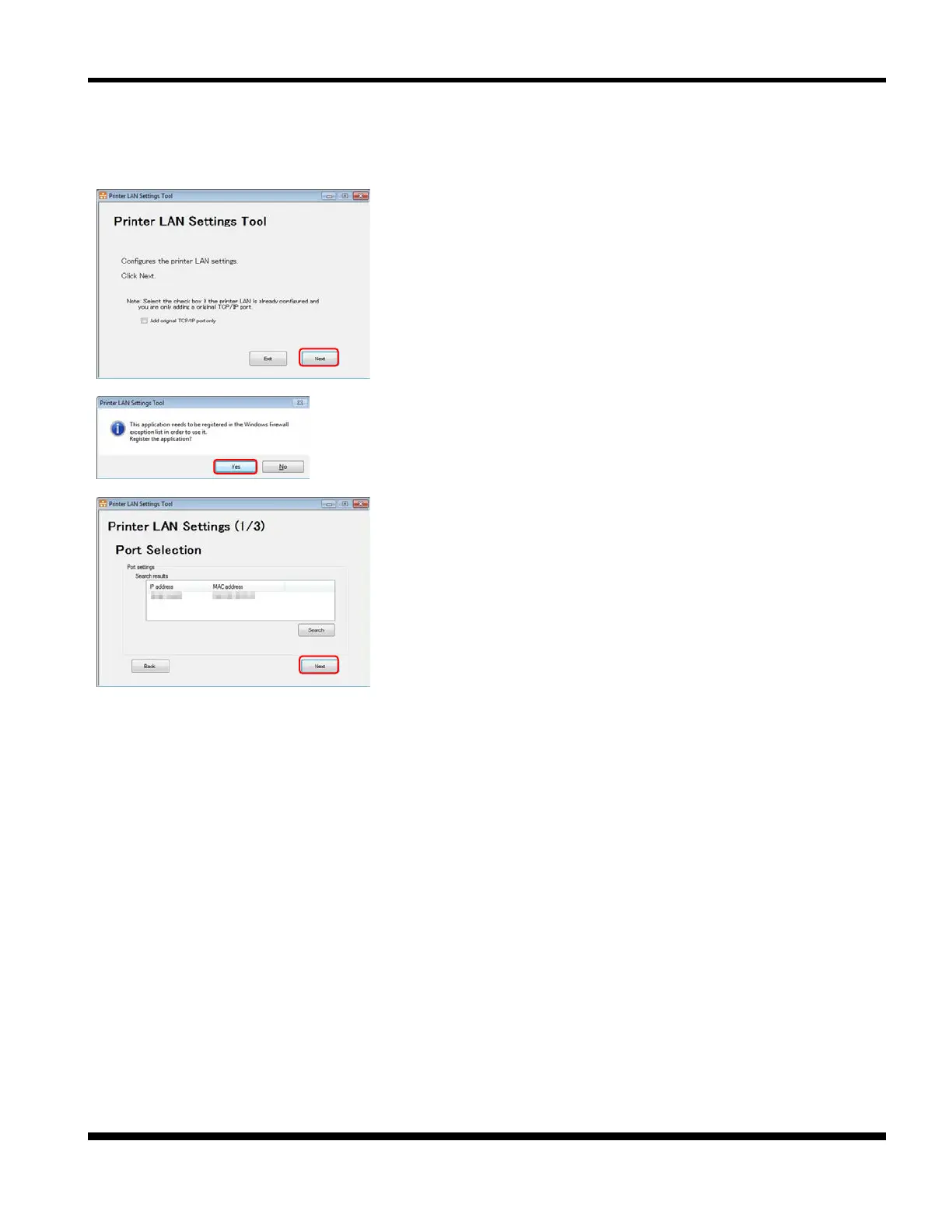
This section describes how to configure the simple IP address in the PR-LN4 by using this tool.
1. Configure the PR-LN4 settings.
Click [Next].
*1) If you are only adding an Original TCP/IP port, select the
[Add Original TCP/IP port only] check box and then
click [Next]. Refer to section 3.2.3.
2. When this screen is displayed, click [Yes].
3. Select the printer to configure from among the search result
and click [Next].
*1) If a list of search results is not displayed, click [Search].
*2) Check the labels displayed on the printer for the MAC address.
*3) If you search printer set as "Enable" of DHCP under network
environments which do not have DHCP server, the printer's IP
address displays "0.0.0.0".



 To Next Page