Accessories for your Tablet PC (opti
onal)
7
5
6
4
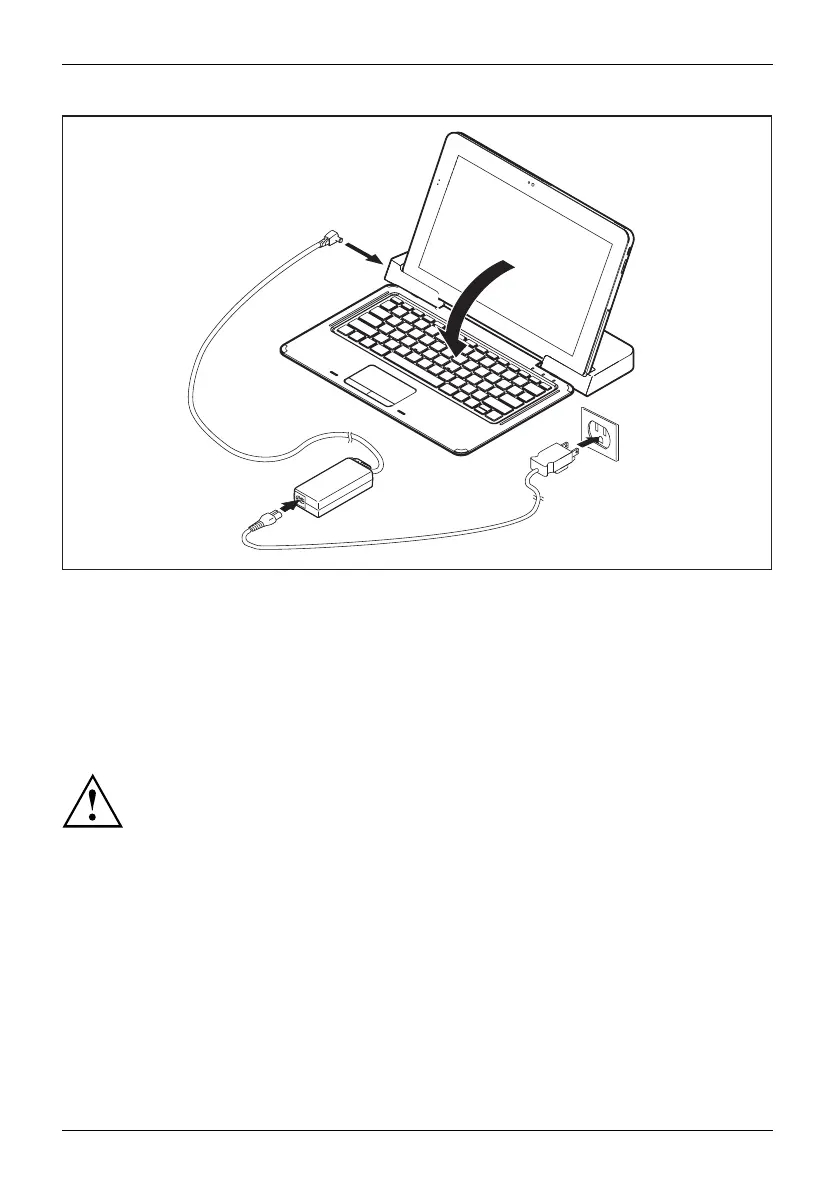
► Fo ld down the magnetic keybo ard in the direction of the arrow (4).
► Plug the AC adap
ter cable into the DC input connector (DC IN) on the docking cradle (5).
► C onnect the power cable to the AC adapter (6).
► Plug the power
cable into the power outlet (7).
Separating the Tablet PC with magnetic keyboard
from the docking cradle
It is possible to separate the Tablet PC from the docking cradle during operation:
You must first separate t he Tablet PC from the docking cradle before you can
remove the keyboard. Attempting to remo ve the magnet ic keyboard while the Tablet
PC is in the docking cradle can damage the magnetic keyboard.
54 Fujitsu


 To Next Page
 Loading...










