Connecting the receiver and the mous
e English - 5
Preparing the mouse and establi
shing the
wireless connection
Before you can use your new mous
e, you must make the following preparations.
When inserting the battery, f
ollow the safety notes and the chapter "
Technical data",
Page 14 - English.UseonlyAAty
pe batteries. Sw itch off the mouse w hen it is
not used for longer period
s. This extends the service life of the battery.
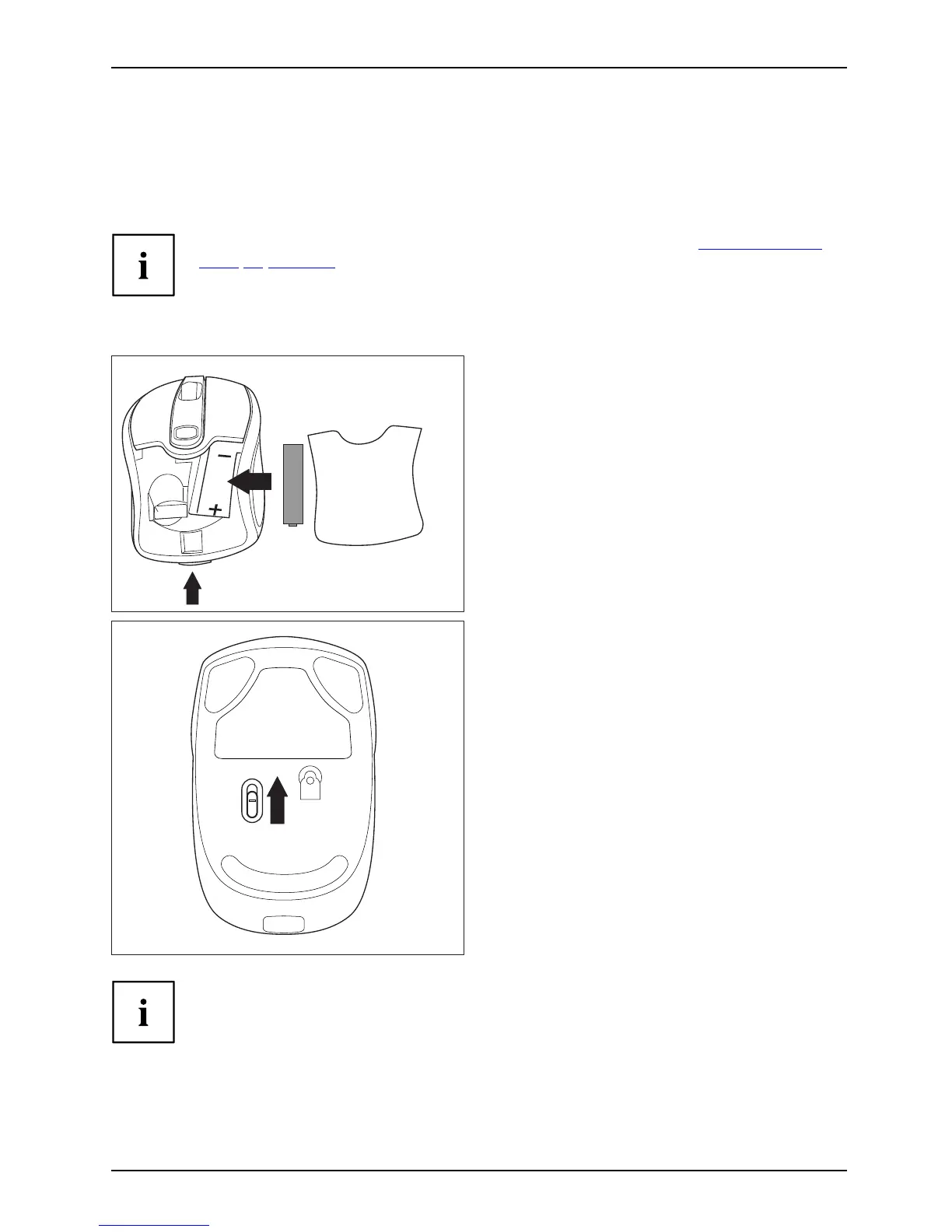
The mouse req uires one AA battery.
1
► Open the cover of the batte ry compartment
on the top of the mouse by pressing the
button (1) and remove the cover.
► Insert the battery into the battery
compartment. The illustration in the battery
compartment shows how to insert the
battery in the correct orientation.
► Close the battery compartment.
OFF ON
► Set the switc h on the bottom of
themouseto"On".
The wireless conne ction between the mouse and the receiver is e stablished
automatically and you can start using the mouse immediately.
Fujitsu Technology Solutions 21


 To Next Page