8 - English Using the mouse
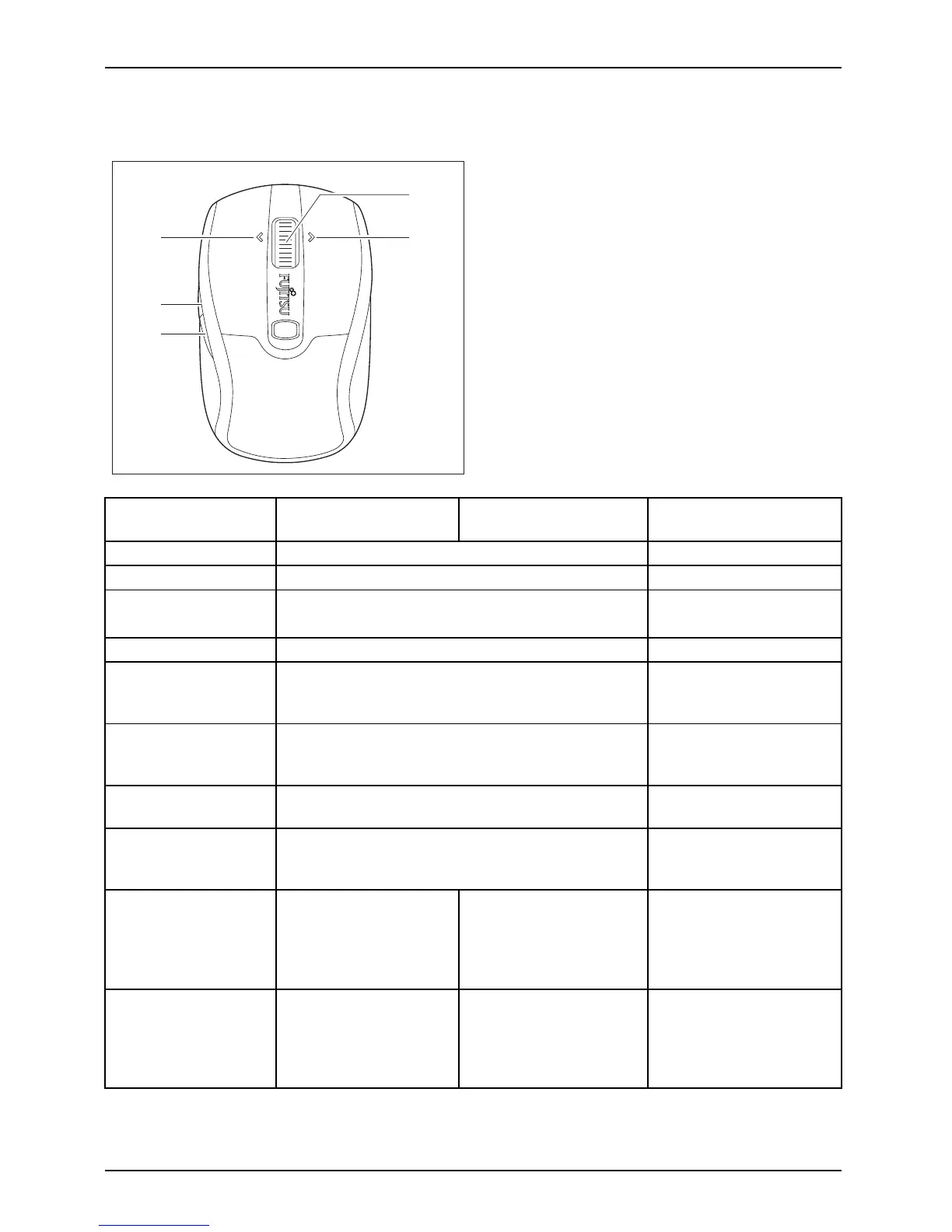
The buttons on the mouse
5
1
4
2
3
Mouse button
Assignme nt without
software
Default assignment
with installed softwa
re
Optional with install
ed
software
Right mo use button Function as right mou
se button
-
Left mouse button Function as left m ouse bu tton
-
DPI button
Increase/decrease the resolution
(scanning sensitivity)
-
1 (centre button
)
Function as centre bu tton Freely prog rammable
1 (centre button)
turn mouse wheel
forwards
Scroll up
-
1 (centre button)
turn mouse wheel
backwards
Scroll down
-
2(forwards
button)
Depending on the active application, you can use
this button to navigate f orwards or scroll forwards
Freely programmable
3 (backwar
ds b utton)
Depending on the active application, you
can use this but ton to navigate backwards
or scroll backwards
Freely programmable
4(mousew
heel
towards
left)
No functi
on (under
Windows
Vista /
Windows
7: screen
conten
t is shifted to the
left)
Screen co
ntent is
shifted
to the left
Freely programmable
5 (mouse wheel
towards right)
No function (under
Windows Vista /
Windows 7: screen
content is shifted to the
right)
Screen content is
shifted to the right
Freel
y programmable
24 Fujitsu Technology Solutions



 To Next Page