10 EN
ɶ Using the Remote Control
Remote Control Usage Guidelines:
• Make sure that there are no obstacles
between the remote control and the
infrared sensor window on the unit.
• Remote operation may become unreliable if
strong sunlight or fluorescent light is shining
on the infrared sensor window of the unit.
• Remote controls of different devices can
interfere with each other. Avoid using a
remote controls of another device which is
located close to the unit.
• Replace the batteries when you notice a fall-
off in the operating range of the remote
control.
• The maximum operable ranges from the
unit are as follows.
Line of sight:
approx. 7 m
Either side of the centre:
approx. 5 m within 30°
Above:
approx. 5 m within 30°
Below:
approx. 5 m within 15°
2.5 Guide to On-Screen Display
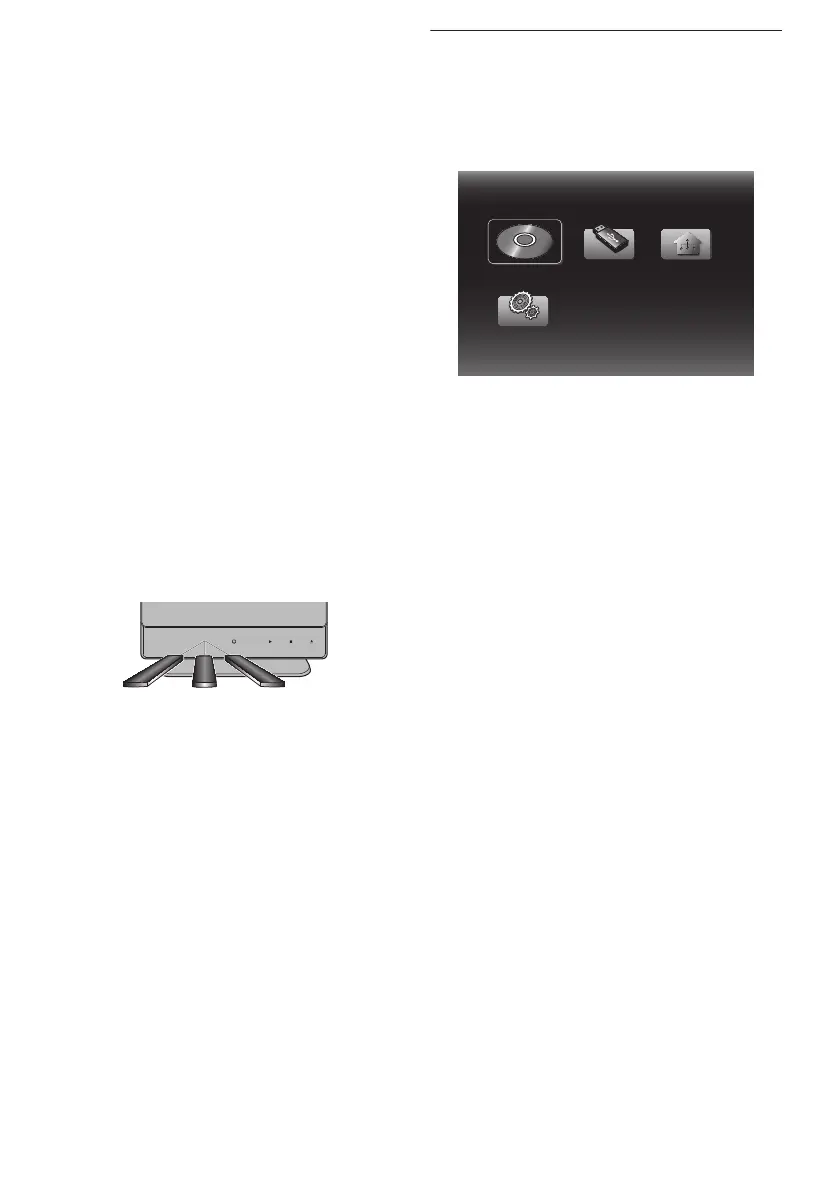
ɶ Home Menu
When you turn on the unit, home menu will
appear automatically. Otherwise, press
[HOME].
“Disc”:
Initiates playback of inserted disc, displays a
list of tracks / files or the media filter menu
“USB”:
Displays a list of tracks / files on the
connected USB flash drive or the media
filter menu
“Home Network”:
To access the home network server
(DLNA)
“Settings”:
To access the setup menu
30˚ 30˚
Disc



 To Next Page