9EN
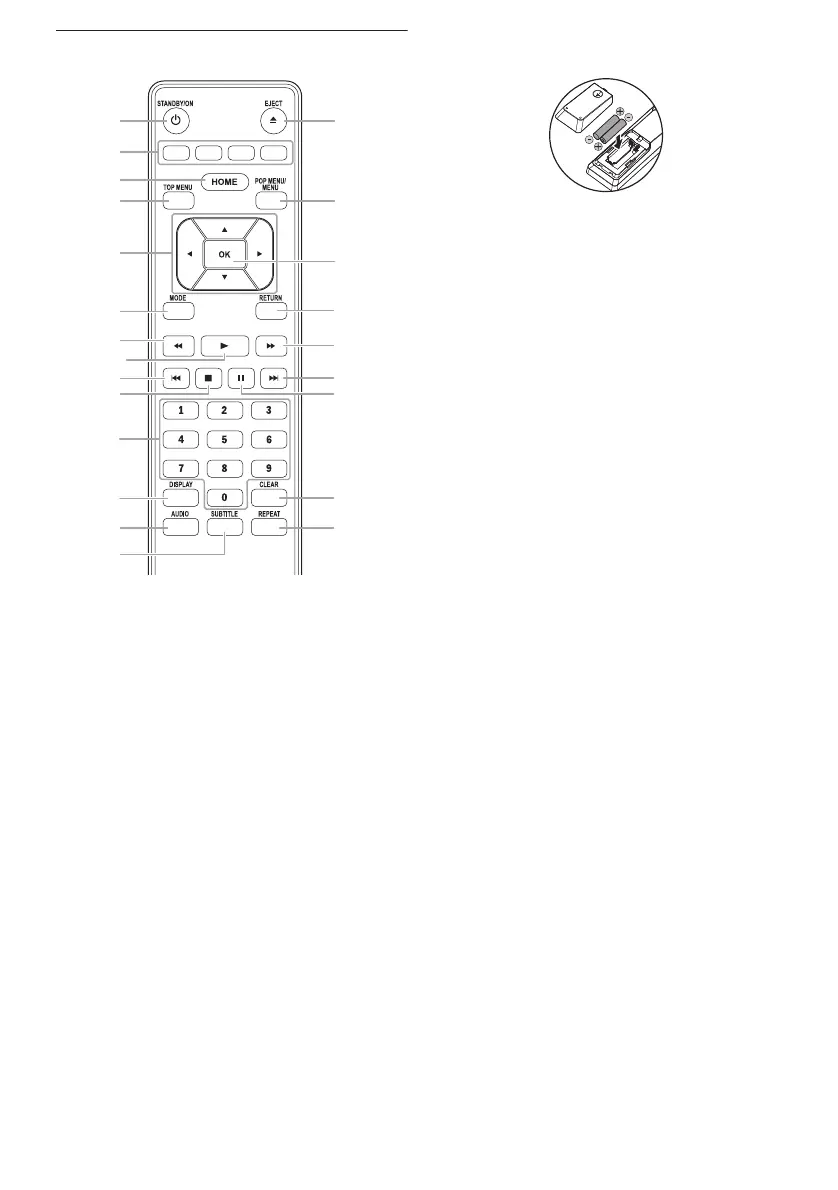
2.4 Remote Control
* The unit can also be turned on by pressing
these buttons.
1STANDBY/ONQ button
2 Red / Green / Yellow / Blue buttons
3 HOME button
4 TOP MENU button
5 K / L / s / B buttons
6MODE button
7 E (reverse) button
8 B (play) button*
9 H (skip) button
10 C (stop) button
11 Number buttons
12 DISPLAY button
13 AUDIO button
14 SUBTITLE button
15 REPEAT button
16 CLEAR button
17 F (pause) button
18 G (skip) button
19 D (forward) button
20 RETURN button
21 OK button
22 POP MENU/MENU button
23 EJECT A button*
ɶ Installing the Batteries in the Remote
Control
Install 2 R03 (1.5 V) batteries matching the
polarity indicated inside battery compartment of
the remote control.
Caution
Incorrect use of batteries can result in hazards
such as leakage and bursting. Please observe the
following:
• Do not mix alkaline, standard (carbon-zinc),
or rechargeable (ni-cad, ni-mh, etc)
batteries.
• Do not mix new and old batteries together.
• Do not use different kinds of batteries
together. Although they may look similar,
different batteries may have different
voltages.
• Make sure that the + and - ends of each
battery match the indications in the battery
compartment.
• Remove batteries from battery
compartment, when the remote is not going
to be used for a month or more.
• When disposing of used batteries, please
comply with governmental regulations or
environmental public rules that apply in your
country or area.
• Do not recharge, short-circuit, heat, burn
or disassemble batteries.
1
4
3
7
9
13
6
19
18
17
23*
22
20
21
16
15
12
11
2
5
10
14
8*



 To Next Page