PRECAUTIONS PREPARATION ADVANCED PLAYBACK
BASIC OPERATIONS
RECORDING OPTIONAL SETTINGS TROUBLESHOOTING INFORMATION
15
BASIC OPERATIONS
Hint for Disc Playba
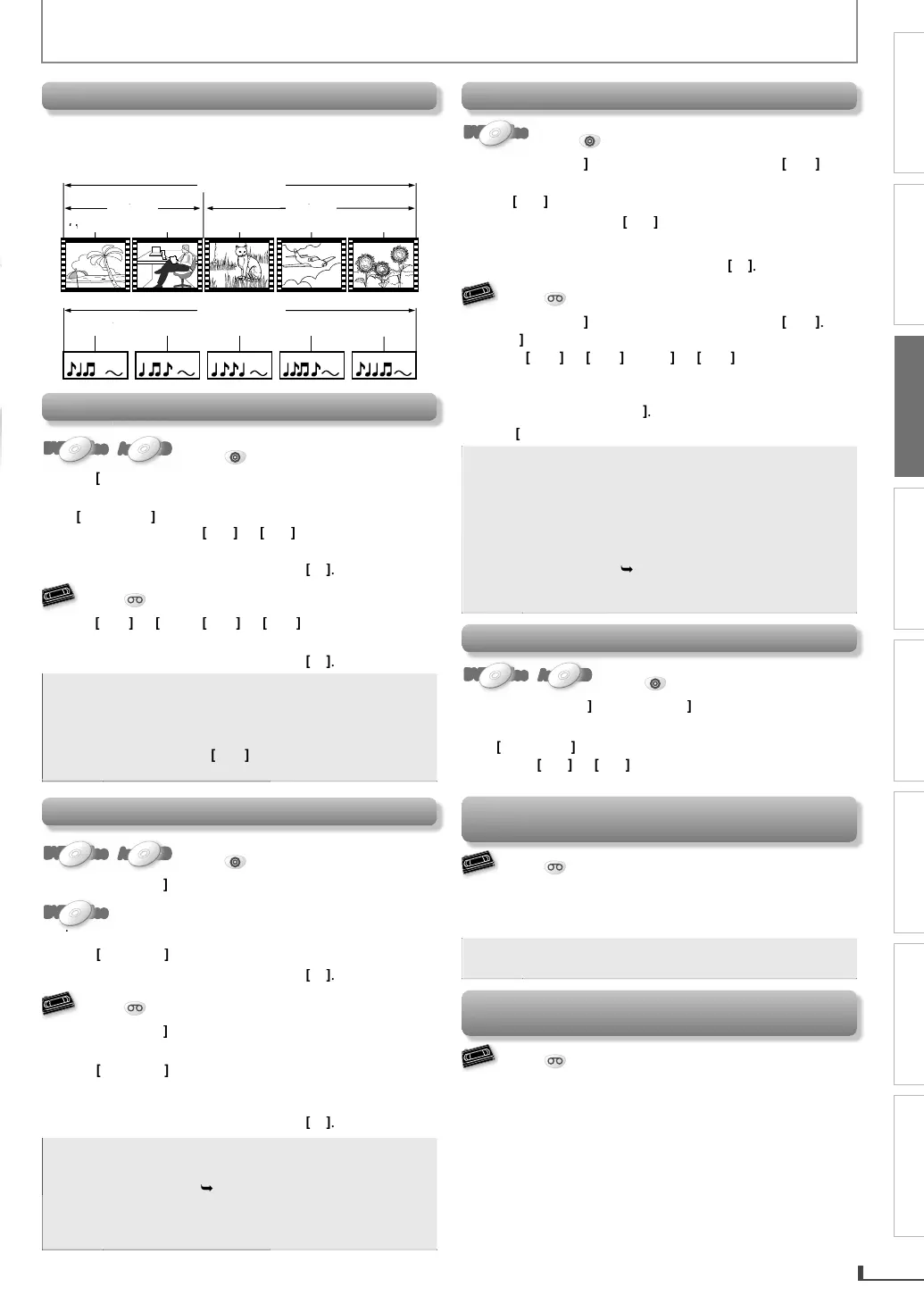
The contents of DVD are generally divided into “titles”.
Titles ma
be further subdivided into “chapters”
T
i
D
n
in
“
r
”
-v
t
e
t
t
e
c
apter 2 c
apter
c
apter 2 c
apter 3
r
k
r
k 2
r
k
r
k 4
r
k
Fast Forward / Fast Reverse Pla
back
DVD-VideoDVD-VideoDVD-VideoDVD-VideoDVD-Video
Audio CD
AudioAudio CDCD
AudioAudio CDCD
Press
DVD
first.
ress
repeate
y
uring p
ay
ac
o
e desired
orward or reverse speed
elect th
Us
ng
n t
is
nit
an
o
ing Pressing
n
i
ni
wi
orward or reverse pla
back speed
change
t
e norma
p
ay
ac
Return t
,
Press
VCR
first.
Pr
on this unit) durin
p
a
ac
Return to t
e norma
p
ay
ac
,
For DVD and audio CD
fast forward or fas
everse speed is di
erent dependin
on the disc.
A
roximate s
eed is 1(2x), 2(4x), 3(8x), 4(16x)
an
5
32x
• For VCR,
ress
a
ain so the unit will search
at higher-speed. (in the SLP mode onl
.
Still Mode / Step-b
-step Pla
bac
DVD-VideoDVD-VideoDVD-VideoDVD-VideoDVD-Video
Audio CD
AudioAudio CDCD
AudioAudio CDCD
Press
DVD
first.
Pr
PAUSE
during pla
back.
DVD-VideoDVD-VideoDVD-VideoDVD-VideoDVD-Video
onl
The picture goes forward by one frame each time you
AU
E
in t
e sti
mo
e.
Return to the normal pla
bac
,
ress
Press
VCR
first.
ress
PAUSE
uring p
ay
ac
.
he picture goes forward b
one frame each time
ou
A
SE
in
h
ill m
If the picture is distorted or rolling verticall
, adjust the
vertical hold control on
our TV if equipped.
Return to t
e norma
p
ay
ac
,
ote
For DVD, set
STILL MODE
to
FIELD
in
“DISPLAY” menu i
pictures in the pause mode
are
urre
. (
page 23.
For VCR, to prevent
amage to t
e cassette
tape, still mode will automaticall
stop a
ter 5
n
t
s
S
ow Forwar
P
ay
ac
DVD-VideoDVD-VideoDVD-VideoDVD-VideoDVD-Video
Press
DVD
first.
r
PAUSE
uring p
a
ac
, t
en press
repeatedly to select the desired
orward speed
Usin
n this
ni
Pressing an
o
ing
n
i
ni
in
i
m
will also change forward pla
back speed.
Return to t
e norma
p
a
ac
, press
Press
VCR
first.
Pr
PAUSE
during pla
back, then press
on this unit.
•Pr
r
r
on this unit
to
han
e the speed
f the distorting picture appears,
ou can adjust it b
s
n
TRACKING
ress
to return to t
e norma
p
ay
ac
or
V
low
orward speed is di
eren
epen
in
on t
e
isc.
roximate s
ee
is 1(1/32x), 2(1/16x), 3(1/8x),
1/4x
an
5
1/2x
•
or DVD
set “STILL MODE” to “FIELD” in
DISPLAY” menu if
ictures in the slow forwar
re blurred.
pa
e 23.)
•
or VCR, to prevent dama
e to the cassette tape,
low mode will automaticall
stop after 5 minutes.
To S
ip t
e Tit
es, C
apters or Trac
s
DVD-VideoDVD-VideoDVD-VideoDVD-VideoDVD-Video
Audio CD
AudioAudio CDCD
AudioAudio CDCD
Press
DVD
first.
Pr
PREV
r
NEXT
during pla
back to skip
titles, cha
ters or tracks to a desired
oint
Us
ng
,
on t
is uni
ressing
on t
is unit wi
a
so s
ip tit
es /
c
apters / trac
s to a
esire
point
To Reset t
e Cassette Tape Counter
Counter Reset
Press
VCR
first.
r
DISPLAY
to
isp
ay t
e cassette tape counter on
t
e TV screen. T
en, press
CLEAR
to reset t
e counter
•
his function is not available if the unit be
ins
e timer recor
in
or one-touc
timer recor
in
.
To Rewin
t
e Cassette Tape automatica
y
Auto Rewin
Press
VCR
first.
When a cassette tape ends during pla
back, fast-forward
or normal recording, the unit will automaticall
rewind
to the be
innin
of the cassette tape. After rewindin
finishes, the unit will e
ect the cassette tape.



 To Next Page