18
ADVANCED PLAYBACK
ote
Up to 20 chapters or tracks can be ordered
To erase a
t
e pro
rams at once, se
ect “ALL
CLEAR’’ and
ress
OK
[CLEAR
program input
The number o
the title or chapter
ou ente
us
ng [t
e Num
er
uttons
cannot excee
the maximum number o
the chapters or tracks
on t
e
isc
• During the program pla
back, press [C]
nc
to set t
e resume
oint, an
t
en
ress [B]
to resume the program pla
back from the
be
innin
of the track where the [C] w
s
resse
During t
e program p
a
ac
, press [C]
w
c
to cance
t
e program p
ay
ac
. Your programs
are sti
store
unti
eit
er t
e
isc is remove
or
power is turned o
• Some DVD will not allow
ou to se
programmed pla
back
During programmed pla
back, “ TITLE” re
ea
DVD
is not avai
a
e
an
om P
ay
ac
his
unction shu
les the playing order o
chapters/tracks
instead o
playing back in sequence
DVD-VideoDVD-VideoDVD-VideoDVD-VideoDVD-Video
Audio CD
AudioAudio CDCD
AudioAudio CDCD
Press
DVD
first.
1) During p
a
ac
, press [MODE] tw
c
w
en operating
i
D
During p
ay
ac
, press [MODE] t
ree time
w
en
operating
V
2
Use
r
to select “RANDOM”. Then
ress
OK
N
• During random pla
back,
ou cannot go back to
the previous track. Pressin
NEXT
ll
ws
ou to search chapters or tracks randoml
• During DVD random playback, you can play
ac
c
apters in t
e current tit
e ran
om
Some DVD wi
not a
ow
ou to set ran
om
p
ay
ac
Settings
lack Level Settin
Ad
ust the black level to make the dark areas of the picture
bri
hter
DVD-VideoDVD-VideoDVD-VideoDVD-VideoDVD-Video
Press
DVD
first.
1) During pla
back, press
MODE
n
2
Use
or
to a
just t
e
ac
eve
ON: ma
es t
e
ar
areas
rig
ter.
OFF: s
ow
t
e origina
picture as recor
e
.
Press
RETURN
o ex
t
Programme
P
ay
ac
ou can change the playback order o
chapters / tracks.
DVD-VideoDVD-VideoDVD-VideoDVD-VideoDVD-Video
Audio CD
AudioAudio CDCD
AudioAudio CDCD
Press
DVD
first.
) During Playback, press [MODE
w
when operating
au
io CD
During P
ay
ac
, press
M
DE
ree time
w
en
operating
V
2
Use
r
to select “PROGRAM”. Then
ress
OK
For DVD:
3
Use
to se
ect
esire
tit
e (DVD) input
ield
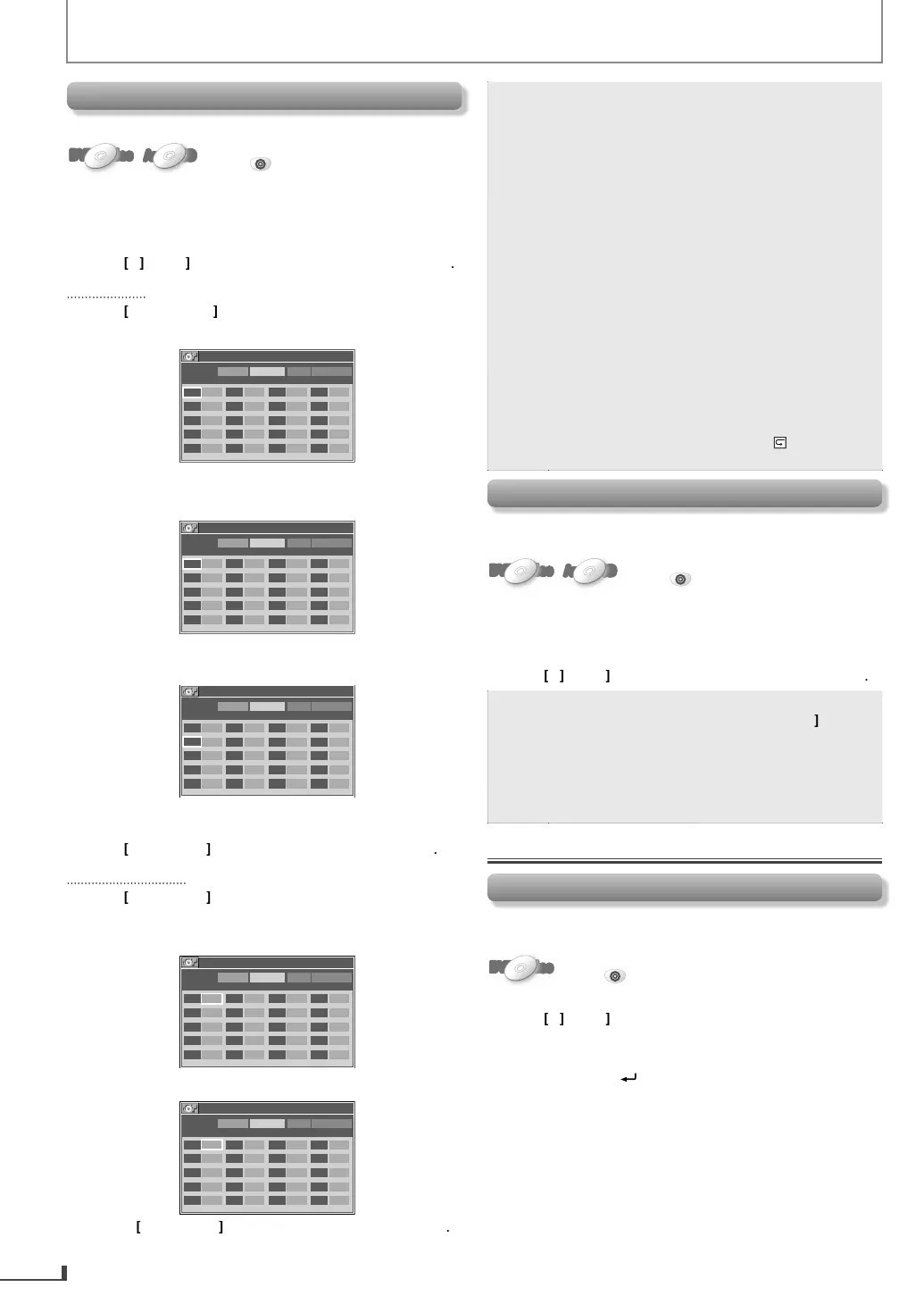
DVD-PROGRAM
Tot a l 0
MAX 4
TITLE CHAPTER PLAY ALL CLEAR
-- ---
-- ---
-- ---
-- ---
-- ---
-- ---
-- ---
-- ---
-- ---
-- ---
-- ---
-- ---
-- ---
-- ---
-- ---
-- ---
-- ---
-- ---
-- ---
-- ---
Use
t
e Num
er
uttons
n
r
ir
i
DVD
number
DVD-PROGRAM
Tot a l 0
MAX 4
TITLE CHAPTER PLAY ALL CLEAR
03
---
-- ---
-- ---
-- ---
-- ---
-- ---
-- ---
-- ---
-- ---
-- ---
-- ---
-- ---
-- ---
-- ---
-- ---
-- ---
-- ---
-- ---
-- ---
-- ---
5
Press
OK
then use
the Number buttons
n
r
esire
c
a
ter num
er (DVD).
DVD-PROGRAM
Tot a l 0
MAX 4
TITLE CHAPTER PLAY ALL CLEAR
03 011
---
-- ---
-- ---
-- ---
-- ---
-- ---
-- ---
-- ---
-- ---
-- ---
-- ---
-- ---
-- ---
-- ---
-- ---
-- ---
-- ---
-- ---
-- ---
6) Re
eat ste
s 3 to 5 to enter anot
er tit
e an
c
a
ter
DVD
numbers
Use
to se
ect “PLAY”, t
en press
K
For audio CD:
3
Use
to select desired track in
ut field
Use
t
e Num
er
uttons
to enter
esire
trac
num
er
CD-PROGRAM
Tot a l 0
MAX 14
No. TRACK PLAY ALL CLEAR
01
--
02
--
03
--
04
--
05
--
06
--
07
--
08
--
09
--
10
--
11
--
12
--
13
--
14
--
15
--
16
--
17
--
18
--
19
--
20
--
5) Repeat steps 3 to 4 to enter anot
er trac
num
er
CD-PROGRAM
Tot a l 0
MAX 14
No. TRACK PLAY ALL CLEAR
01 05
02
--
03
--
04
--
05
--
06
--
07
--
08
--
09
--
10
--
11
--
12
--
13
--
14
--
15
--
16
--
17
--
18
--
19
--
20
--
6
Use
to se
ect “PLAY”, t
en
ress
K



 To Next Page