6
PREPARATION
3
4
2
7
11
15
17
6
1
18
21
22
28
27
25
24
31
30
32
9
12
13
14
16
19
8
5
10
20
2
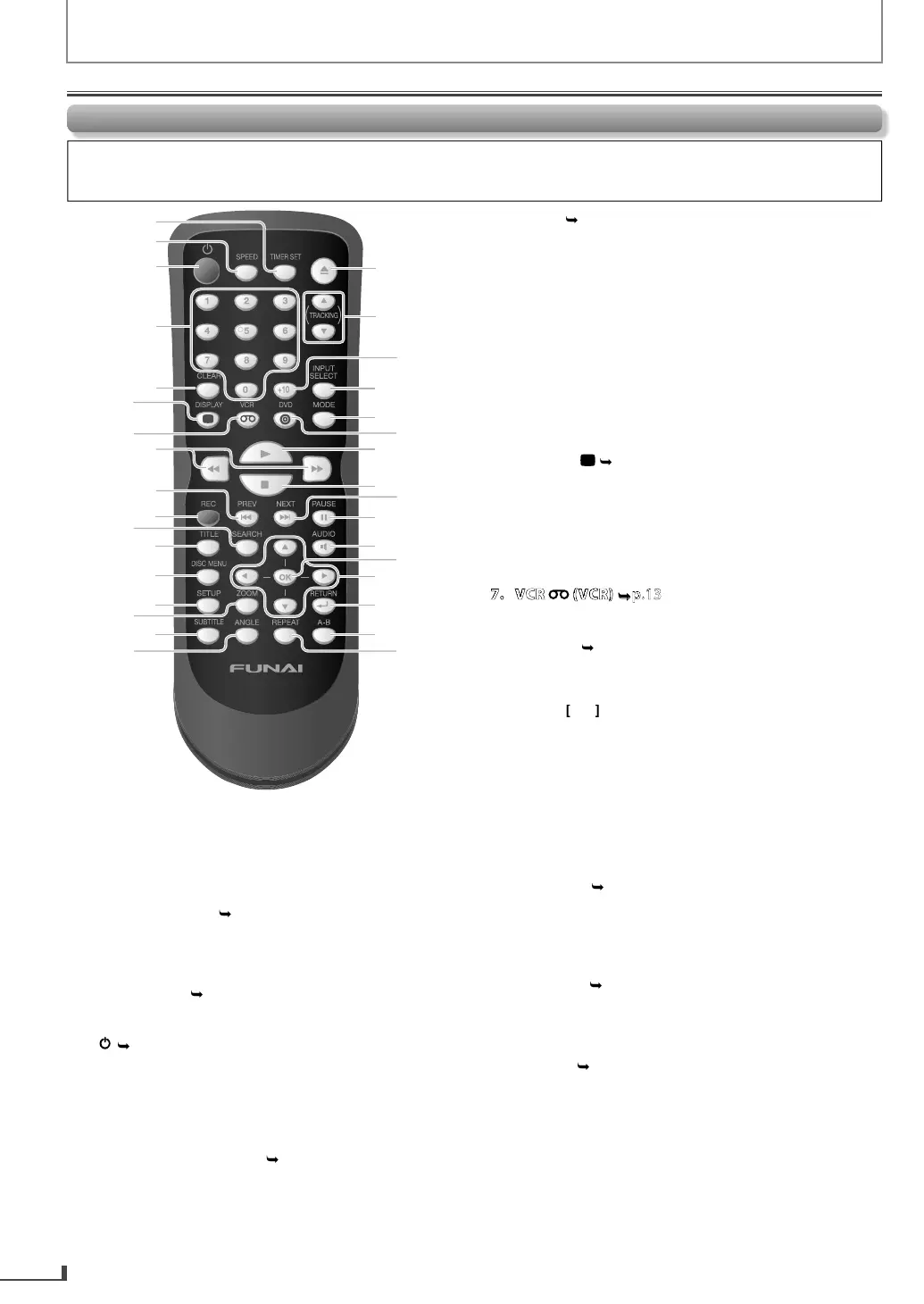
1. TIMER SET
VCR
p.
Press to put the VCR into standby mode
or a timer
ecor
ing
Pulse para colocar el VCR en modo espera para una grabación
con temporizador.
. SPEED
VCR
.
• Press to select the recording speed
Pulse para seleccionar la velocidad de grabación.
.1
• Press to turn on the unit
or to turn the unit into
the standb
mode. (To completel
turn off the unit,
ou must unplug the AC power cord.
Pulse el boton para encender la unidad, o para pasar la
unidad al modo de espera. (Para apagar completamente la
unidad, debe desconectar el cable de alimentacion de CA.)
4. Num
er
uttons
DVD
p.1
Press to se
ect c
apter / tit
e (DVD), trac
(CD)
irect
y
Pulse para seleccionar un capítulo o título (DVD) o pista (CD)
directamente.
LEA
.1
DVD mode:
Press to c
ear num
ers entere
incorrect
. (DVD, CD)
Pulse para borrar los números ingresados incorrectamente. (DVD, CD)
Press to cancel the point
or A-B repeat. (DVD, CD
Pulse para cancelar el punto para repetición de A-B. (DVD, CD)
• Press to clear all the tracks entered for pro
rammed
pla
back. (DVD, CD
Pulse para borrar todas las pistas ingresadas para la reproducción
programada. (DVD, CD)
VCR mode:
•Pr
xi
h
V
R m
n
Pulse para salir del menú de VCR.
• Press to reset the cassette ta
e counter
Pulse para restaurar el contador del casete.
6. DI
PLAY
.1
DVD mode:
Press to
isp
ay t
e current
isc mo
e
Pulse para visualizar el modo de disco actual.
VCR mode:
• Press to displa
the current time, cassette tape
counter
and L1 / L2
Pulse para visualizar la hora actual, el contador del casete y L1 o L2.
Press to activate VCR mo
e.
Pulse para activar el modo de VCR.
.1
DVD mode:
• Press to search forward / backward throu
h a disc
Pulse para buscar hacia adelante o hacia atrás en el disco.
r
to begin slow
orward pla
back in the
pause mode. (DVD
Pulse [ D] para iniciar la reproducción lenta hacia adelante en el
modo pausa. (DVD)
VCR mode:
Press to
orward / backward a cassette tape
Pulse para adelantar o retroceder un casete.
Press
to begin slow
orward pla
back in the
ause mode
Pulse [ D] para iniciar la reproducción lenta hacia adelante en el
modo pausa.
9
DVD
.15
• Press to
o back to the previous chapters / titles.
DVD
Pulse para volver a los capítulos o títulos anteriores. (DVD)
Press to
o back to the previous tracks (CD)
Pulse para volver a las pistas (CD) anteriores.
10. REC
VCR
.2
• Press to start recording or press repeatedl
to
activate the One-touch Timer Recordin
Pulse para comenzar a grabar o pulse reiteradamente para activar
la grabación rápida con temporizador.
11.
EAR
.1
DVD mode:
Press to searc
c
apter / tit
e (DVD)
Pulse para buscar un capítulo o título (DVD).
• Press to search track
CD
Pulse para buscar una pista (CD).
Press to searc
time (DVD, CD)
Pulse para buscar la hora (DVD, CD).
VCR mode:
• Press to call u
the index or time search menu.
Pulse para visualizar el menú de búsqueda de hora o el índice.
Rem
te
ntr
Button names
escri
e
in t
is Owner’s Manua
The instructions in this manual rest primarily on the premise that you will operate using the remote control (Please be
informed that some operations can onl
be made on the front panel of the unit)
Function Overview
ontinue
on Next Pa
e



 To Next Page