20
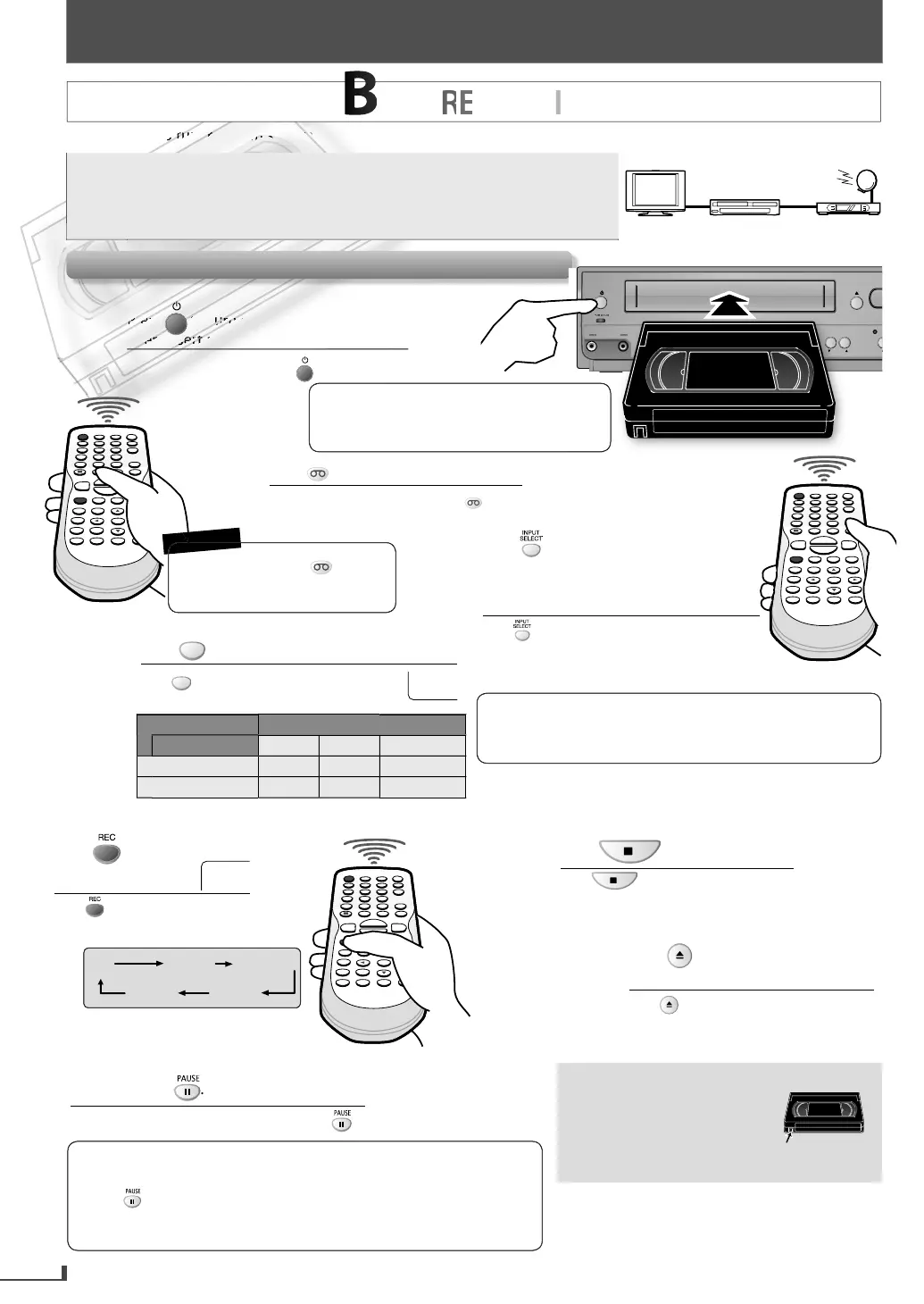
RECORDING
m so it cannot receive TV broadcasts without external tuner or such devices.
You can also set the external tuner
or timer recordin
. Re
er to
Sate
ite Lin
” on page 22
ou CANN
u
a DVD to a vi
eo cassette tape
Do not c
ange t
e externa
tuner’s c
anne
w
i
e you are recor
ing.
You CANNOT watc
one c
anne
an
recor
anot
er at t
e same time.
Recor
in
& OTR (One-touc
Timer Recor
in
)
external tuner
this unit
TV
1
I
Para encender la unidad, pulse .
Luego inserte una cinta grabable.
2
3
Pres
until “L1” or “L2” is displayed
TV
r
n
“L1”
v
r
r
input
acks. Select “L2” to activate
ront
input
ac
s
Pulse hasta que se visualice “L1” o “L2” en la
pantalla de la TV. Seleccione “L1” para activar los
conectores posteriores de entrada. Seleccione “L2”
para activar los conectores frontales de entrada.
4
Pr
SPEED
to select the desired ta
e s
eed
Pulse
SPEED
para seleccionar la velocidad deseada
de la cinta.
You nee
to press
VCR
first
ever
t
me
ou operate an
V
R
r
R
E
M
E
M
B
E
R
e
re
T
rn
n
h
TV
How to set the timer recordin
or satellite link,
refer to pages 21-22
Tape spee
ecor
ing / p
ay
ac
tim
pe of tape
12
T1
P m
h
r
h
r
2-2
3hour
SLP mo
3
our
ours 8
our
LP mo
e cannot
e Recor
e
, LP mo
e can
e P
aye
ac
r
n
i
ir
recordin
im
l
Pulse hasta que se seleccione el
tiempo de duración de grabación
deseado.
• Connect
our external tuner to the L1 (rear panel) jacks
f
h
ni
nn
m
r
r
n
h
r
h
vi
to the L2 (front panel)
acks. Refer to pages 8, 9
VCR
REC
REC
TIMER REC
TRACKING
SOU
V
• If the erase-
rotection tab has been
removed, cover the hole with clear ta
e
*
w
ress
VCR
to switc
to t
e VCR mo
e
Para cambiar al modo de VCR, pulse
VCR
.
Durin
the recordin
in the pause mode, 5
marks a
ear on the
V
r
n
E
h
mark re
resents 1 minute
r
again to resume recor
ing.
• Pause mode will be automaticall
cancelled after 5 minutes to
prevent dama
e to the cassette tape and the video head
o stop recor
ing temporari
y,
Para detener la grabación temporalmente, pulse .
6
7
ress to stop recor
ing
Pulse para detener la grabación.
8
r
to e
ect the recorded
asse
e
ape
Pulse para expulsar el casete grabado.
RE
REC OTR (0:30) OTR (1:00).....
(normal recording)
OTR (8:00) OTR (7:30)
5
*
cci
ent
l Er
re Preventi
To
revent accidental
recording, remove erase
protection tab of the cassette
tape. To record a
ain, cover
the hole with adhesive ta
e
erase-
rotection tab
RECORDING



 To Next Page