24
OPTIONAL SETTINGS
Press
DVD
first.
r
[
i
you are playing back a disc
PARENTAL Settin
Parental setting will prevent your children
rom viewing
nappropriate materia
s (passwor
protecte
). P
ay
ac
will stop i
the ratings exceed the levels you set
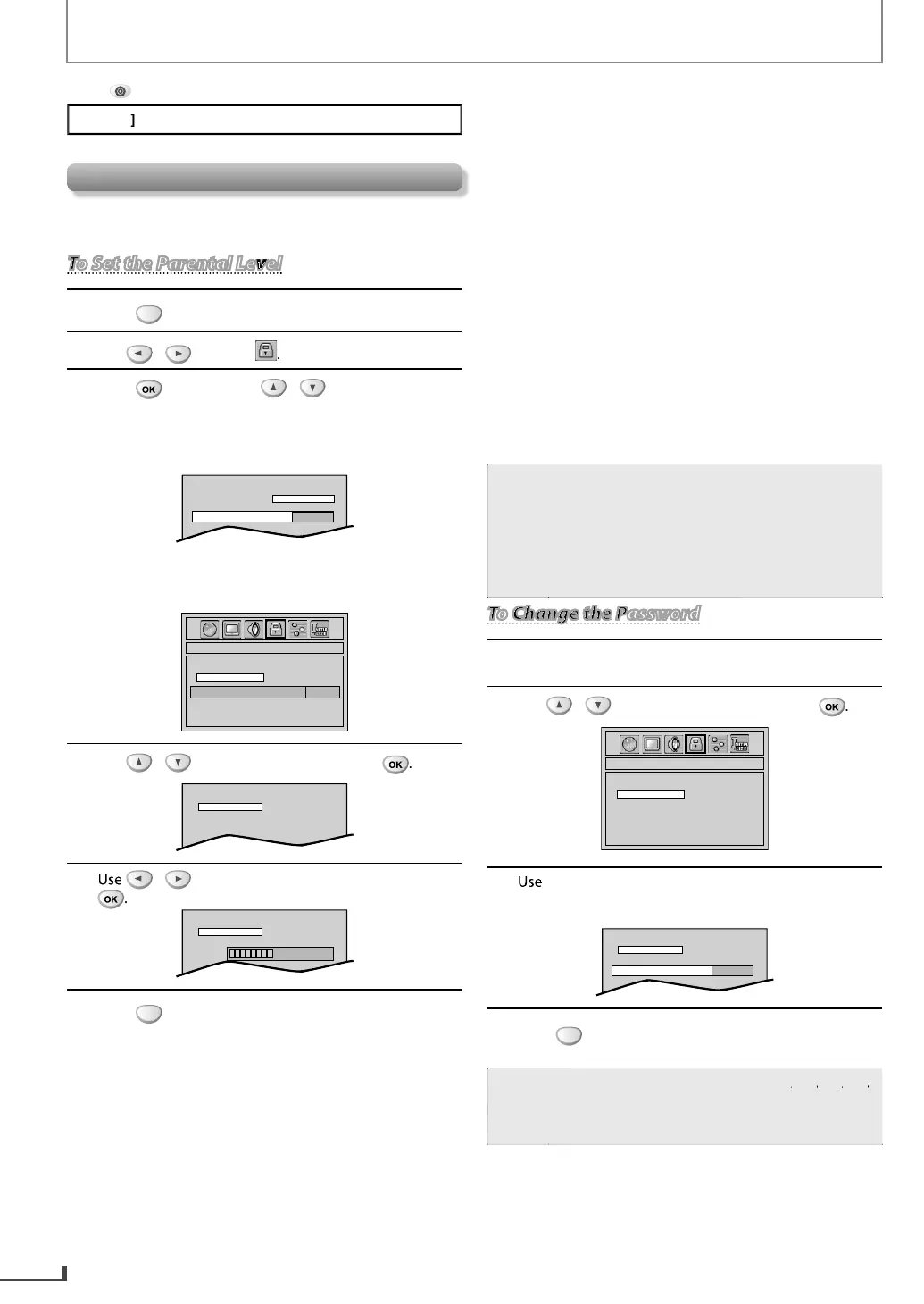
To Set the Parental LevelTo Set the Parental Level
1
r
to call u
the setu
menu
2
3
r
, an
t
en use
“YE
”
hen you use the unit
or the
irst time, use
t
e Num
er
uttons
to enter t
e 4-
igit num
er
or
our password (except
or 4737). Then, re-enter
e new passwor
PASSWORD NO
YES
Enter password
----
I
you have set password already, use
[t
e Num
er
uttons
to enter t
e current 4-
igit
asswor
PARENTAL_CHANGE
PASSWORD
LEVEL
CHANGE
Enter password
----
4
select “LEVEL“, then
ress
5
to select the desired level, then
ress
PASSWORD
CHANGE
LEVEL
8 [ADULT]
6
r
xi
NTR
L LEVEL
evel 8: DVD so
tware o
an
grades (adult
general/children) can be played back
eve
s 7 to 2:
onl
DVD software intended for general
n
r
hil
r
n
evel 1: only DVD so
tware intended
or
children, with those intended
or adult
an
genera
use pro
i
ite
IPS F
R LEVEL
•
[ADULT]: DVD so
tware o
an
grades (adult/
general/children) can be pla
ed back
[NC-17]: no one un
er 17 a
mitte
•
[R]: restricted; under 17 re
uires
accompan
ing parent or adult
uardia
•
[PGR]: parenta
ui
ance recommen
e
[PG13]: unsuitable
or children under 13
•
[PG]: parental
uidance su
ested
2 [G]: genera
au
ience
•
KID SAFE
: suitable for children
N
Record the password in case
ou forget it
Some DVD-vi
eo may not respon
to
“PARENTAL“ setting. Make sure this
unction
wor
s wit
our DVD-vi
eo
The resume in
ormation will be cleared i
ou
chan
e the parental level when the resume
inf
rm
i
n i
n
1
Fo
ow t
e step 1 to 3 in “To Set t
e Parenta
Leve
” on
the le
t
2
select “CHANGE, then
ress
PARENTAL_CHANGE
PASSWORD
LEVEL
CHANGE
3
t
e Num
er
uttons
to enter t
e new 4-
igit
password (expect
or 4737). Then, re-enter the new
passwor
PASSWORD
CHANGE
LEVEL
----
Enter new password
4
r
xi
I
ou
orget the password, press
then enter your new password
Passwor
wi
e c
eare
an
parenta
eve
s wi
e set to “LEVEL 8
ADULT
”.



 To Next Page