PRECAUTIONS PREPARATION ADVANCED PLAYBACKBASIC OPERATIONS
RECORDING
OPTIONAL SETTINGS TROUBLESHOOTING INFORMATION
21
RECORDING
Timer Recordin
Press
VCR
first.
1
ress
, u
to se
ect
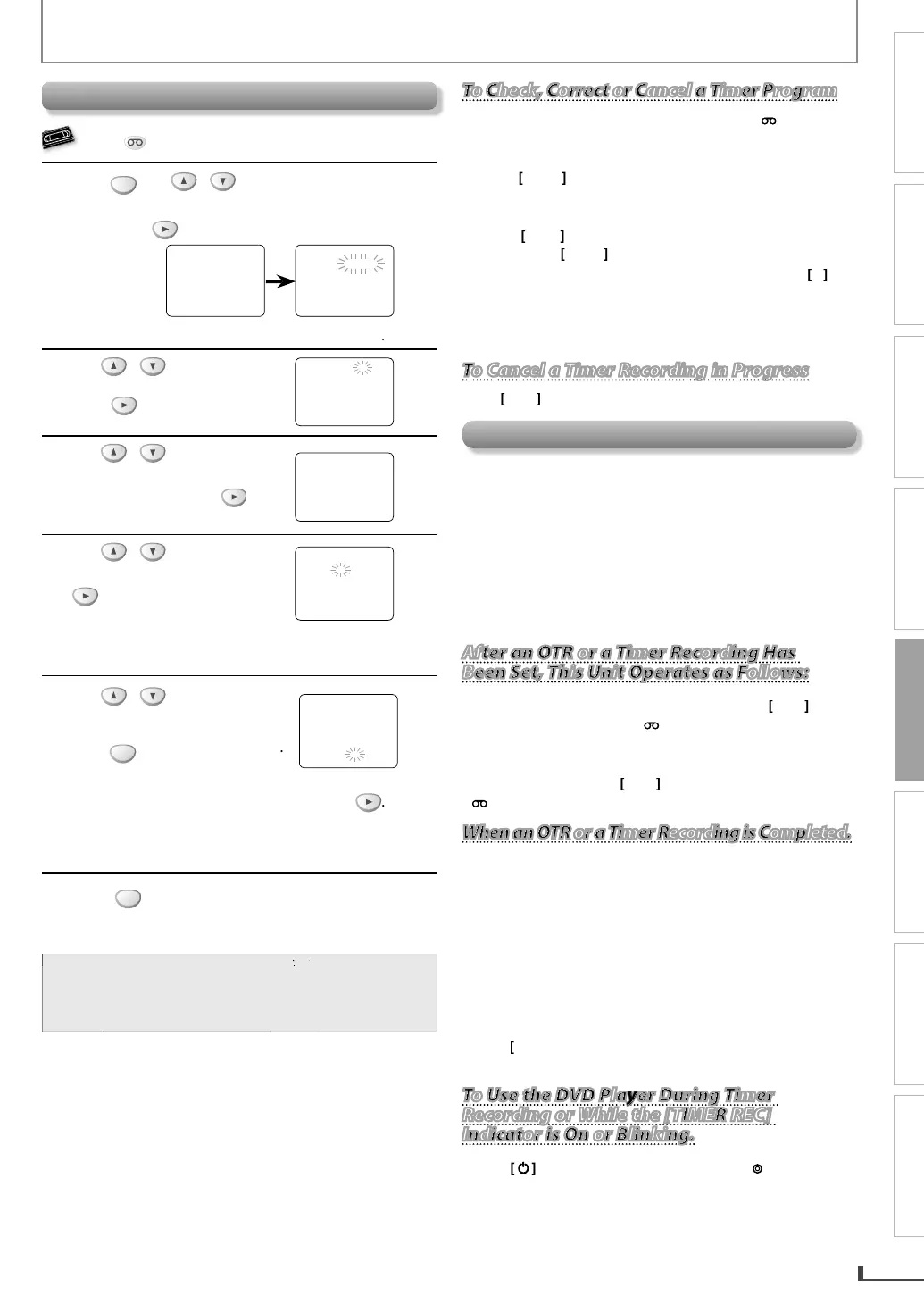
TIMER PROGRAMMING
.
en, press
o go
o nex
s
ep.
TIMER PR
GRAMMING
PR
G 12
4
7
DATE
TART TIME
EN
TIME
L1
L2
RE
PEED
- M E N
-
TIMER PR
GRAMMING
ATELLITE LINK
AUTO REPEAT
OFF
L
K
ET
LANG
AGE
ELE
vailable pro
ram
m
r
link
2
se
o se
ect an
mpt
program num
er. T
en,
o go
o nex
s
ep
PR
GRAM N
MBER 1
DATE – –
– –
TART TIME – –
– – – –
END TIME – –
– – – –
L1
L2 – –
RE
PEED – –
3
l
“ONCE“
“DAILY“ (Mon-Fri)
or
“WEEKLY“. Then,
ress
PR
GRAM N
MBER 1
N
E
AILY
4
l
h
esire
mont
. T
en,
ress
to
o to the next step
NE TIME PR
GRAM
PR
GRAM N
MBER 1
DATE 1 0
0 2 TUE
TART TIME – –
– – – –
END TIME – –
– – – –
L1
L2 – –
RE
PEED – –
en, repeat proce
ures a
ove to se
ect t
e
ay, s
ar
ime, en
time, an
“L1” or “L2” as we
5
l
recordin
speed. Then,
ress
r
m
v
h
MEN
NE TIME PR
GRAM
PR
GRAM NUMBER 1
DATE 1 0
0 2 TUE
TART TIME 0 7 : 3 0 PM
EN
TIME 0 8 : 3 0
M
L1
L2 L1
RE
PEED
P
P
LP
o set another pro
ram a
ter step 5, press
hen, repeat procedures from steps 2 throu
h 5
ou can program t
e unit to recor
up to 8 programs,
an
up to 1 year in a
vance
6
r
to set the timer standb
mode
e
TIMER REC
n
icator on t
is unit
ig
ts up an
e unit goes to t
e DVD mo
e
To
o
ac
one step, press
Select “L1” or “L2” to activate rear input
acks o
front input jacks accordingl
To Check, Correct or Cancel a Timer Prog
To Check, Correct or Cancel a Timer Program
To Check, Correct or Cancel a Timer Program
1
Press
TIMER SET
, and then press
VCR
on the
m
n
r
2) Repeat procedures in step 1 above.
3
Use
to se
ect t
e program num
er
ou want
o check. The details of the program
ou select will
ear on t
e TV screen
to go to the digit
ou want to change.
Then
use
n
r
h
rr
n
m
r
You can cancel the entire program b
pressing
w
i
e t
e pro
ram num
er
in
s
4
Press
CLEAR
x
5
Press
TIMER SET
to return to t
e timer stan
y
To Cancel a Timer Recording in Progress
To Cancel a Timer Recording in Progress
r
n
ni
Note for Timer Recordin
& OTR
If a
ower failure occurs or the cassette ta
e does not
ave the erase-protection tab,
TIMER REC
in
icato
in
s an
timer recor
ing
cannot be
erformed
I
there is a power
ailure occurred or the unit is
unplugged
or more than 30 seconds, clock setting and
programme
timer recor
ings wi
e
ost
• If a cassette ta
e runs out before an OTR or a timer
recording is finished, the unit e
ects the cassette tape.
After an OTR or a Timer Recording Has
After an OTR or a Timer Recording Has
After an OTR or a Timer Recording Has
Been Set, This Unit Operates as Follows:
Been Set, This Unit Operates as Follows:
ress
TIMER SET
on t
e remote contro
or
t
e unit, t
en press
VCR
to activate t
e VCR
unction again
To cance
t
e timer stan
y mo
e, press
TIMER SET
t
e remote contro
or
on t
e unit, t
en press
VCR
to activate the VCR
unction again
When an OTR or a Timer Recording
When an OTR or a Timer Recording is Completed.
When an OTR or a Timer Recording is Completed.
•
timer programmings are le
t on the VCR, the unit will
witc
to t
e DVD mo
e an
t
en t
e VCR wi
go stan
or the next timer recordin
. ( All the VCR
unctions will be
unavailable.) I
auto
ower o
has been in e
ect, however,
both DVD and VCR will go to standb
mode
All
h
DVD
n
i
n
r
v
il
l
whil
h
V
R i
in
OTR, Timer standby, or Timer Recording mode.
T
[TIMER REC] in
icato
link
i
h
r
r
n
m
r
t
mer pro
rams
r
n
i
ni
r
TIMER SET
n
r
m
control to use the VCR when the unit is turned o
.
To Use the DVD Player During Timer
To Use the DVD Player During Timer
Recording or While the [TIMER REC]
Recording or While the [TIMER REC]
Indicator is On or Blinking.
Indicator is On or Blinking.
Indicator is On or Blinking.
•
r
rn
n
h
ni
Pr
DVD
n
h
R
m
n
r
l
h
DVD m
Th
n
n
in
wi
h
h
h
r DVD f
r
ri
in
hi
m
n
l



 To Next Page