23
Prepare
Please use the specified paper and Ink cartridge.
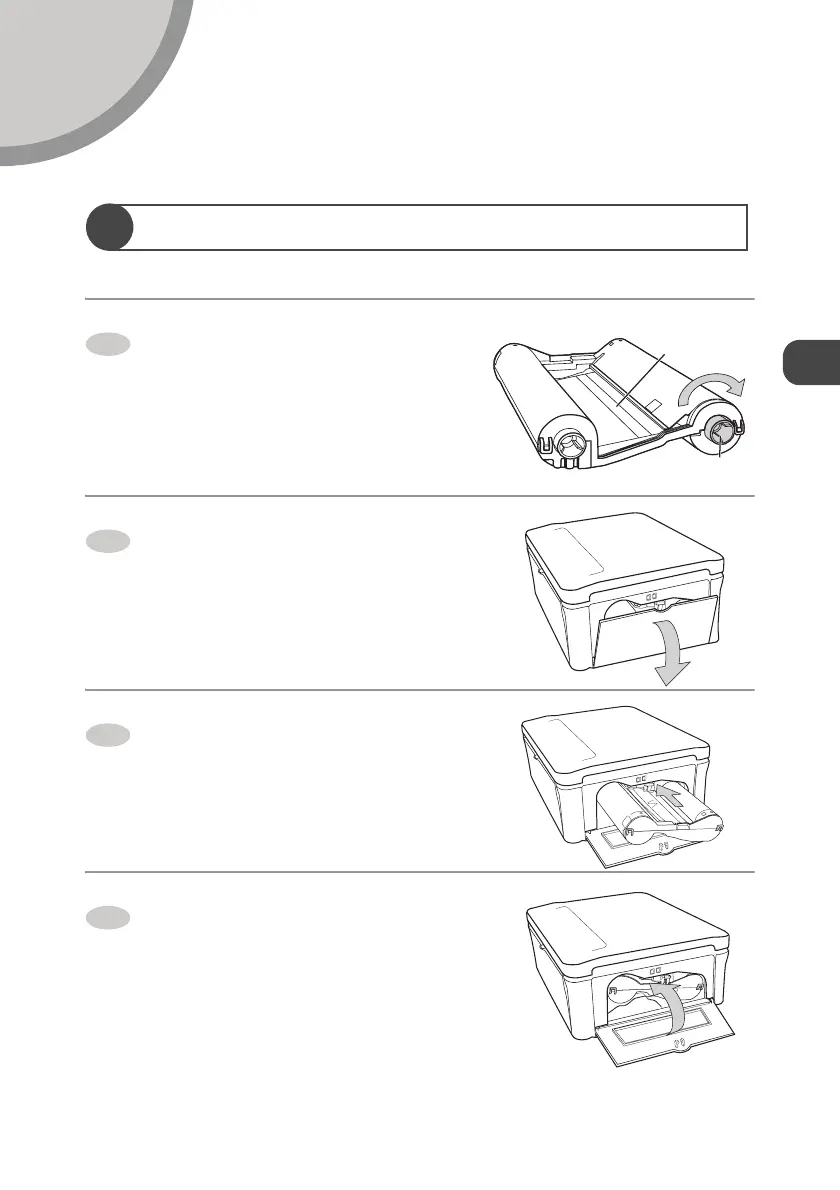
Set the Ink Cartridge in the Printer
Confirm that there is no slack in
the Ink cartridge.
z If the Ink ribbon is slack, turn a to the
direction of the arrow pressing a in until the
Ink ribbon is strained. (You cannot print
allotted sheets of paper in the print set if you
turn around a too much.)
Open the Ink cartridge
compartment door.
Insert the Ink cartridge all the way
into the Ink cartridge slot until it
clicks.
z Confirm that the direction of the Ink
cartridge is correct before inserting it.
Close the Ink cartridge
compartment door.
1
Ink ribbon
a
2
3
4


 To Next Page