Printing from the Computer
34
Printing from the Computer
Display/Select an image to be printed on your application.
Display the print screen and set the printer name to “FUNAI FDP-
100” (“FDP-100” (Mac OS)).
z Printing and printer selection methods varies depending on the application. Refer to
the user’s guide of your application.
Display the details screen.
Set “Print direction”, “Layout specification” and “No. of copies”.
z The same images are printed on one sheet of paper by the specified number of
splits.
z Split specification cannot be selected when selecting “Borderless”.
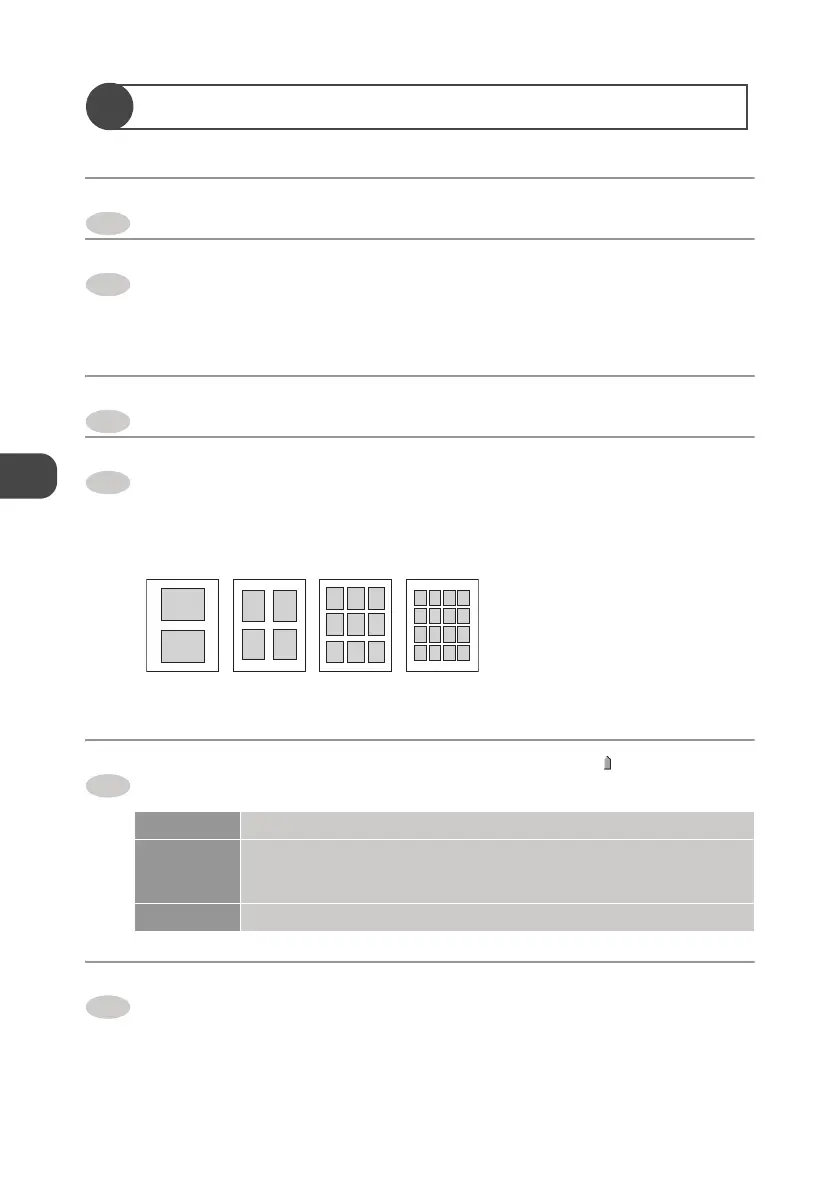
z Selectable split number is as follows.
Click “Image processing setting”, and drag the “ ” to
manipulate an image.
Click “OK”.
z The print screen is displayed.
Brightness Adjust brightness.
Contrast When sliding it to the strong side, the image becomes distinct, and
when sliding it to the weak side, a middle tone increases and the image
lacks depth in color.
Saturation When sliding it to the increase side, the dull image becomes vivid.
1
2
3
4
2-split
4-split 9-split 16-split
5
6


 To Next Page