11
EN
Introduction Connections
Basic Setup /
TV View Operation
Playback Editing OthersFunction SetupRecording VCR Functions
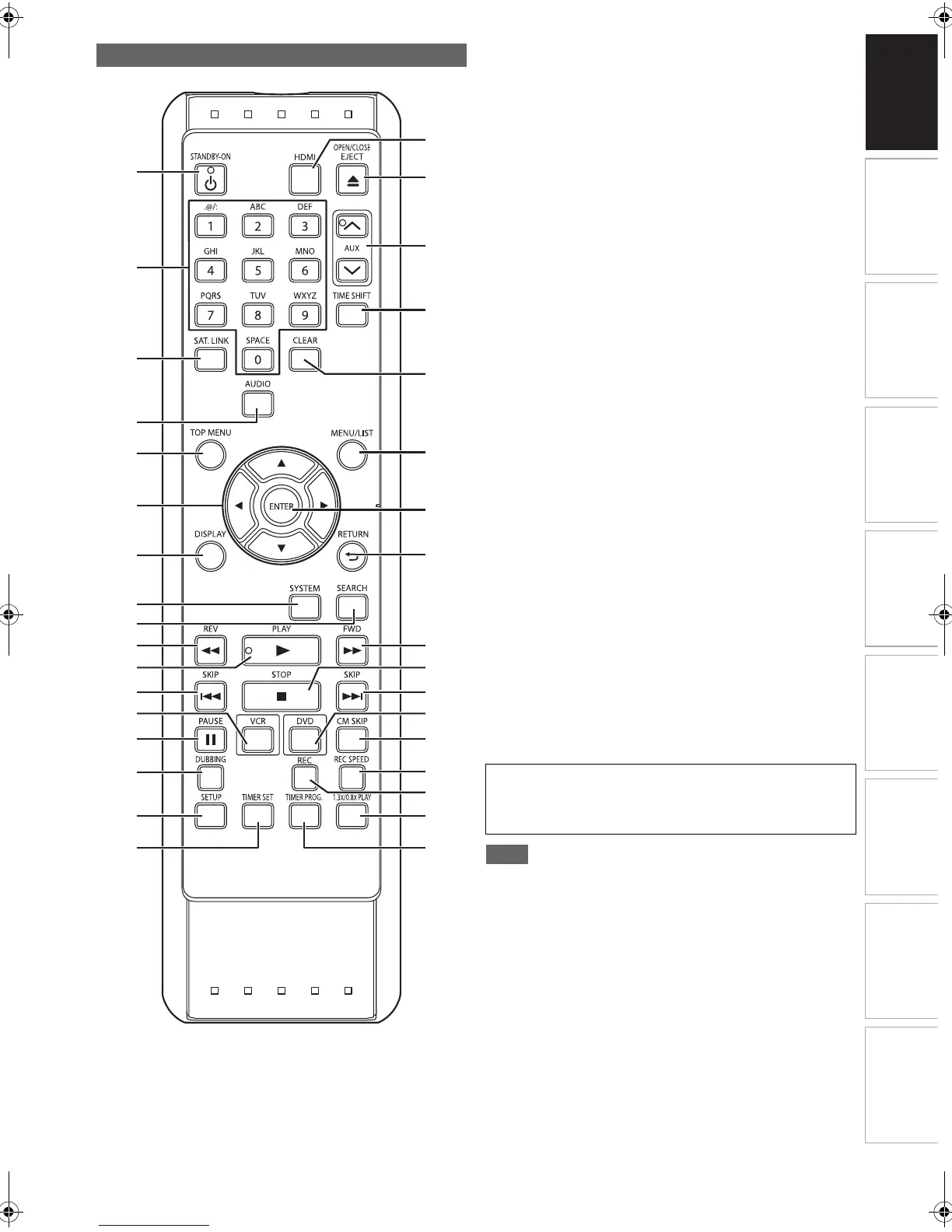
1 STANDBY-ON Q button
2 Number buttons
3 SAT.LINK button
4 AUDIO button
5 TOP MENU button (DVD)
6 Direction
K / L / 0 / 1 buttons
7 DISPLAY button
8 SYSTEM button (VCR)
9 SEARCH button (VCR)
10 REV E button
11 PLAY B button
12 SKIP H button (DVD)
13 VCR button
14 PAUSE F button
15 DUBBING button
16 SETUP button
17 TIMER SET button
18 HDMI button
19 OPEN\CLOSE EJECT A button
20 AUX G\H buttons
21 TIME SHIFT button (DVD)
22 CLEAR button
23 MENU/LIST button (DVD)
24 ENTER button
25 RETURN button
26 FWD D button
27 STOP C button
28 SKIP G button (DVD)
29 DVD button
30 CM SKIP button (DVD)
31 REC SPEED button
32 REC button
33 1.3x/0.8x PLAY button (DVD)
34 TIMER PROG. button
• If you turn off this unit, [OPEN\CLOSE EJECT A] on the
remote control is not available. Be sure to use
[OPEN\CLOSE A] or [STOP\EJECT CA] on the unit.
Remote Control
1
18
19
20
21
22
23
24
25
26
27
28
29
30
31
33
32
34
2
3
4
5
6
7
8
9
10
12
13
14
15
16
17
11
Button names described in the Owner’s Manual
The instructions in this manual are described mainly with the
operations using the remote control. Some operations can
be carried out using the buttons on the front panel.
E9RF0FH_EN.book Page 11 Friday, May 16, 2014 7:17 PM



 To Next Page