15
EN
Introduction Connections
Basic Setup /
TV View Operation
Playback Editing OthersFunction SetupRecording VCR Functions
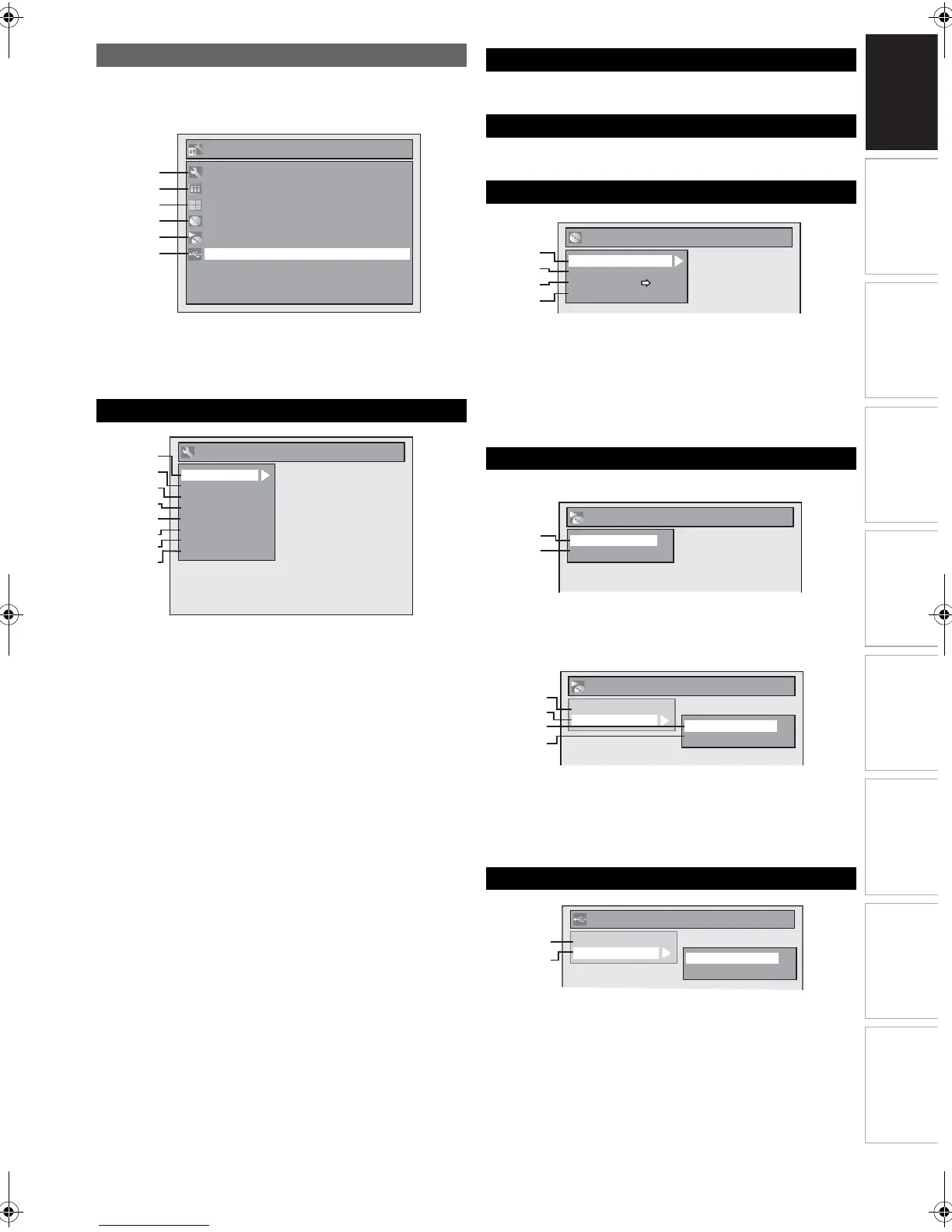
Press [SETUP] to display the main menu. Then use [K \ L] to
select a menu and press [ENTER] to display the sub menu.
Press [RETURN] to return to previous screen.
• E is displayed when a disc with CD-DA/MP3/JPEG/
KODAK Picture CD is inserted.
• F is displayed when a USB flash memory with MP3/JPEG
is plugged.
1 Playback: [E Page 57]
2Display: [E Page 59]
3Video: [E Page 60]
4 Recording: [E Pages 23-24, 30]
5Clock: [E Page 61]
6DivX: [E Pages 38, 61]
7 HDMI: [E Page 61]
8 Reset All: [E Page 61]
To programme a timer recording. [E Page 26]
To call up the title list. [E Page 47]
1 Format (DVD-RW only): [E Pages 23-24]
2 Finalise: [E Page 33]
3 Disc Protect (VR mode DVD-RW disc only):
[E Page 33]
4 Delete All Playlists (VR mode DVD-RW disc
only): [E Page 51]
Audio CD
1Random Play: [E Page 44]
2 Programme Play: [E Page 44]
CD-RW/-R with MP3 / JPEG / KODAK Picture CD files
3 Music (MP3 files): [E Page 44]
4 Photo (JPEG files): [E Pages 44, 45]
5 Slide Show (JPEG / KODAK Picture CD files):
[E Page 45]
1 Music (MP3 files): [E Page 44]
2 Photo (JPEG files): [E Pages 44, 45]
Main Menu
A General Setting
11
22
33
44
55
A
B
C
D
E
66F
Setup
Timer Programming
Title List
DVD Menu
General Setting
DISC Playback Mode
USB Playback Mode
1
2
3
4
5
6
7
8
HDMI
General Setting
Playback
Display
Video
Recording
Clock
Reset All
DivX
B Timer Programming
C Title List
D DVD Menu
E DISC Playback Mode
F USB Playback Mode
1
2
3
4
Format
Finalise
Disc Protect OFF ON
Delete All Playlists
DVD Menu
1
2
DISC Playback Mode
Random Play
Programme Play
DISC Playback Mode
Music
Photo
Random Play
Slide Show
3
4
1
5
USB Playback Mode
Music
Photo
Random Play
Slide Show
2
1
E9RF0FH_EN.book Page 15 Friday, May 16, 2014 7:17 PM



 To Next Page