4. INSTALLING OPTIONAL EQUIPMENT
4-4
5. Confirm gyrocompass specifications and set up the DIP switches and jumper wires on
the GYRO CONVERTER board according to gyrocompass connected:
x Setting jumper wires and DIP switches by gyrocompass specifications: page 4-5
x Setting jumper wires and DIP switches by make and model of gyrocompass: page 4-7
x Location of jumper wires and DIP switches: page 4-8
6. Pass gyrocompass cable through the cable clamp and connect it to connector J602 as
shown in the figure on page 4-3.
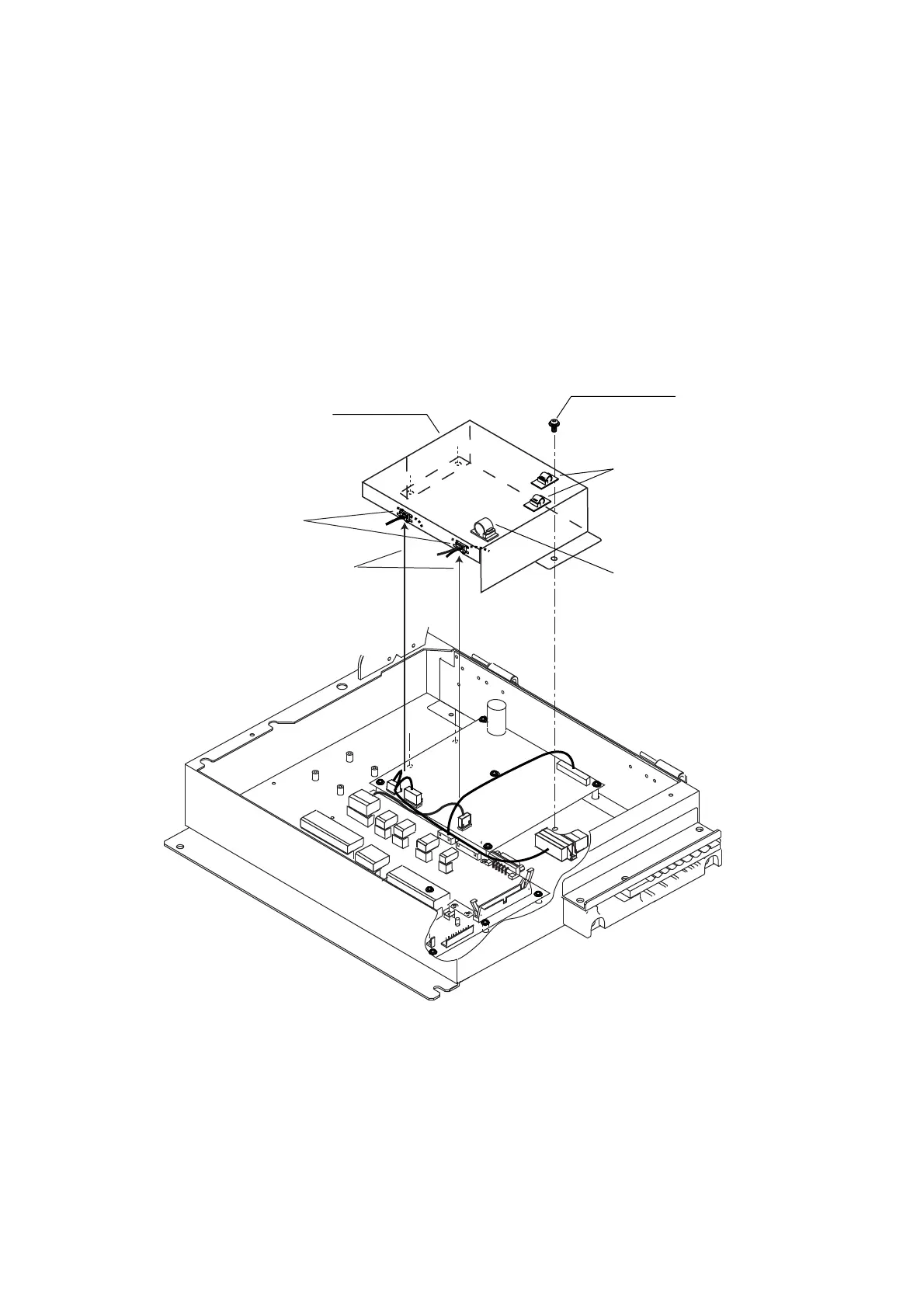
7. Attach the clamps on the plastic cover and then attach the cover to the GYRO
CONVERTER board as shown in the figure below. Insert cables to the clamp ED-1,
respectively.
1
1
4
1
12
1
3
1
2
1
3
1
12
1
5
1
7
1
3
Screw
M4x8
3 pcs
Plastic cover
Insert cables to these
clamp.
Clamp EDS-1
Clamp CKS-10-L
Clamp CKS-13-L
Attaching plastic cover for GYRO CONVERTER board
8. Close the processor unit.









 To Next Page