1. OPERATION
24
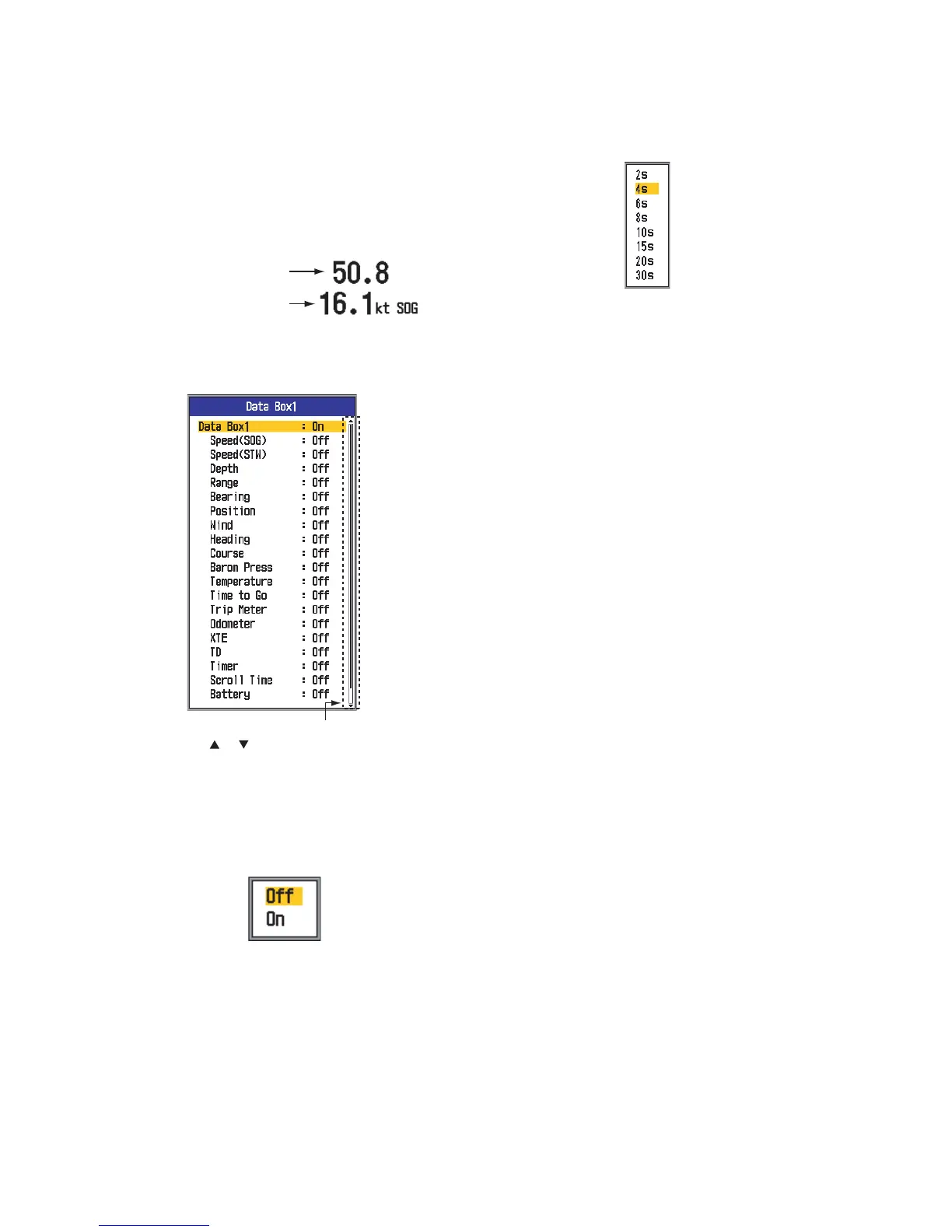
Data Box1, Data Box2: Turn on to display
data at the upper left corner on the display. If
several data items are turned on, they are dis-
played alternately at the interval (default: 4 s)
chosen with Switching Cycle. Data other than
Depth, Range, Timer, Scroll Time and Battery
require appropriate sensor.
1. Select Data Box1 and press the [ENTER]
key.
2. With Data Box1 selected, press the [EN-
TER] key.
3. Press S or T to select On if it is not al-
ready selected. All menu items are shown
in black, meaning they are available for
selection.
4. Use S or T to select a data and then
press the [ENTER] key.
5. Use S or T to select Off or On as appro-
priate and press the [ENTER] key.
6. Repeat steps 4 and 5 as necessary.
7. Use S or T to select Switching Cycle and
then press the [ENTER] key.
8. Use S or T to select desired display in-
terval and then press the [ENTER] key.
9. Set up data box 2 similar to how you did
data box 1.
Bearing: Select how to display bearing data,
fed from navigator. The choices are true and
magnetic.
Nav Data: Select source of position data,
among Auto, GPS and Loran C. Auto selects
navigator in order of accuracy in case of mul-
tiple navigators. The order is GPS followed by
Loran C.
Wind Spd/Dir: Display wind speed and direc-
tion data in True or Apparent. The apparent
wind is the actual flow of air acting upon a
sail, or the wind as it appears to the sailor. The
true wind is the wind seen by a stationary ob-
server in velocity and direction.
Trip Source: Select source for trip data cal-
culation. The choices are Own (internal speed
sensor) and NMEA (speed data from external
navigator).
Temp Source: Select source for water tem-
perature data. The choices are Own (internal
temperature sensor) and NMEA (temperature
data from external navigator).
Speed Source: Select source for speed data.
The choices are Own (internal speed sensor)
and NMEA (speed data from external naviga-
tor).
Trip Reset: Select Yes to reset trip meter to
zero. A few beeps sound after resetting is
completed.
Odo Reset: Select Yes to reset the odometer
to zero. A few beeps sound after resetting is
completed.
Data box 1 information
Data box 2 information
ft
Timer counts time up from 0H00M
to 99H59M. Can be reset to zero
with the [MARK] key.
You can see the hidden menu by
using or .



 To Next Page