2. SYSTEM MENU
26
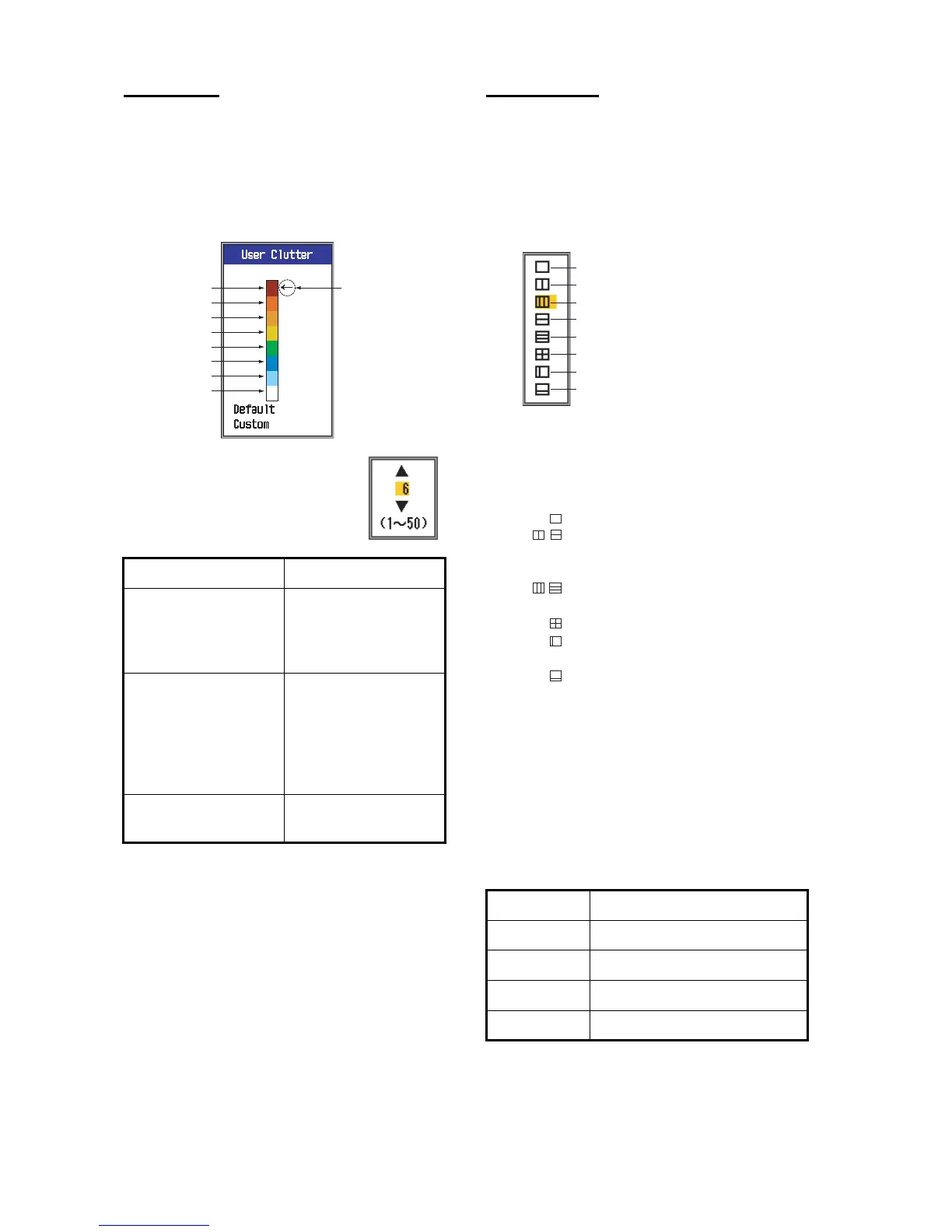
User Clutter
Select the colors to reject with the clutter re-
jector.
1. Select User Clutter and press the [EN-
TER] key to show the user clutter color
bar.
2. Use S or T to select the
color to adjust and then
press the [ENTER] key.
3. Use S or T to set value, re-
ferring to the table below.
4. Press the [ENTER] key.
5. To set another color, repeat steps 2-4.
6. To enable the user clutter settings, press
S or T several times to select Custom at
the bottom of the color bar and then press
the [ENTER] key.
7. Press S or T to select Yes and press the
[ENTER] key. (The setting for HF Curve
and/or LF Curve in Clutter on the Sounder
menu automatically becomes "Custom".)
8. Press the [MENU/ESC] key three times to
quit the menu.
User 1, User 2
Define what to show on the two user display
mode screens, selectable with the [MODE]
control.
Screen Layout: Select the screen layout,
from among the following eight choices.
Display Mode: Select the displays to show.
The choices depend on the setting of Screen
Layout.
The screen modes are shown as follows:
HF: High Frequency
LF: Low Frequency
Zm: Zoom
Mix: Mix display
HF1, HF2, LF1, LF2: 1 and 2 show the same
picture. Gain can be adjusted independently
for each.
If you want to... then set...
emphasize strong
colors (reddish-
brown, red)
Strong color- Color-6:
Large value
Color-5 to Color-1:
Small value
emphasize middle
colors (yellow, green)
Strong color to Color-
5: Small value
Color-4 and Color-3:
Large value
Color-2 and Color-1:
Small value
remove the weakest
color
Color-1: Small value
Color currently
selected
Strong color
Color 6
Color 5
Color 4
Color 3
Color 2
Color 1
Bkgd color
Display Control for adjusting gain
HF1 [GAIN HF] control
HF2 [GAIN LF] control
LF1 [GAIN LF] control
LF2 [GAIN HF] control
Full screen
Two-way vertical split
Three-way vertical split
Two-way horizontal split
Three-way horizontal split
Four-way split
Two-way vertical split (1:2)
Two-way horizontal split (2:1)
: HF; LF; HZm; LZm; Mix
: HZm+HF; LZm+LF; LF+HF;
LZm+HZm; HF+Mix; LF+Mix;
HF2+HF1; LF2+LF1
: LF+HZm+HF; LZm+LF+HF;
LF+HF+Mix
: LZm+LF+HZm+HF
: HZm+HF; HZm+LF; LF+HF
LZm+HZm; HF+Mix;LF+Mix
: HZm+HF; LZm+LF
,
,



 To Next Page