2. OPERATION
2-4
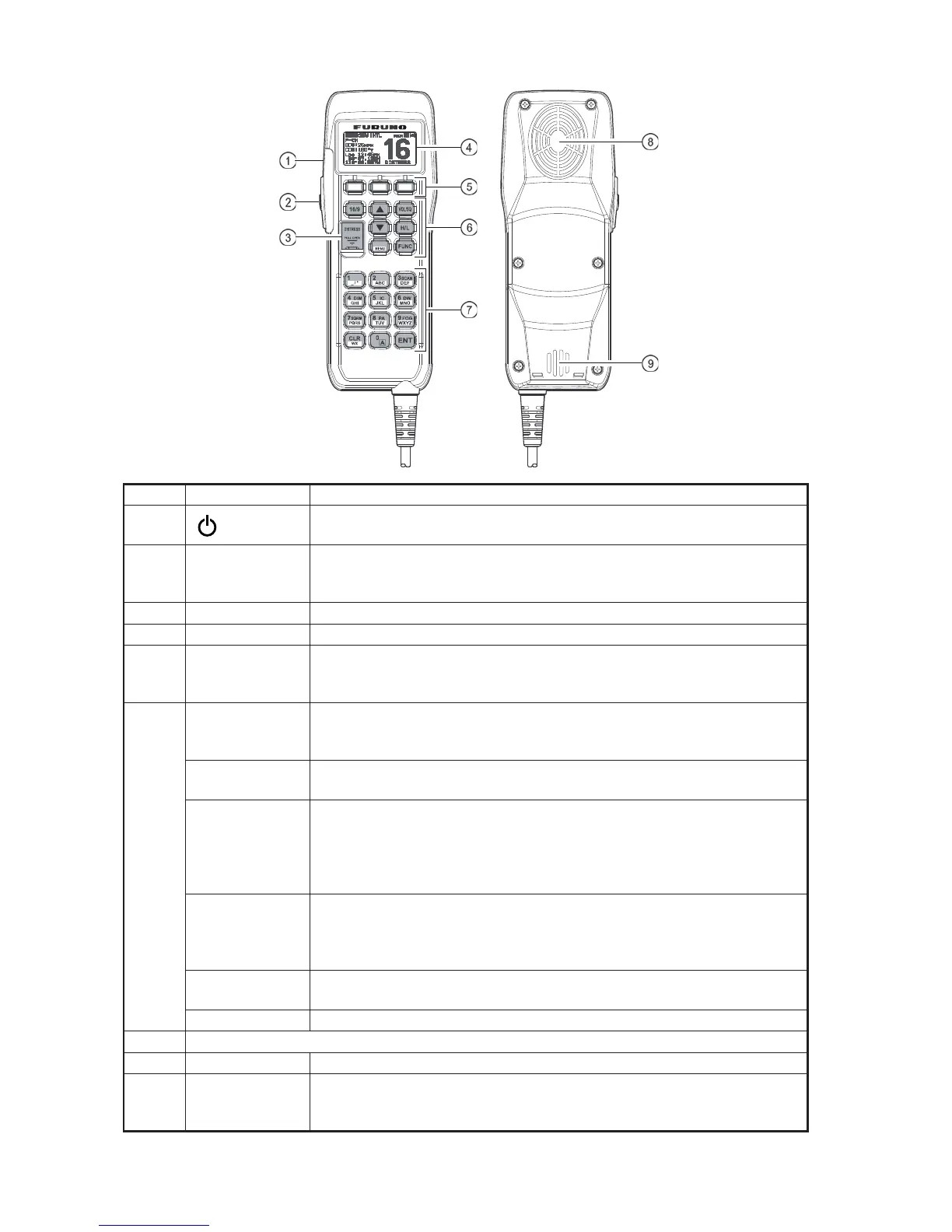
No. Control Description
1
(POWER)
Press and hold down this key to turn the transceiver and Handset on or
off.
2 PTT switch
(Push-To-Talk
Switch)
Push this key to enable the transmitter.
3 DISTRESS Transmit a DSC Distress Alert. See chapter 3.
4 Display Full dot matrix display.
5 Soft keys These three key's functions can be customized by the [Setup Menu]
mode. When press one of these key briefly, the key functions appear at
the bottom of the display. See section 4.12.2 Soft Keys.
6 16/9 • First press: CH16 is immediately selected.
• Second press: Recall the last selected channel.
• Press and hold: Select channel 9.
S, T These keys are used to select channels, adjust the volume and squelch
level, and to select DSC calls, DSC setup and Radio setup function.
VOL/SQ
(Volume Con-
trol / Squelch
Control)
• First press: Volume adjustment mode
• Second press: Squelch adjustment mode
• Third press: Exit adjustment mode
When in volume or squelch mode, press the S or T keys to adjust the
level.
H/L Toggle between high and low power. When the H/L key is pressed while
the transceiver is on CH13 or CH67, the power is temporarily switched
from LO to HI until the PTT switch is released. The H/L key is inoperative
on transmission inhibited and low-power only channels.
CALL/MENU • Press this key to access the [DSC MENU].
• Press and hold this key to access the [SETUP MENU].
FUNC Press this key to activate the Alternate key function.
7 See respective description on page 2-2.
8 Speaker The internal speaker is located here.
9 Microphone The internal ClearVoice Noise Canceling mic is located here.
When transmitting, position your mouth about 1.5 centimeter away from
the small mic hole. Speak slowly and clearly into the microphone.
MEM
CALL



 To Next Page