Configuration with the web interface
5-25
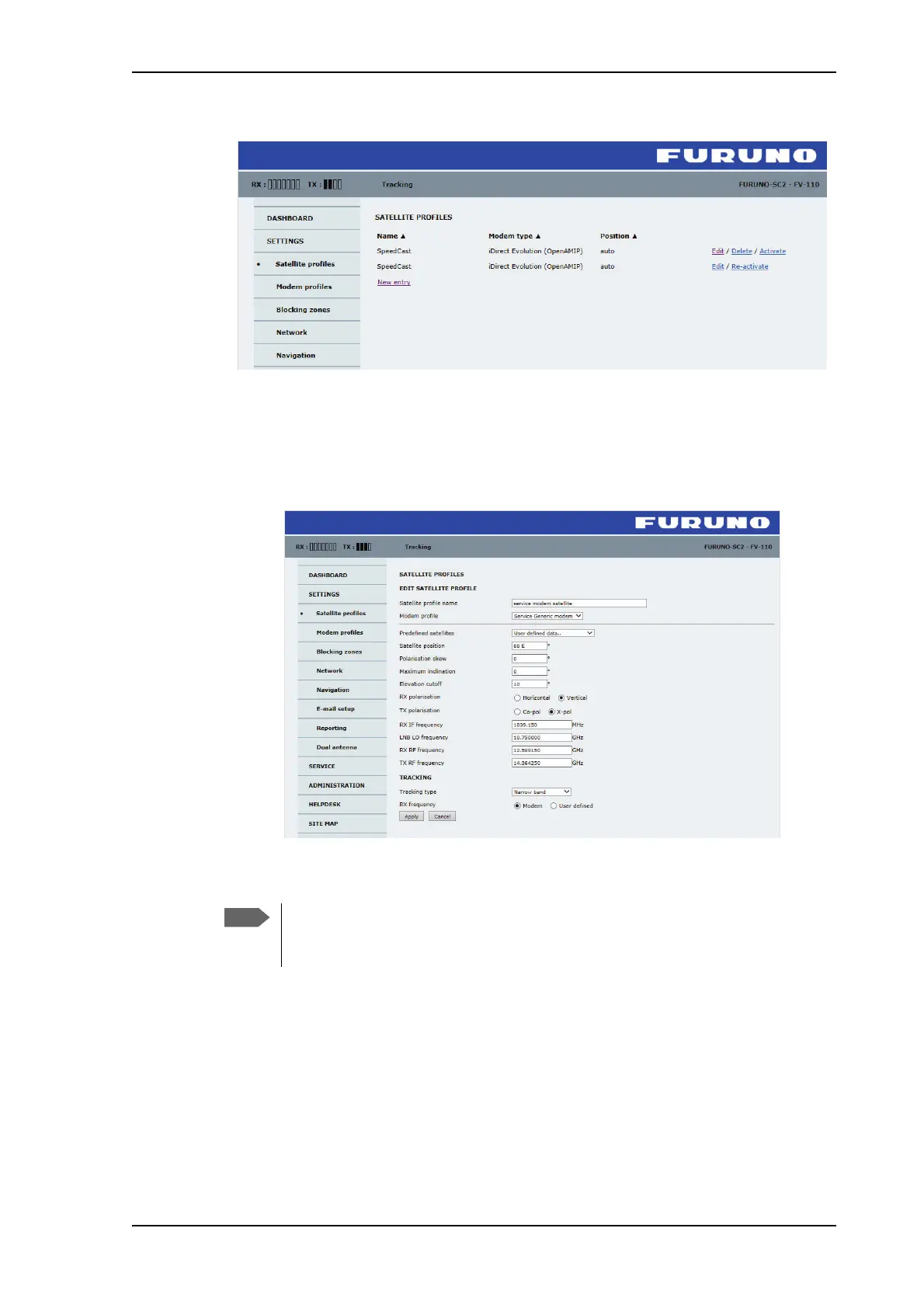
Figure 5-19: Web interface: SETTINGS - list of satellite profiles (example)
Each satellite profile has one assigned VSAT modem profile.
To add or edit a satellite profile, do as follows:
1. Go to SETTINGS or Satellite profiles and click Edit or New entry.
Figure 5-20: Web interface: SETTINGS, Satellite profiles — new entry (example)
2. Enter or edit the Satellite profile name.
3. Select a VSAT modem profile. The page automatically displays the parameters
available for the selected VSAT modem profile.
For instruction how to add a VSAT modem profile see Modem profiles on page 5-22.
4. Enter the data for the satellite that you want to use. For satellite data see DVB-S
satellites on page E-1 or www.lyngsat.com.
5. Polarisation skew: See documents from VSAT provider.
It is helpful to assign a name containing the location where the Satellite
profile is to be used (e.g. Gulf of Mexico or North Sea) and possibly the
provider.



 To Next Page