Configuration with the web interface
5-24
For modems communicating via Ethernet: Make sure that you have entered the
correct IP address also for the LAN connector that is used for the modem, see To
configure the LAN network on page 5-29.
5. Click Apply to add the new profile to the list of VSAT modem profiles or to accept the
edits.
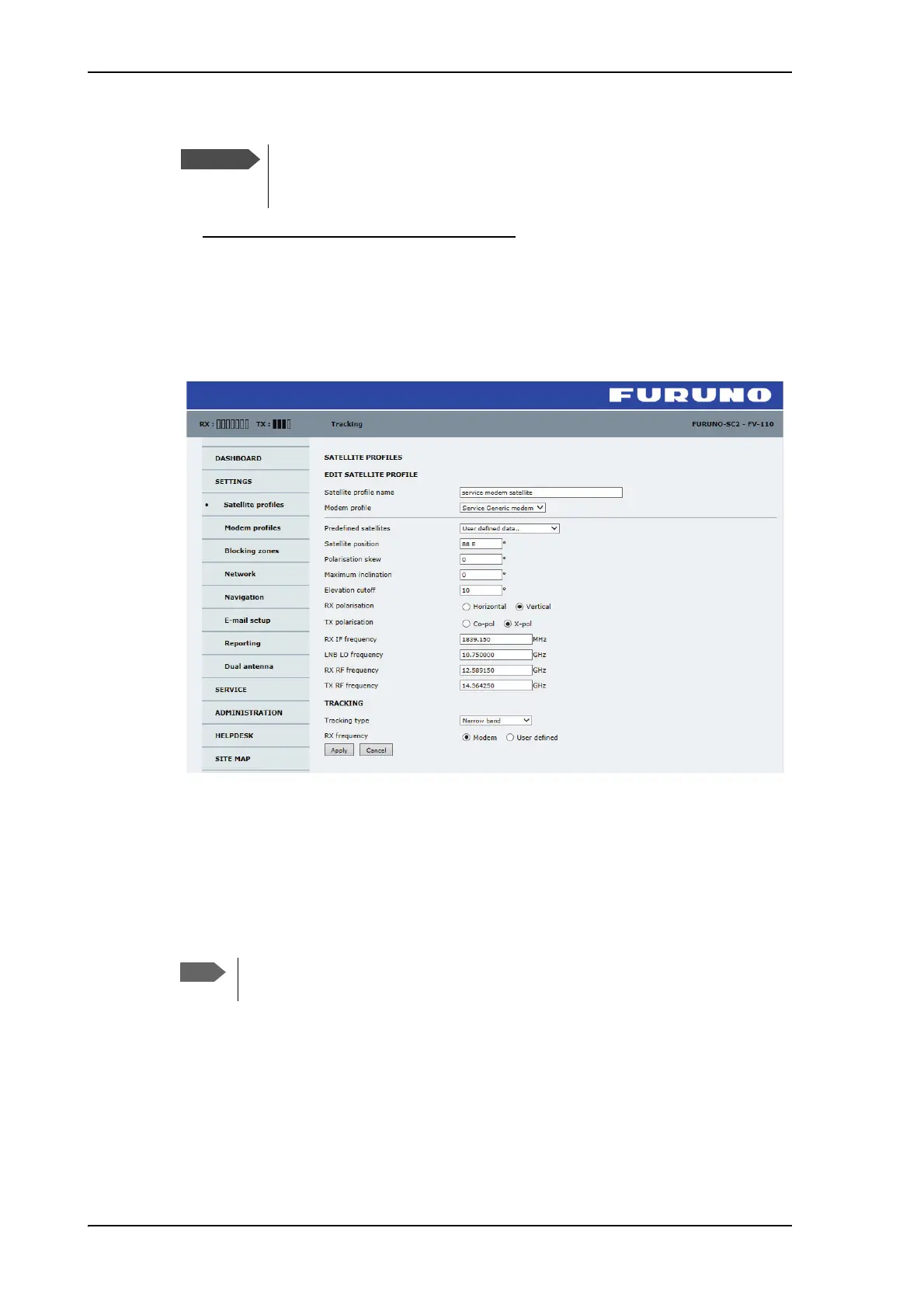
For a generic modem you enter all parameters in the satellite profile.
Figure 5-18: Satellite profile for generic modem
Satellite profiles
On the page Satellite profiles you add, edit and delete satellite profiles. A satellite profile
contains all settings that are necessary for a successful connection to the satellite,
including a VSAT modem profile. Most of the data you have to fill in are provided by
your VSAT service provider. Each satellite profile has one assigned modem profile. You
must activate one satellite profile. You must activate one satellite profile.
The FV-110 can work either using the Rx or Tx 10 MHz reference signals
provided by the modem or using its own built-in 10 MHz reference signal. It
is recommended to use the Tx 10 MHz reference signal from the modem.
You must add at least one VSAT modem profile before you can add a satellite
profile. See Modem profiles on page 5-22.



 To Next Page