10
4. OPERATION
S
S
S
S
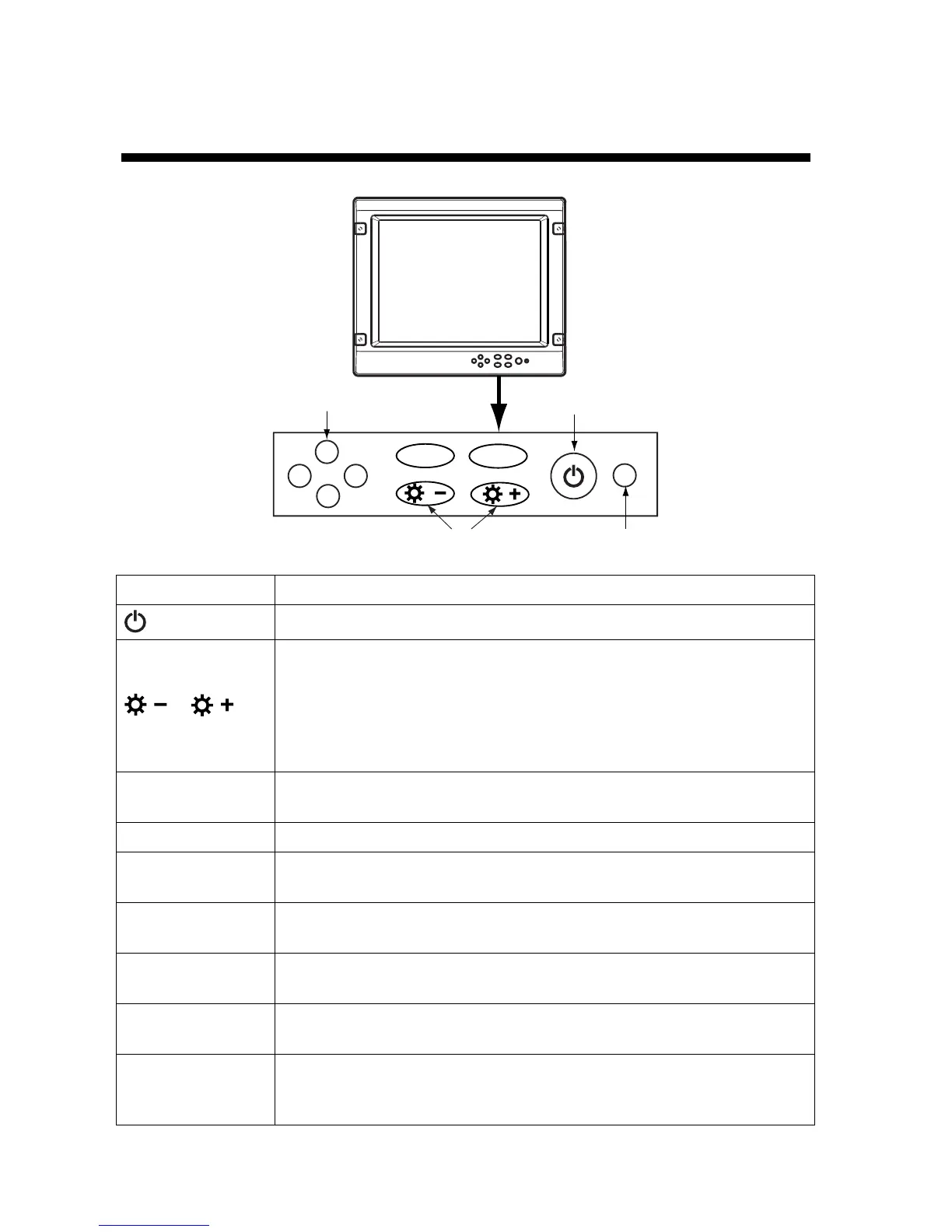
MENU
DISP
LED
Arrow keys
Power key
Brill key
Key/LED Function
Turns the power on/off.
a) Adjusts the display brilliance (lowest: 0, highest: 10).*
-: Decreases the display brilliance.
+: Increases the display brilliance.
b) Switches the display mode between full screen and fixed aspect ratio.
Press [+] while pressing the [DISP] key: Full screen zoom
Press [-] while pressing the [DISP] key: Fixed aspect ratio
MENU
a) Opens/closes the OSD.
b) Saves settings.
DISP Switches input signal between RGB and DVI .
Arrow key (▲)
a) Returns to the main hierarchy on the OSD.
b) Saves settings.
Arrow key (▼)
a) Moves to mark at the lower hierarchy on the OSD.
b) Selects item.
Arrow key (◄)**
a) Chooses item on the OSD (move to the left).
b) After selecting the item, selects options on the bar.
Arrow key (►)**
a) Chooses item on the OSD (move to the right).
b) After selecting the item, selects options on the bar.
LED
Shows input signal status as below.
Green: Video signal is applied.
Orange: No video signal is applied.



 To Next Page
 Loading...










