138
< Modelmenu(Airplane/Glider/MulticopterFunctions) >
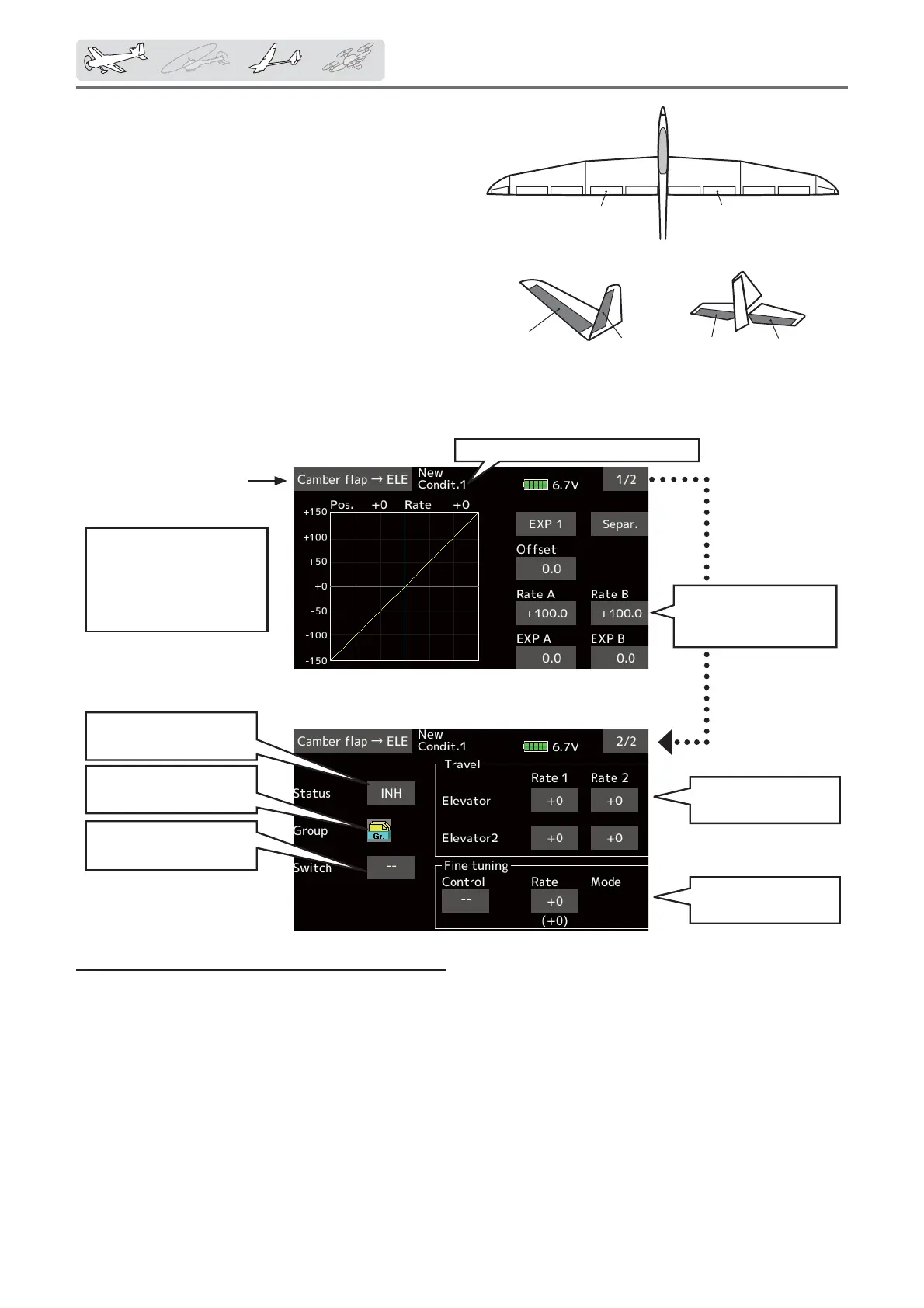
Adjustmentof
elevatorservo
Currentlyselectedconditionname
● Mixingcurvesetting
(Foradescriptionofthe
settingmethod,seethe
descriptionattheback
ofthismanual.)
Up/Downoverall
adjustmentatRateA
andRateB
Activatethefunctionby
tappingthe[INH].
Conditiongroup/single
modeselection(Gr./Sngl)
TheON/OFFswitchof
mixingischosen.
Finetuning
setting
ELEVATOR
ELEVATOR2
V-TAIL
ELEVATOR
ELEVATOR2
AILVATOR
FLP2
(CamberFlap)
FLP1
(CamberFlap)
Camberflap → ELE
[Corresponding model type]: Airplane/
glider,
2 ailerons + 1 Áap or more
This mixing is used to correct changes (elevator
direction) generated when the camber Àaps (speed
Àaps) are used.
ŏ The elevator servos up side/down side rate can be
adjusted. When the mixing direction is reversed
by the linkage, adjustments can be made by
changing the mixing rate polarity (+ or ²).
ŏ A mixing curve can be set.
ŏ Mixing during flight can be turned ON/OFF by
setting a switch. (Always ON at [--] setting)
ŏ The mixing rate can be Àne-tuned by setting a VR.
Setting method
ŏ Tap [INH].
(ON is displayed.)
ŏ When setting a switch, tap to the [--] item
of the switch and tap the screen to call the
selection screen. Then, select the switch and
set its ON direction. (Always ON at "--" setting)
(For a description of the switch selection
method, see the description at the back of
this manual.)
ŏ Tap elevator servos. Adjust the mixing rate.
*When the mixing direction is reversed by the linkage,
adjustments can be made by changing the mixing rate
polarity (+ or –).
ŏ When setting a VR, tap the Fine tuning "--"
item and tap the screen to call the selection
screen, and then select the VR. The VR
operation mode can be selected.
ŏ A mixing curve can be set.
(For a description of the curve setting
method, see the description at the back of
this manual.)
ŏ Select [Camber flapńELE] at the model
menu and call the setup screen shown
below.
ŏReturn to Model menu



 To Next Page