46
< ModelBasicSettingProcedure >
ŔőŃŰƒƇƈƏŃƄƇƇƌƗƌƒƑŃƄƑƇŃƆƄƏƏ
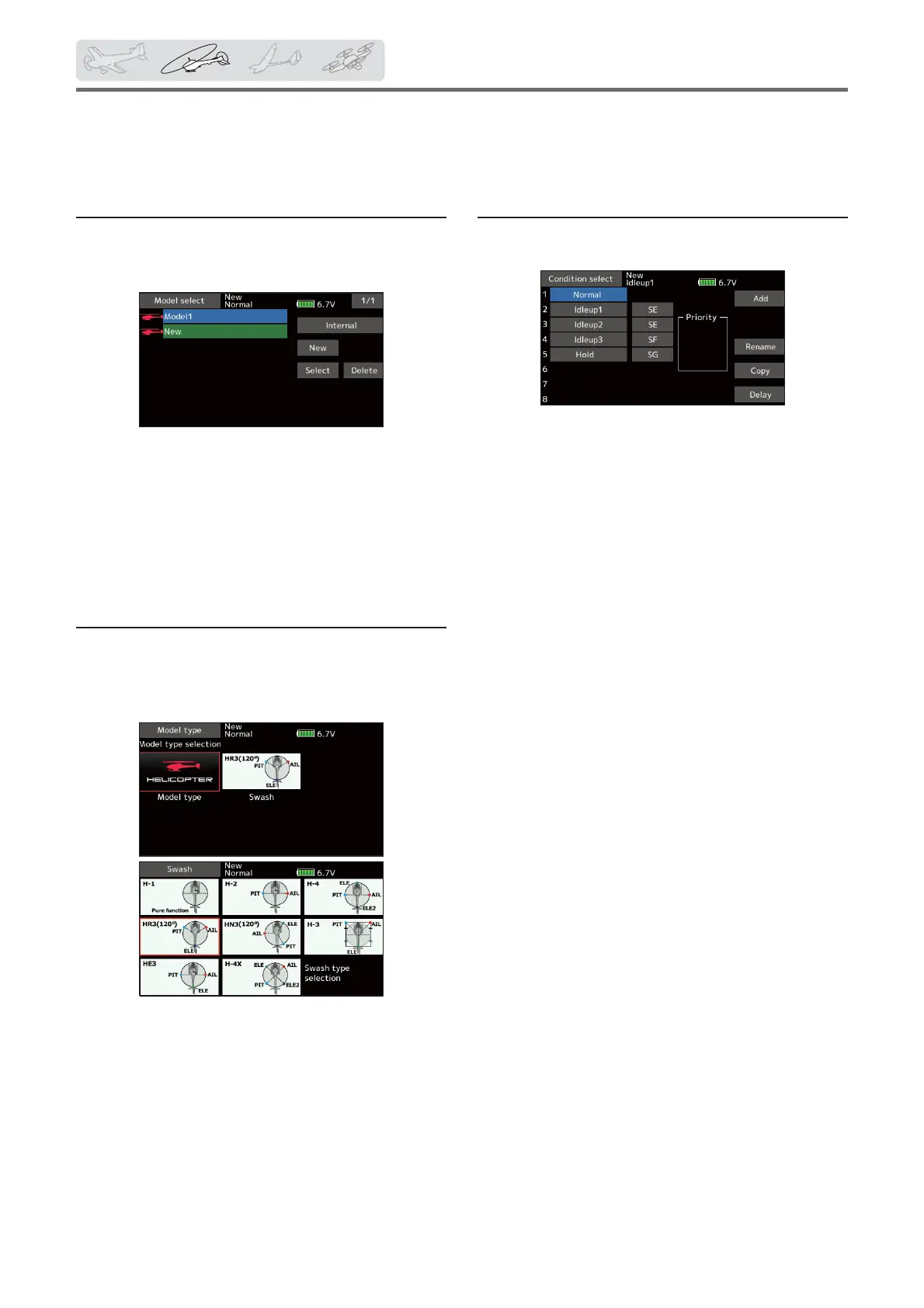
Default setting assigns 1 model to the FX-36. To add
new models or to call a model already set, use the Model
select function.
This is convenient when calling a model after
registering the model names in advance. (The data of up
to 30 models can be saved at the transmitter. Data can
also be saved to the optional SD card.)
The currently called model is displayed at the top
of the screen. Before flying and before changing any
settings, always con¿rm the model name.
ŕőŃŰƒƇƈƏŃƗƜƓƈŃƄƑƇŃƖƚƄƖƋŃƗƜƓƈŃƖƈƏƈƆƗƌƒƑ
If a different model type is already selected, select
helicopter with the Model type function of the Linkage
menu, and then select the swash type matched to the
helicopter.
*The Model type function automatically selects the
appropriate output channels, control functions, and mixing
functions for the chosen model type. Eight swash types are
available for helicopters.
*For a description of the swash type selection, refer to the
Model type function.
ūƈƏƌƆƒƓƗƈƕŃƅƄƖƌƆŃƖƈƗƗƌƑƊŃƓƕƒƆƈƇƘƕƈ
This section outlines examples of use of the helicopter functions of the FX-36. Adjust the actual values, etc. to match
the fuselage used.
ŖőŃũƏƌƊƋƗŃƆƒƑƇƌƗƌƒƑŃƄƇƇƌƗƌƒƑ
The transmitter can install up to eight Àight conditions
per model.
The Condition select function automatically allocates
¿ve conditions for helicopter.
(General setting)
ŏ Normal
ŏ Idle up1
ŏ Idle up2
ŏ Idle up3
ŏ Hold
Note: Delete conditions you have not set
up and will not use. Otherwise you may
accidentally activate them during Áight and
cause a crash.
*For a description of the condition deletion, refer to the
Condition select function.
The Normal condition is always on, and remains on
until other conditions are activated by switches.
The priority is throttle hold/idle up 2/idle up 1/normal.
Throttle hold has the highest priority.
Add other conditions, as required.
The Condition delay can be programmed for each
channel. The Condition delay is used to change the servo
throw smoothly when switching conditions.
(*eneral Àight condition setting example)
ŏ Normal: (8se initial setting conditions/operate
when switch OFF)
8se from engine starting to hovering.
ŏ Idle up 1: (Operate at SW-E center)
8se in 540 stall turn, loop, rolling stall turn, and other
maneuvers.
ŏ Idle up 2: (Operate at SW-E forward side)
8se in rolls.
ŏ Throttle hold: (Operate at SW-G forward side)
8se in auto rotation.



 To Next Page