EasyManua.ls Logo

FXP CD-220 VFD - Page 12

FXP CD-220 VFD
36 pages
Print Icon
To Next Page IconTo Next Page
To Previous Page IconTo Previous Page
Loading...
7
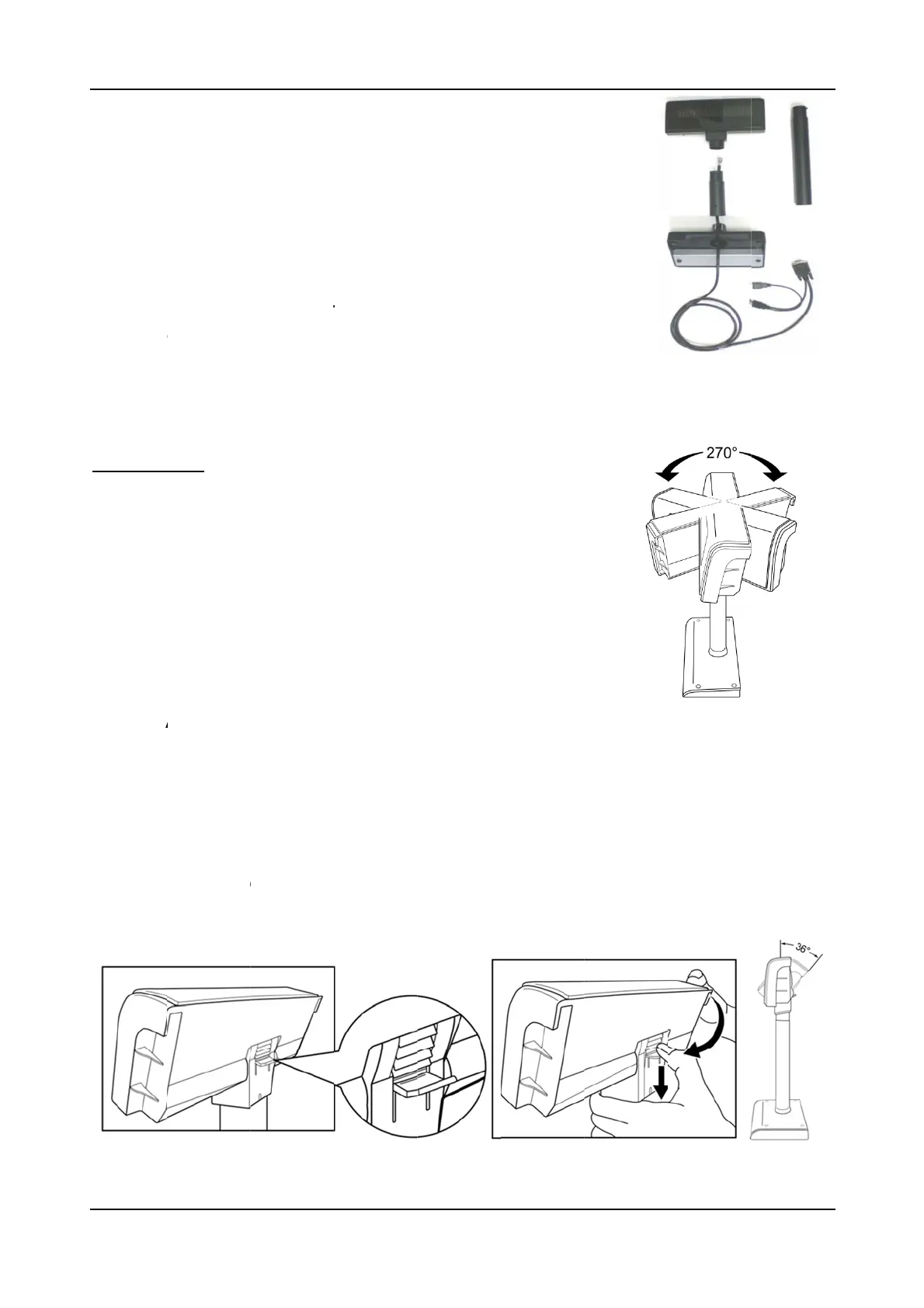
3.1.2
Insert th
e
the pipe
t
extend th
for differ
e
Low 173
482 (m
m
NOTE:
A
to the
D
3.1.3
This pro
ATTENT
I
(1) Viol
e
dama
g
e
(2) Sec
u
extensi
o
3.1.4
A
This pro
d
easily til
How t
o
(1) Loc
a
(2) Pull
t
Asse
m
e
RJ45 en
d
t
hen into t
h
e pole to t
h
e
nt heights
:
(mm), Mid
m
).
A
ttach th
e
D
isplay P
a
Rotati
o
duct allo
w
ION
e
ntly rota
s of the
D
u
re the D
i
o
n pole to
A
n
g
lin
g
d
uct allo
w
ted to th
e
o
Ad
j
u
s
a
te the hi
n
t
he tab d
o
m
blin
g
d
of the du
a
h
e panel a
n
h
e desired
:
260 (mm)
e
j
oint of
t
a
nel until
o
n
w
s a 270
tin
g
the
D
D
isplay P
a
i
splay Pa
n
a desire
d
g
w
s 0~36
d
e
desired
s
t
ng
e secti
o
o
wnward
a
l interface
n
d connect
height by
a
,
High 394
t
he exte
n
it is pro
p
de
g
ree r
o
D
isplay P
a
a
nel.
n
el prope
r
d
hei
g
ht.
d
e
g
ree til
t
position
o
n on the
and tilt t
cable thro
to the RJ
4
a
ttaching t
h
(mm) and
n
sion pol
e
p
erly lock
e
o
tation in
a
nel may
r
ly after
a
t
an
g
le a
d
by usin
g
backsid
e
he panel
C
u
ugh the b
a
4
5 slot. Yo
u
h
e extensi
o
Highest
e
or stan
d
e
d.
either h
o
cause
a
ttachin
g
dj
ustmen
t
a hin
g
e
d
e
of Displ
a
up or do
w
u
stomer Pol
a
se and
u
can
o
n pole
d
base
o
rizontal
d
the
t
. The Dis
p
esi
g
n.
a
y Panel.
w
n to the
INS
T
l
e Display
C
d
irection.
p
lay Pan
e
desired
p
T
ALLATION
C
D-220 VFD
e
l can be
p
osition.