CONFIGURE YOUR DEVICE
15 Customer Pole Display CD-220 VFD
4.4 Define Your Own Font
You can create your own font and download it with the software tool.
There are three ways to create the font:
4.4.1 From an Existing Font
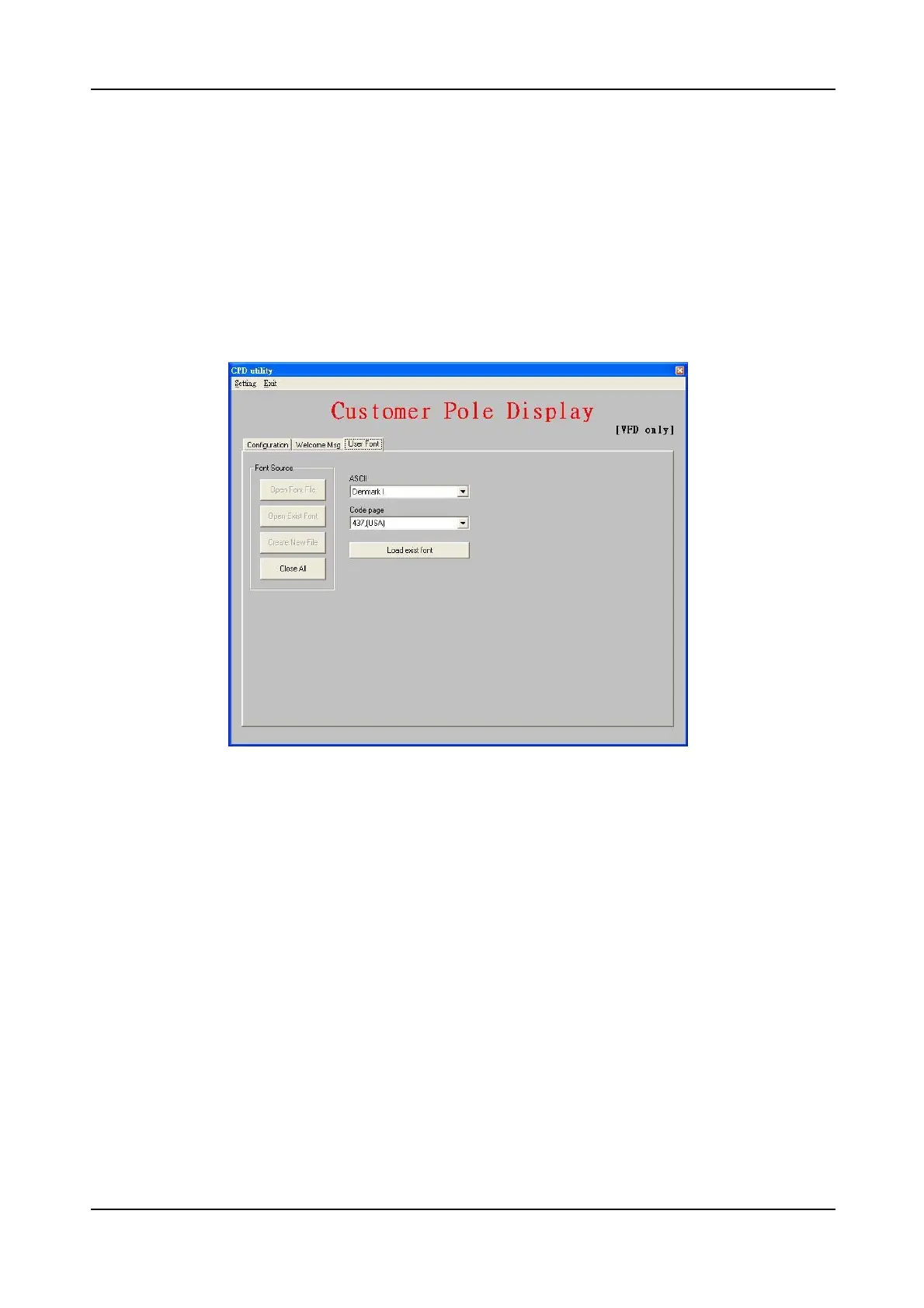
You can see the following dialog by pressing “Open Exist Font” button.
Please select a font to be your font base and modify it to fit your requirement.
1, The first part is ASCII code which contains the characters coded as 0x20~0x7f.
Within the ASCII, some of characters own different definition in different country.
Please refer to the user’s manual for the details of the code table.
2, The second part is 0x80~0xff which is the range that code page refer to. You
can select a desired code page from the list as a base of your font.
After selecting these existing font, press “Load Existing Font” and the font will be
loaded into system memory. Once you finish editing font, you can choose either
to save your font to a file by pressing “Save to file” or download your font to
device by pressing “Download to device”. If you want to quit current modification,
you can press “Reload font” button to load the font again. All your modification
will be lost after reloading font. Press “Reset” button also let you abandon
current modification and restart the whole operation.


 To Next Page