38 Rino
®
130 Owner’s Manual
UNIT OPERATION > ALTIMETER PAGE
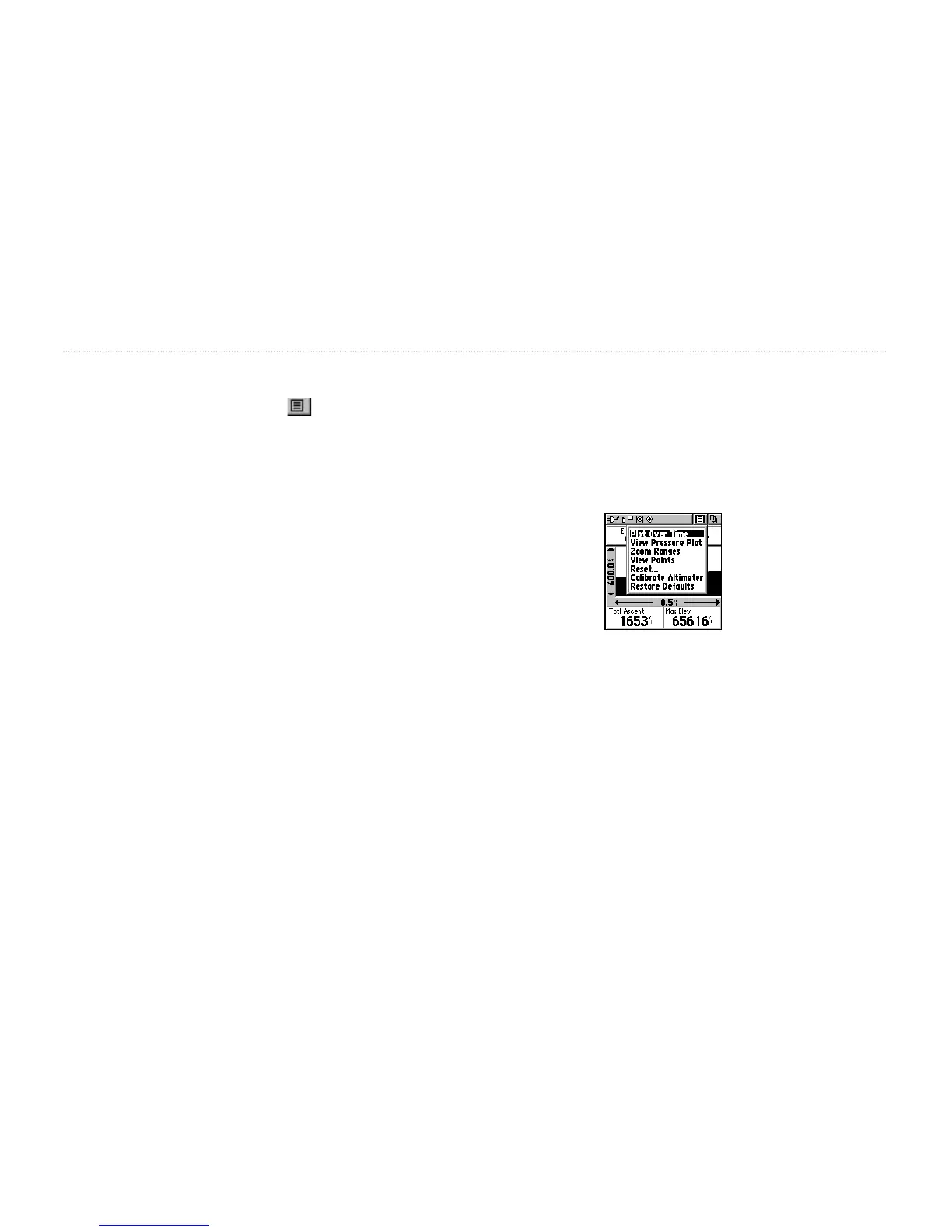
Altimeter Page Options
The Altimeter Page Option Menu allows you to select
the type of information and how it is to be displayed.
Altimeter Page Options include:
Plot Over Time/Distance
—Plots the changes in
elevation or pressure over a length of time or over a
distance. When Plot Over Distance is selected, Plot over
Time is displayed in the Option Menu (and vice versa).
View Pressure/
Elevation Plot—Displays a record of
changes in barometric pressure or elevation for a set
period of time.
Zoom Ranges—Sets the zoom range for elevation,
distance, or time.
View Points—Shows the elevation, time of day, and date
a specific point was created
Reset…—Clears recorded data from the page to begin
recording new data.
Calibrate Altimeter
—Increases the accuracy of the
altimeter. You must know your elevation or pressure to
calibrate the altimeter.
Restore
Defaults—Returns the Altimeter Page to the
original factory settings (defaults).
Altimeter Page Option Menu


 To Next Page