Reviewing Laps
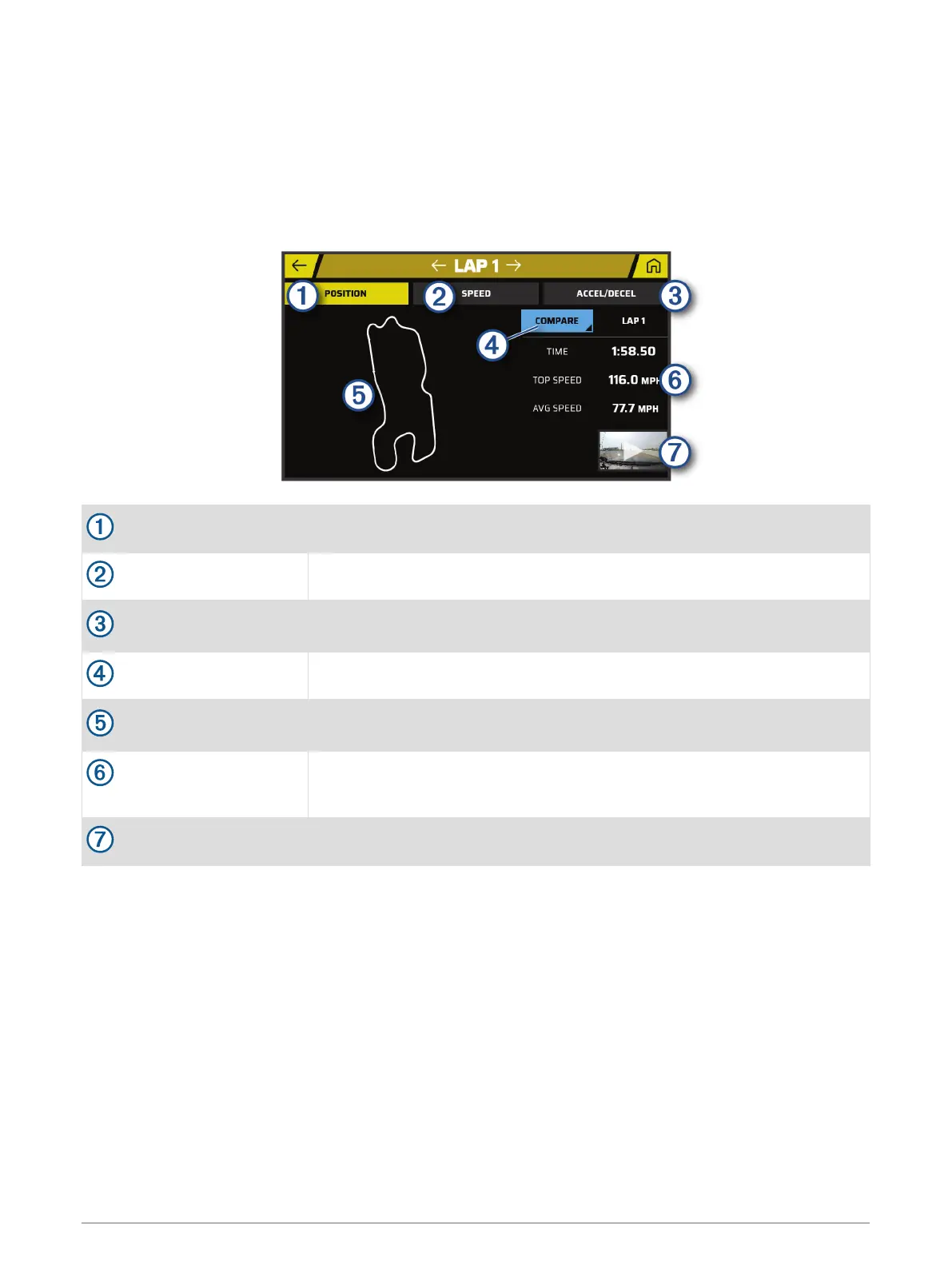
The Laps page lets you review lap time and speed information for each lap. You can compare any two laps
from the same session.
From the session summary page, select LAPS.
Laps
POSITION
Select to view a map of your track position during the lap.
SPEED
Select to view a map showing your speed at different points during the lap.
ACCEL./DECEL.
Select to view a map showing rates of acceleration or deceleration at
different points during the lap.
COMPARE
Select to compare the selected lap with another lap.
Track map
Use the touchscreen controls (Using the Touchscreen, page 10) to adjust your
view of the lap data.
Time and speed informa
tion
Displays the lap time, top speed, and average speed.
Video thumbnail
Select to view a video of the selected lap.
Viewing Lap Speed Data
You can view a map of detailed speed data at different points during the lap.
1 From the session summary page, select LAPS.
2 Select a lap.
3 Select SPEED.
Viewing Acceleration and Deceleration Data
You can view a map of detailed acceleration data at different points during the lap.
1 From the session summary page, select LAPS.
2 Select a lap.
3 Select ACCEL./DECEL..
Reviewing Drive Sessions 19









 To Next Page