◦ Color Mode
◦ Configure Colors
◦ Beeper
◦ GPS
◦ Skyview
◦ GPS Mode
◦ SBAS
◦ Speed Filter
◦ Auto Power
◦ Off
◦ On
◦ Language
◦ System Information
◦ Event Log
◦ Software Information
◦ Factory Settings
◦ Simulator
• My Vessel
◦ Keel Offset
◦ Temp. Offset
◦ Calibrate Water Speed
• Communications
◦ Serial Port
◦ NMEA 0183 Setup
◦ Sounder
◦ Route
◦ System
◦ Garmin
◦ Posn Precision
◦ XTE Precision
◦ Waypoint IDs
◦ MMSI
◦ Diagnostics
◦ Defaults
• Alarms
◦ Navigation
◦ Arrival
◦ Type
◦ Activation
◦ Change Time
◦ Anchor Drag
◦ Off Course
◦ System
◦ Alarm Clock
◦ Device Voltage
◦ GPS Accuracy
◦ Sonar
◦ Shallow Water
◦ Deep Water
◦ Water Temp.
◦ Fish
◦ Off
◦
◦
◦
◦ AIS
◦ AIS Alarm
◦ Time To
◦ Range
◦ AIS-EPIRB Test
◦ AIS-MOB Test
◦ AIS-SART Test
• Units
◦ System Units
◦ Variance
◦ North Reference
◦ Position Format
◦ Map Datum
◦ Time Format
◦ Time Zone
• Navigation
◦ Route Labels
◦ Auto Guidance
◦ Turn Transition Activation
◦ Turn Transition Time
◦ Route Start
• Other Vessels
◦ AIS
◦ DSC
◦ AIS Alarm
◦ AIS Alarm
◦ Time To
◦ Range
◦ AIS-EPIRB Test
◦ AIS-MOB Test
◦ AIS-SART Test
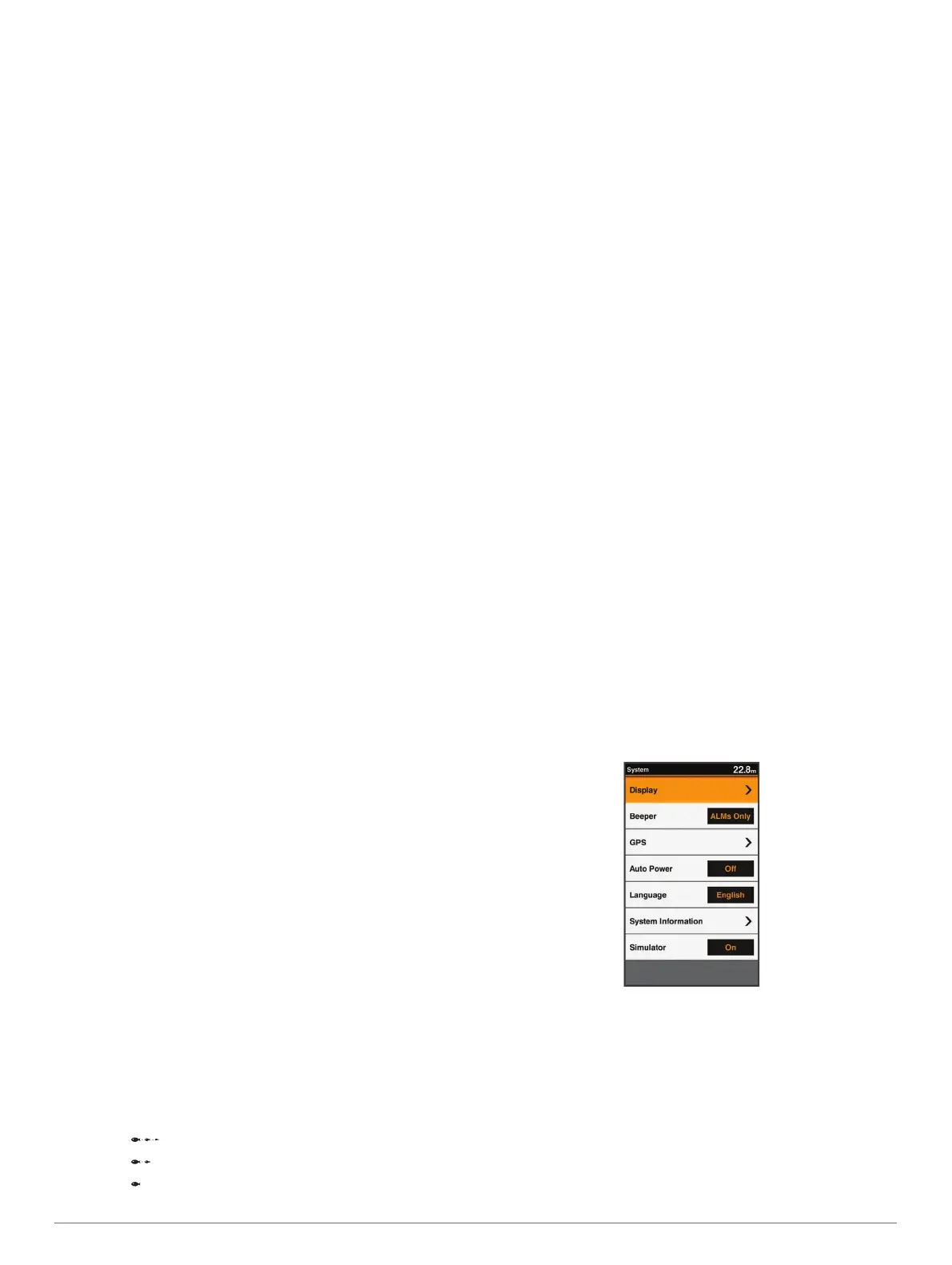
System Settings
Select Settings > System.
Display: Adjusts the backlight brightness (Adjusting the
Backlight, page 2) and color scheme (Changing the Color
Mode, page 2).
Beeper: Turns on and off the tone that sounds for alarms and
selections (Setting the Beeper, page 2).
GPS: Provides information about the GPS satellite settings and
fix, and allows you to select a GPS system.
Auto Power: Turns on the device automatically when power is
applied.
Language: Sets the on-screen language.
Device Configuration 13










 To Next Page