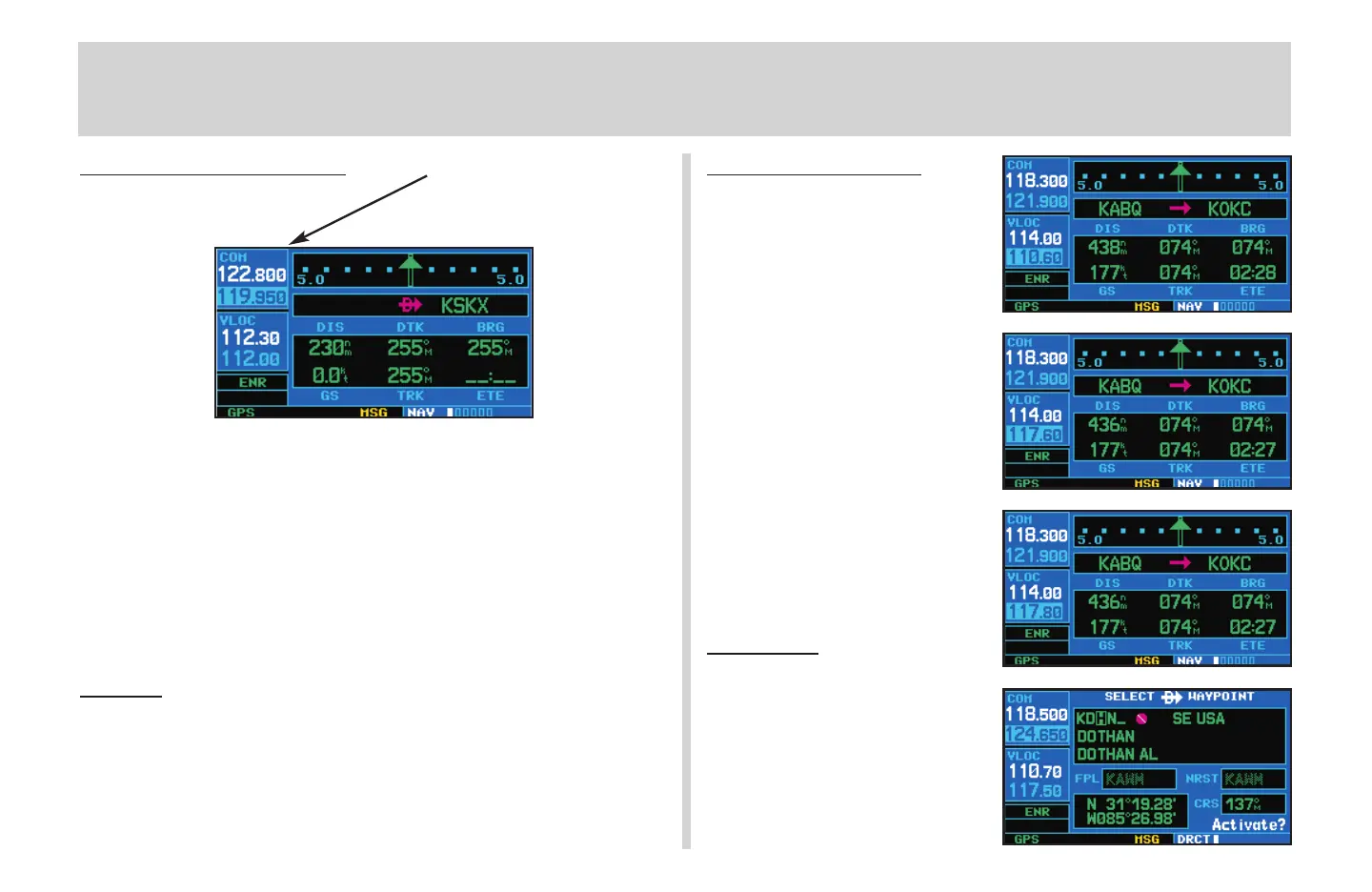
Screen Layout (windows)
The GNS 430’s display is divided into three separate “windows” (or
screen areas). The left 1/4 of the display provides a COM window (top two
lines) and a VLOC window (bottom two lines) The right 3/4 of the display
consists of a GPS window, which is where you’ll find the various navigation,
waypoint information and settings “pages”.
Each unique screen of information is referred to as a page. Pages are
typically selected using the small (
a
) and large (
d
) right knobs—with the
cursor removed from the GPS window. See the following page for details
on arrangement of the GNS 430’s main pages.
Cur
sors
There are two separate cursors: a tuning cursor and a GPS window
cursor. The tuning cursor is used to select the standby COM or VLOC
frequency. If desired, press the small left knob (
v
) to move the tuning
cursor to the VLOC window. Then, use the small (
f
) and large (
h
) left
knobs to select the desired frequency. The COM (
W
) and VLOC (
V
) flip-
flop keys are used to activate the selected frequency.
F
requency Selection
1. If the tuning cursor is not currently in
the desired window (COM or VLOC),
press the small left knob
(
v
) momen-
tarily.
2. Rotate the large left knob (
h
) to
select the desired megahertz (MHz)
value. For example, the 117 portion
of the frequency 117.80.
3. Rotate the small left knob
(
f
) to
select the desired kilohertz (kHz)
value. For example, the .80 portion
of the frequency 117.80.
4. To activate the selected frequency,
press the corresponding flip-flop
key
W
for COM frequencies or
V
for VLOC frequencies.
Data Entry
Data is entered in the GPS win-
dow using the large (
d
) and small
(
a
) right knobs. The large right
knob (
d
) is used to move the cursor
about the page. The small right
knob (
a
) is used to select individual
characters for the highlighted cursor
location (see illustration).
Screen Layout / CURSORs / Frequency Selection
4
COM Window
GPS Window
Active Frequency on top &
Standby on bottom
(highlighted by cursor)
{
{
VLOC Window
}
430QR c.qxd 6/21/00 2:16 PM Page 4



 To Next Page