91
Reference
Main Menu: Alarm Tab
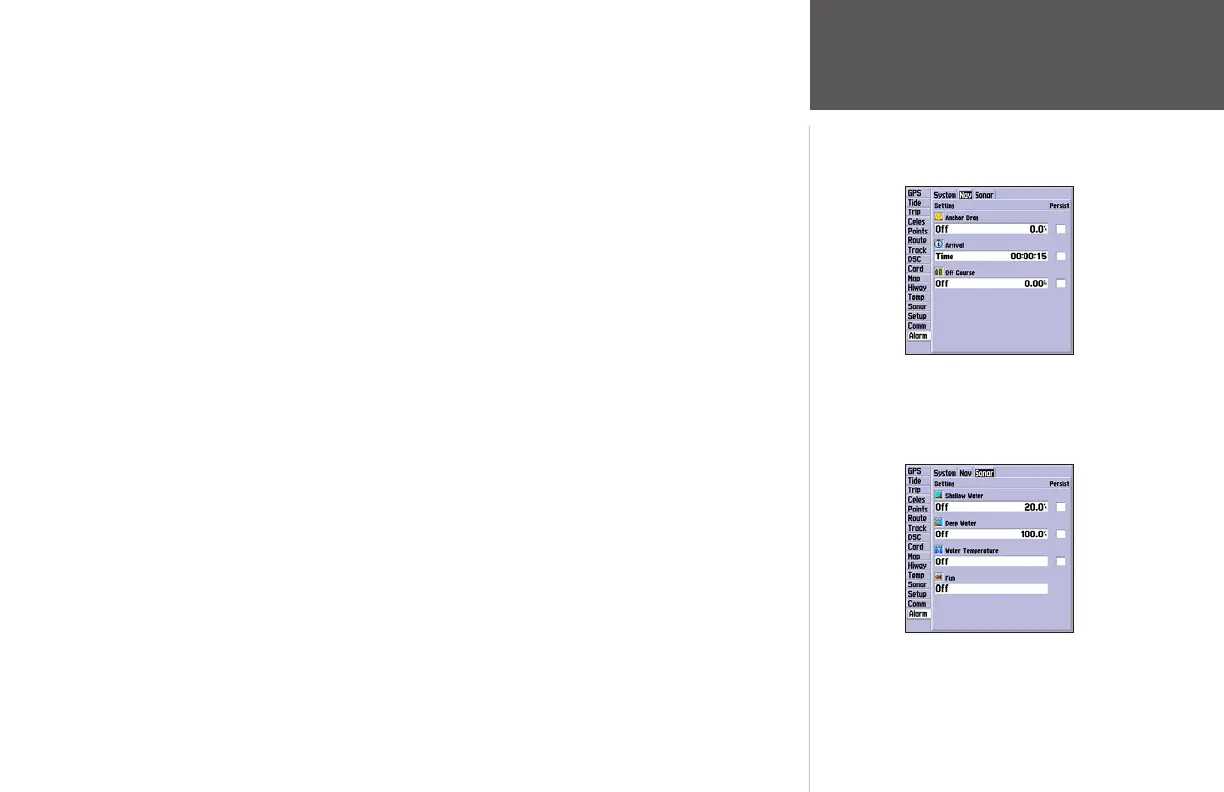
Sonar Submenu Tab
Shallow Water/Deep Water – set alarms to sound when you enter an area of specified depth that
is too shallow and/or too deep. You must be receiving sonar data for this function to work.
Water Temperature – sets an alarm to sound when the transducer reports a temperature either
above, below, inside or outside the specified values.
Fish – sets an alarm to sound when the unit detects a fish of the specified size symbol(s).
To set an alarm:
1. Use the ARROW KEYPAD to highlight desired submenu tab of the Alarm Tab.
2. Highlight the field below the alarm name you wish activate and press ENTER.
3. Change the mode to the desired setting and press ENTER.
4. Highlight the next field to the right and press ENTER, then enter the desired settings and press
ENTER to finish.
5. If you want the alarm to display and beep until acknowledged, highlight the ‘Persist’ box and press
ENTER to place a check mark in the box.
Main Menu—Alarm Tab
(Nav Submenu)
Main Menu—Alarm Tab
(Sonar Submenu)














 To Next Page