64
Reference
Active Route Page
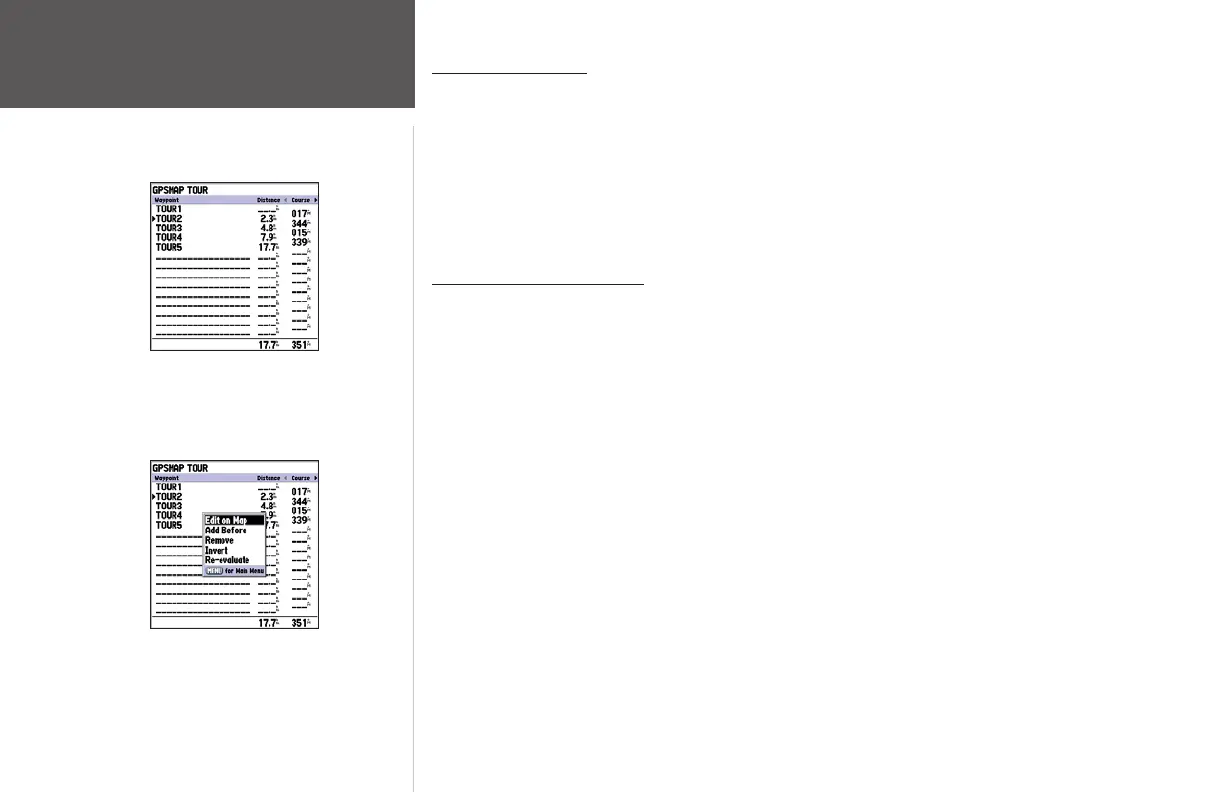
Active Route Page
Active Route Page Menu Options
Active Route Page
Whenever you have activated a route in the GPSMAP 178/178C, the Active Route Page shows each
point (waypoint or map item) of the active route, with the point name, distance and choice of Course,
ETA, Fuel to point, Leg Distance, Leg Fuel, Leg Time, Sunrise, and Sunset at point location, or Time
To point for each point from your present position. The current destination point, the ‘active’ point, is
marked with an arrow icon. As you navigate a route, the point list automatically updates to indicate the
next ‘active’ point first. The Active Route and Route Review Pages share many of the same features and
options.
Active Route Page Options
The following options are available by pressing MENU on the Active Route page:
• Edit on Map — see page 61 for instructions.
• Add Before — see page 62 for instructions.
• Remove — see page 62 for instructions.
• Invert — reverses the direction of the route.
To invert an active route:
1 From the Active Route page, press MENU.
2. Using the
ARROW KEYPAD, highlight ‘Invert’ and press ENTER to reverse the route.
• Re-evaluate — recalculates and reactivates the current route data. Selects the route leg closest to
your current position as the active leg (the active leg defines the current ‘from’ and ‘to’ waypoints).
To re-evaluate an active route:
1 From the Active Route Page, press MENU.
2. Using the ARROW KEYPAD, highlight ‘Re-evaluate’ and press ENTER to recalculate.














 To Next Page