97
Selecting a Transducer
Appendix A
Transducers
The transducer acts as the eyes and ears of your new sonar. Proper transducer selection and installa-
tion are critical to the operation of your unit. The transducer transmits sound waves toward the bottom
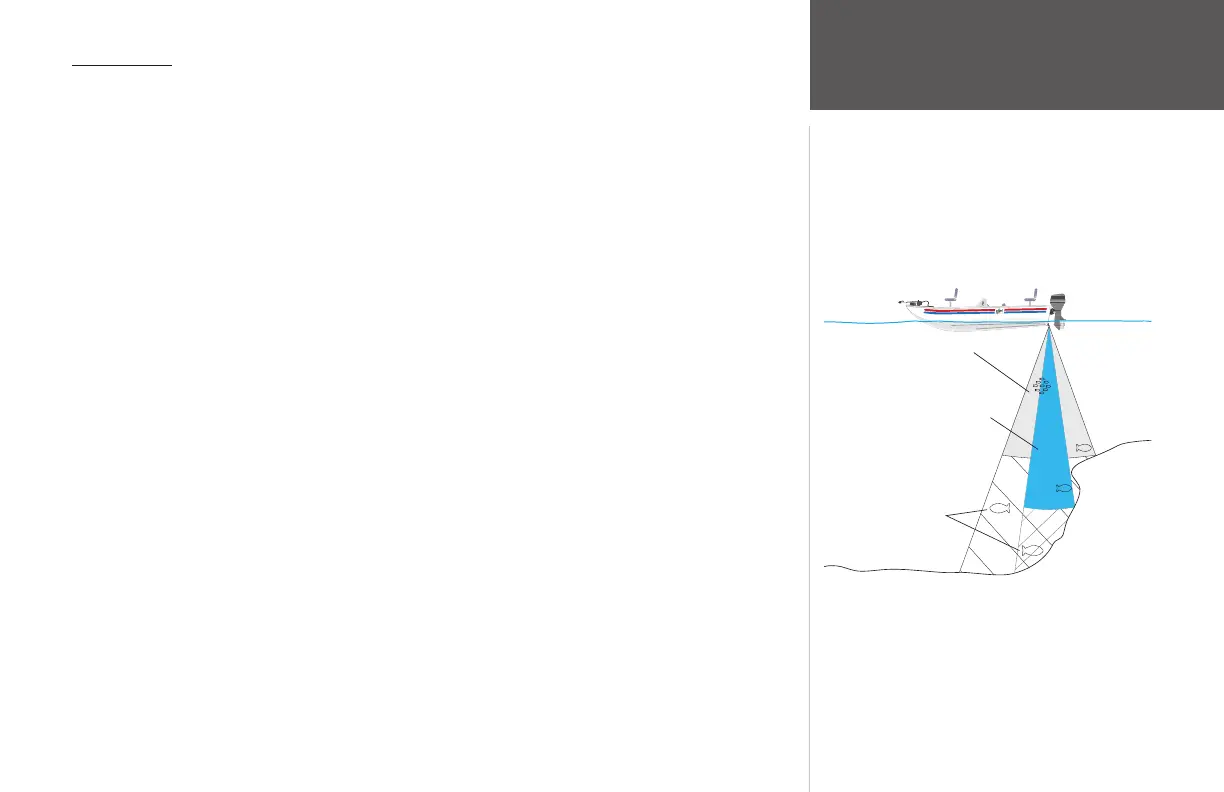
in a cone shape. The larger the cone angle, the larger the coverage area at a given depth.
A wide cone angle transducer works best in shallow water. The wide cone angle provides a large
coverage area, but at a decreased bottom resolution. In deeper water this can result in a large dead zone
where fish cannot be seen. A narrow cone angle transducer is better suited to deep-water installations.
The narrow cone angle provides a smaller viewing area (compared to a wide cone angle transducer at the
same depth) with improved bottom resolution and a smaller dead zone. Dual frequency transducers give
you the best of both wide and narrow cone angles.
The GPSMAP 178/178C is packaged with and without a transducer. Depending on which transducer
you select, you will have either single or dual frequency performance. Since many mounting locations
vary, there are a variety of standard and optional transducers, and accessories which are available. See
your local Garmin dealer or contact Garmin to help you in your selection of optional transducers and
accessories.
X
X
dead zone
fish not seen
Wide cone angle
Narrow cone angle
(red) + 10-35 VDC
(black) - Ground (Power/Data)
(blue) Port 1 Data OUT
(brown) Port 1 Data IN
(white) Port 2 Data IN
(green) Port 2 Data OUT
(yellow) Alarm Low
To Transducer
To Unit
Beacon
Receiver or
DSC VHF
Autopilot/
NMEA Device
DC �
Power Source
RXD +
RXD -
RX+
TX+
Alarm Relay
100ma max
coil current














 To Next Page