GPSMAP 3205 Owner’s Manual 7
gettIng started > usIng sIMulator Mode
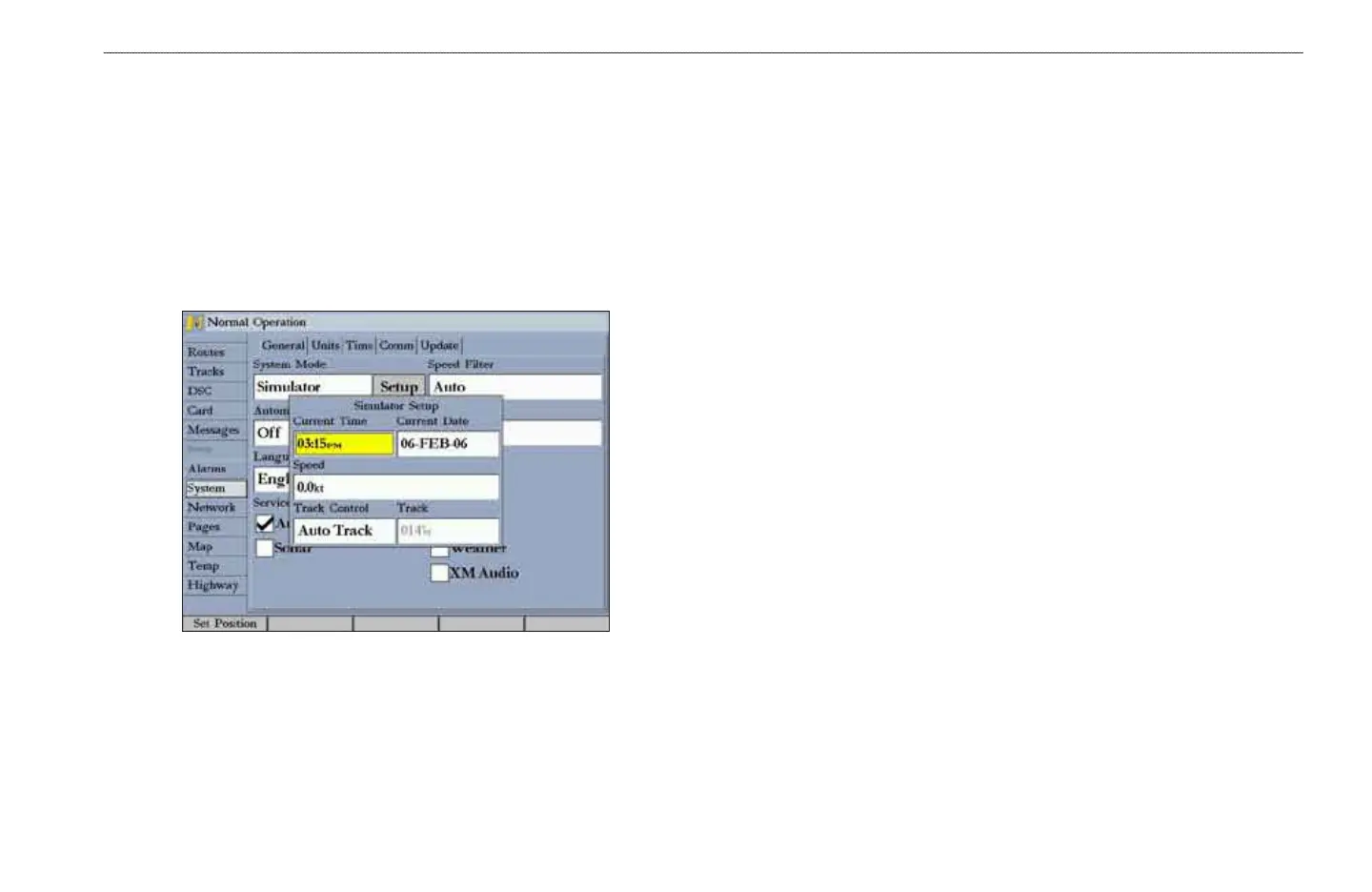
To set up Simulator Mode:
Highlight the Setup button, and press ENTER. The Simulator Setup
window appears. The following options are available:
• Current Time/Date—enter a simulated date and time.
• Speed—enter a simulated speed.
• Track Control—select track control. Auto Track steers to the current
navigation point; User Track allows you to enter a heading in the
Track eld.
• Track—enter a simulated heading.
Use the Set Position soft key to set your location while in Simulator Mode.
You can also control the speed and track from the Compass or 3D Highway Page.
Press up or down on the ROCKER to increase or decrease the speed; press left or
right to change the heading.
To turn off Simulator Mode:
1. Press and hold ADJ/MENU to open the Main Menu.
2. Press up or down on the ROCKER to highlight the System tab.
3. Press right on the ROCKER to highlight the General sub tab, highlight the
System Mode eld, and press ENTER.
4. Highlight Normal, and press ENTER.
When Normal Mode is active, the message “Normal” appears in the status bar at
the top of each page.













 To Next Page