12 GPSMAP
®
400 Series Owner’s Manual
uSInG chartS
Using Mariner’s Eye 3D
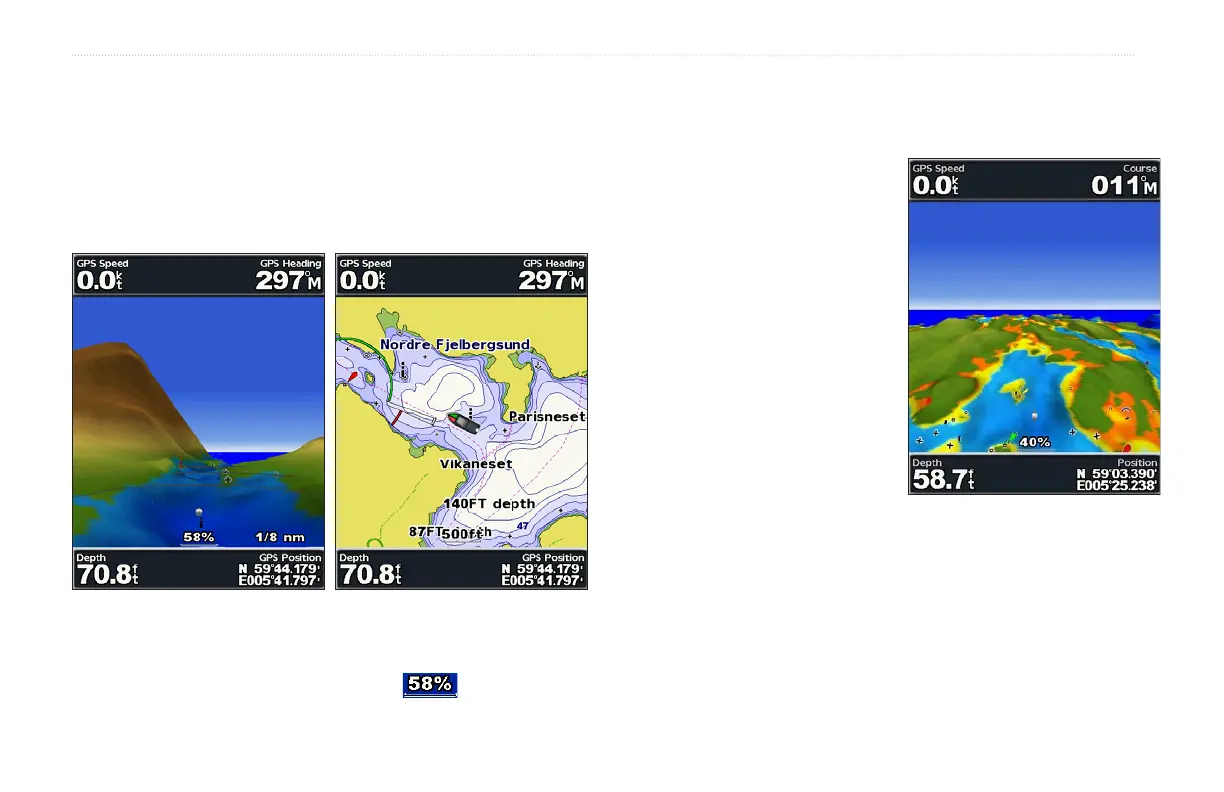
Mariner’s Eye 3D provides a bird’s eye view from above and behind
the boat (according to your course), and provides a visual navigation
aid. This view is helpful when navigating tricky shoals, reefs,
bridges,orchannels,andisbenecialwhentryingtoidentifyentry
and exit routes in unfamiliar harbors or anchorages.
Mariner's Eye 3D Navigation Chart
The RANGE (+) key moves the view closer to your boat and lower
to the water, while the RANGE (-) key moves the view away from
the boat. When adjusting the range, a scale ( ) appears at the
bottom of the screen.
Mariner’s Eye 3D Settings
To access additional settings or options from the Mariner’s Eye 3D
screen, press MENU.
Colors—choose between Normal
(Default), Water Hazard, and All
Hazard. The Normal setting indicates
land in greens and browns, and the
Water Hazard setting indicates
shallow water and land with a color
scale. Blue indicates deep water, yellow
and orange for shallow water, and red
for very shallow water. All Hazard
setting shows land as dark red.
Rings—toggle the range rings on or
off.
Tracks—turn the track log on or off.
Safe Depth—adjust the depth at
which red indicates shallow water.
Nav Lane Width—adjust the width of the course line drawn when
navigating.
Overlay Numbers—
—showorhidecruising,navigation,shing,and
sailing numbers.
Mariner’s Eye 3D
(Water Hazard Colors)
Mariner’s Eye 3D
(Water Hazard Colors)













 To Next Page