Setting the Keel Offset
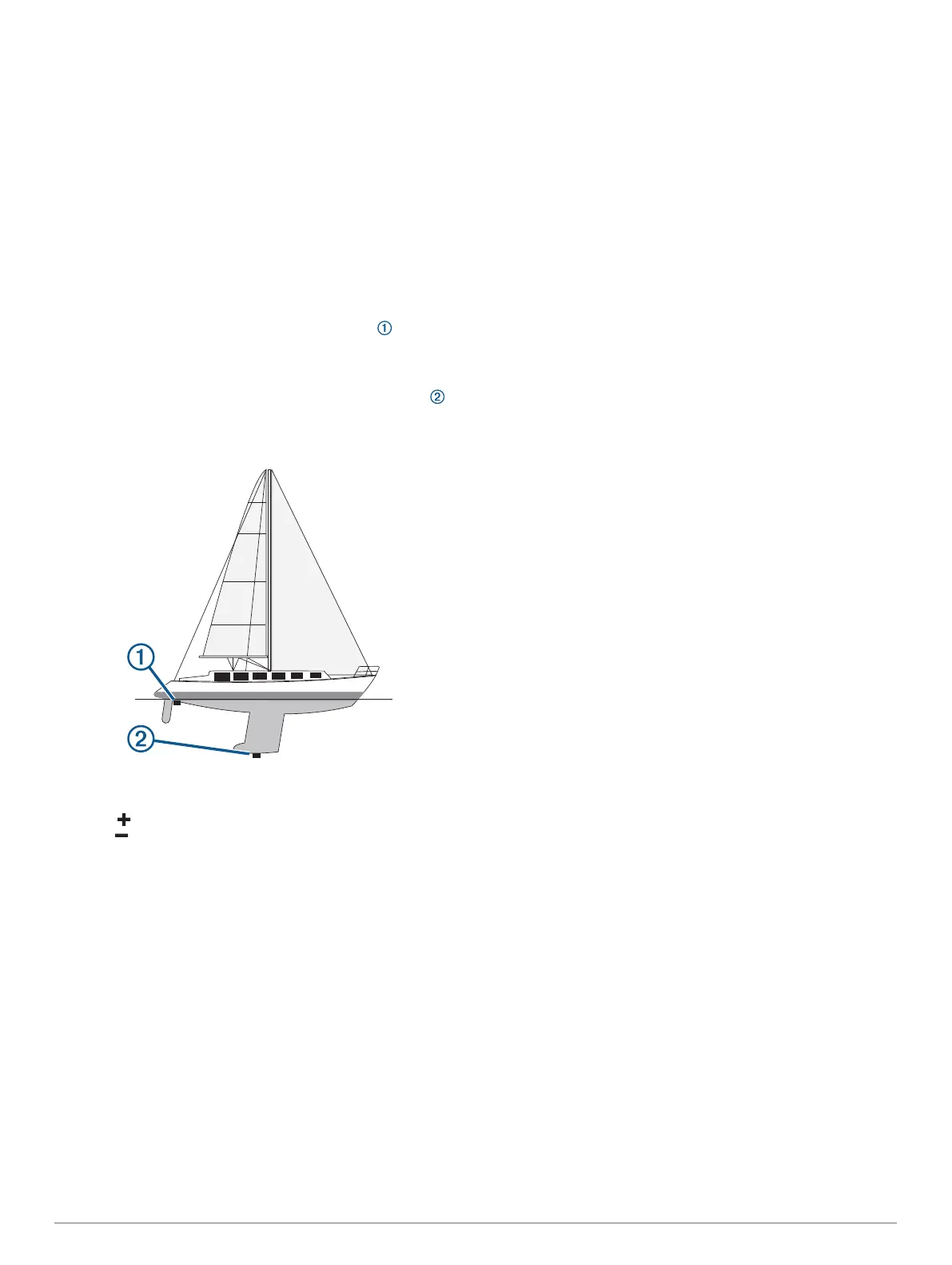
You can enter a keel offset to compensate the water depth
reading for the transducer installation location. This allows you
to view the depth of the water below the keel or the true depth of
the water, depending on your needs.
If you want to know the water depth below the keel or the lowest
point of your boat and the transducer is installed at the water
line or anywhere above the end of the keel, measure the
distance from the transducer location to the keel of the boat.
If you want to know the true water depth and the transducer is
installed below the water line, measure the distance from the
bottom of the transducer up to the water line.
NOTE: This option is only available when you have valid depth
data.
1
Measure the distance:
• If the transducer is installed at the water line or
anywhere above the end of the keel, measure the
distance from the transducer location to the keel of the
boat. Enter this value as a positive number.
• If the transducer is installed at the bottom of the keel
and you want to know the true depth of the water,
measure the distance from the transducer to the water
line. Enter this value in as a negative number.
2
Select Settings > My Vessel > Depth and Anchoring >
Keel Offset.
3
Select if the transducer is installed at the water line, or
select if the transducer is installed at the bottom of the
keel.
4
Enter the distance measured in step 1.
Setting the Water Temperature Offset
Before you can set the water temperature offset, you must have
a NMEA 0183 water-temperature sensor or a temperature-
capable transducer to measure water temperature.
The temperature offset compensates for the temperature
reading from a temperature sensor.
1
Measure the water temperature using the temperature sensor
or temperature-capable transducer that is connected to the
chartplotter.
2
Measure the water temperature using a different temperature
sensor or a thermometer that is known to be accurate.
3
Subtract the water temperature measured in step 1 from the
water temperature measured in step 2.
This is the temperature offset. Enter this value in step 5 as a
positive number if the sensor connected to the chartplotter
measures the water temperature as being colder than it
actually is. Enter this value in step 5 as a negative number if
the sensor connected to the chartplotter measures the water
temperature as being warmer than it actually is.
4
Select Settings > My Vessel > Temp. Offset.
5
Enter the temperature offset calculated in step 3.
Calibrating a Water Speed Device
If you have a speed-sensing transducer connected to the
chartplotter, you can calibrate that speed-sensing device to
improve the accuracy of water-speed data displayed by the
chartplotter.
1
Select Settings > My Vessel > Calibrate Water Speed.
2
Follow the on-screen instructions.
If the boat is not moving fast enough or the speed sensor is
not registering a speed, a message appears.
3
Select OK, and safely increase the boat speed.
4
If the message appears again, stop the boat, and ensure the
speed-sensor wheel is not stuck.
5
If the wheel turns freely, check the cable connections.
6
If you continue to get the message, contact Garmin product
support.
Other Vessels Settings
When your compatible chartplotter is connected to an AIS
device or VHF radio, you can set up how other vessels are
displayed on the chartplotter.
Select Settings > Other Vessels.
AIS: Enables and disables AIS signal reception.
DSC: Enables and disables digital selective calling (DSC).
Collision Alarm: Sets the collision alarm (Setting the Safe-Zone
Collision Alarm, page 10).
AIS-EPIRB Test: Enables test signals from Emergency Position
Indicating Radio Beacons (EPRIB).
AIS-MOB Test: Enables test signals from man overboard (MOB)
devices.
AIS-SART Test: Enables test transmissions from Search and
Rescue Transponders (SART).
Settings that are Synced on the Garmin
Marine Network
The following devices sync certain settings when connected to
the Garmin Marine Network.
• echoMAP
™
70 series
• GPSMAP 507 series (software version 3.0 or later)
• GPSMAP 701 series (software version 3.0 or later)
• GPSMAP 702 series
• GPSMAP 800 series
• GPSMAP 902 series
• GPSMAP 1000 series
• GPSMAP 1002 series
• GPSMAP 1202 series
• GPSMAP 7400/7600 series
• GPSMAP 8400/8600 series
The following settings are synced, if applicable, to the device.
Alarm Settings (also syncs alarm acknowledgment):
• Arrival
• Anchor Drag
• Off Course
• GPS Accuracy
• Shallow Water
Device Configuration 55


 To Next Page