6 nüvi 310/360/370 Owner’s Manual
maIn paGes
Main PaGes
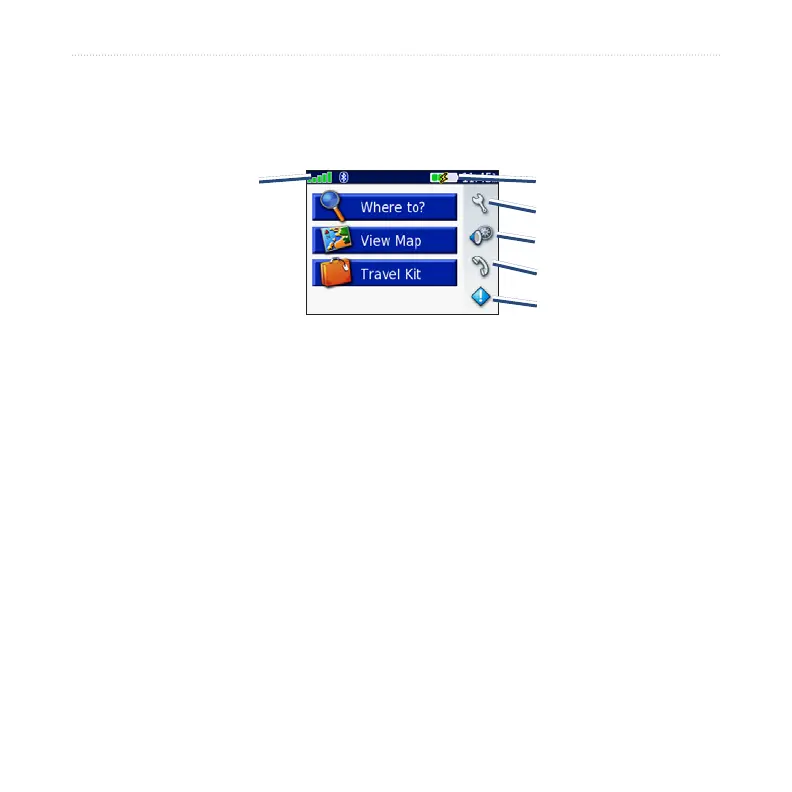
Understanding the Menu Page
GPS satellite
signal status
Settings
Quick settings
Phone
Trafc
Battery status
Menu Page
● GPS satellite signals—represents the satellite signals being received by your nüvi.
When you see green bars, you have a strong signal.
●
Battery status—represents the status of the battery charge. The lightening bolt
symbol indicates that the nüvi is currently charging.
● Settings—accesses the nüvi settings.
● Quick settings—accesses the settings for volume, brightness, and screen lock.
● Phone—appears when you pair the nüvi with a phone; accesses phone features.
● Trafc—appears when you connect an FM trafc receiver; accesses the trafc
incident list.



 To Next Page