36 nüvi 310/360/370 Owner’s Manual
manaGInG fIles on your nüvI
Loading Items to Your nüvi
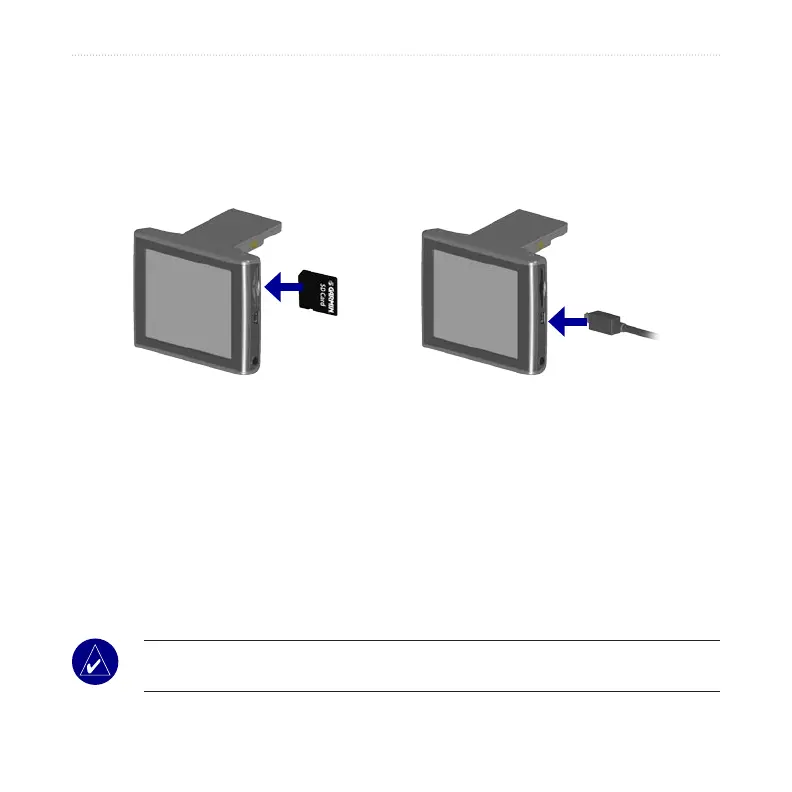
Step 1: Insert an SD Card (Optional)
The SD card slot is located on the side of the nüvi. To insert the card, press it in until
it clicks.
Inserting an SD Card
Connecting the USB Cable
Step 2: Connect the USB CableUSB Cable
1. Plug the small end of the USB cable into the connector on the side of the nüvi.
2. Connect the larger end of the USB cable to an available USB port on your
computer.
After you connect your nüvi to your computer, one or two additional drives
appear in your computer’s list of drives: “nuvi” and “nuvi sd.” “nuvi” is the
available storage in the nüvi’s internal memory. “nuvi sd” appears if an SD card
is inserted into the nüvi.
NOTE: On some operating systems, the nüvi drives may not be named
automatically. See your Help le to learn how to rename the drives.



 To Next Page