nüvi 310/360/370 Owner’s Manual 33
usInG an fm tmc traffIc receIver
Viewing Trafc Incidents
1. On the Menu page, touch to display a list of trafc incidents.
2. Select an item to view details.
3. Select an option.
Avoiding Trafc
The Map page displays or in the lower-right corner of the screen when there is
a trafc incident on your current route or road.
1. From the Map page, touch or .
2. Select an item to view details.
3. Touch Avoid.
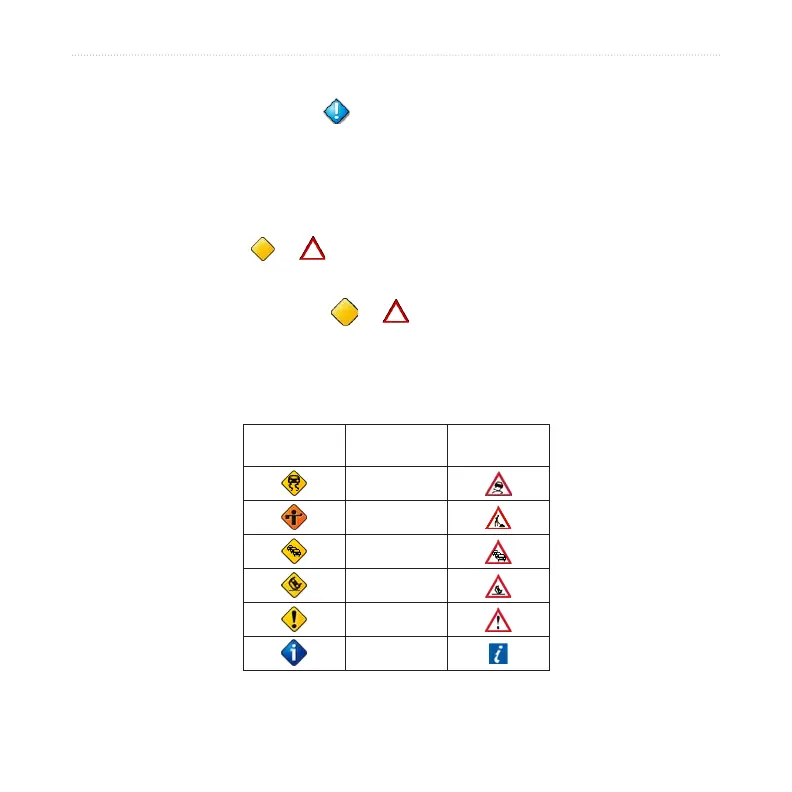
Trafc Symbols
North
American
Meaning International
Road Condition
Road
Construction
Congestion
Accident
Incident
Information



 To Next Page