10 Quest
®
2 Owner’s Manual
basIc operatIon > fIndInG places and routInG to them
Finding an Address or Intersection
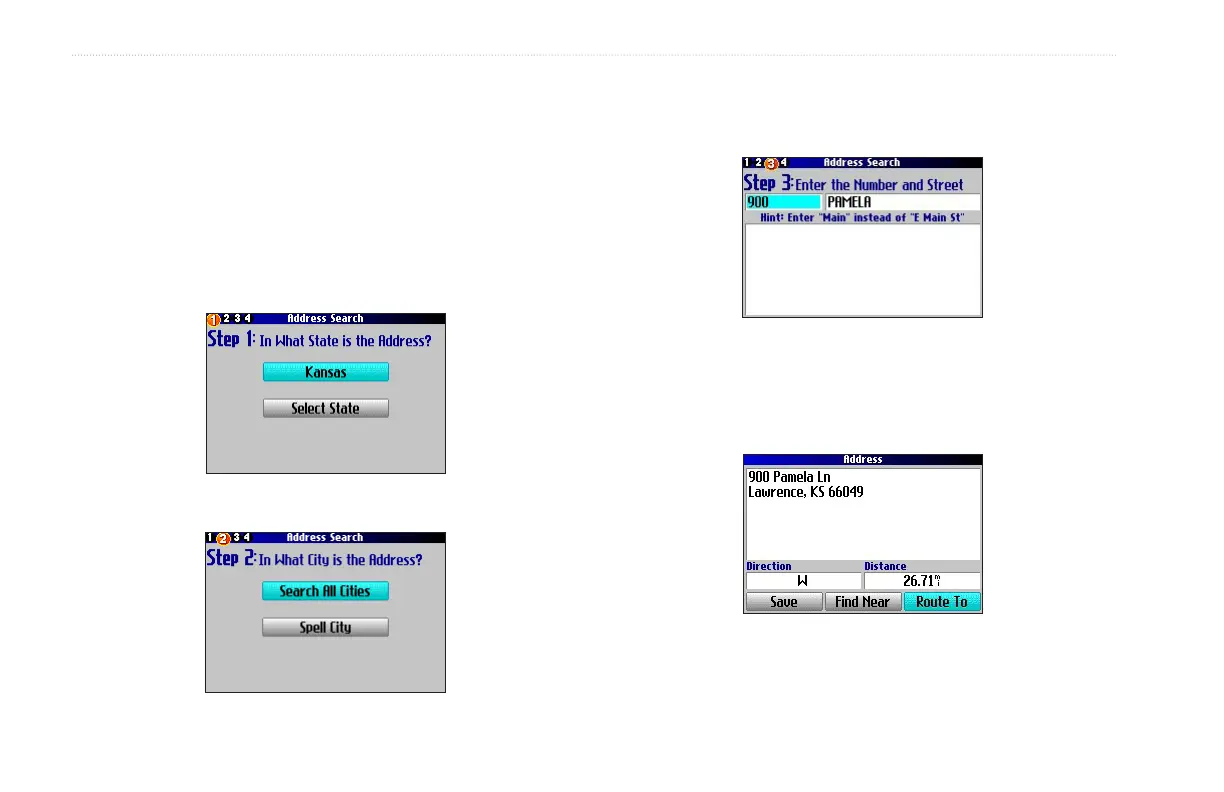
To search for an address or intersection, select Addresses or
Intersections from the Find Menu. In both cases, a search wizard
appears that allows you to enter street information.
To nd an address or intersection:
1. Press FIND, highlight Addresses or Intersections, and
press OK.
2. Highlight a state and press OK.
3. Highlight Search All Cities and press OK.
4. Enter the address number and street using the on-screen
keyboard. For intersections, you only need to enter street
names.
5. A list of addresses or intersections appears. Highlight the
place you are looking for and press OK.
6. To create a route to this address, highlight Route To and
press OK.



 To Next Page