Page 14 709-BTP3 Manual
Find RV:
Android
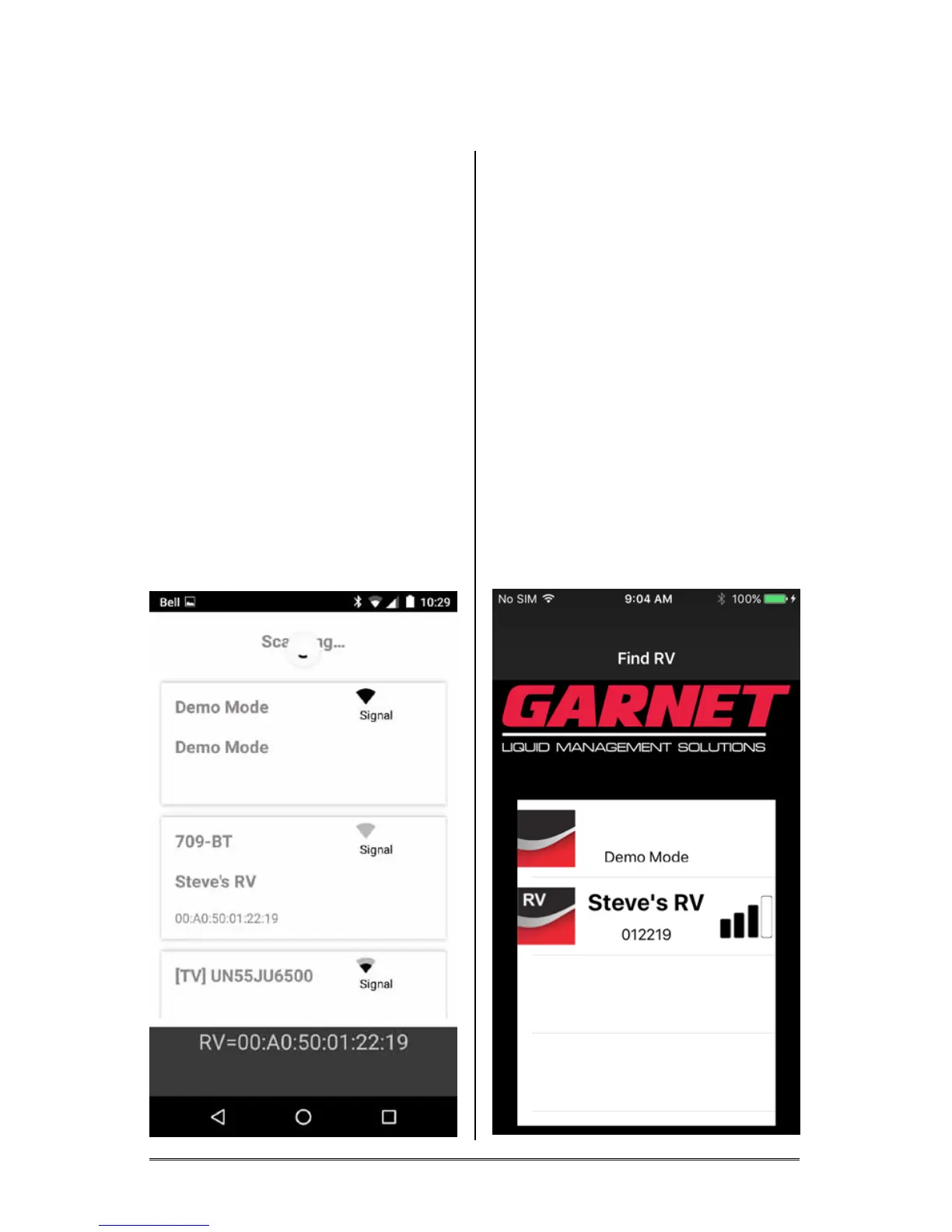
Select the device named “709-BT”.
This device selection will be
saved for future use and will
automatically be selected the next
time you run the app.
The name shown is the user
entered name for the RV. See
“Name RV”.
The identication string shown
under the “709-BT” device is a
unique identier for the Garnet
hardware installed in your RV.
Note: Ensure you select your
device if you are in an area with
other SeeLeveL tank monitoring
systems.
Apple iOS
Select the device with the “RV”
icon displayed.
This device selection will be
saved for future use and will
automatically be selected the next
time you run the app.
The name shown is the user
entered name for the RV. See
“Name RV”.
The identication number shown
is a unique identier for the Garnet
hardware installed in your RV.
Note: Ensure you select your
device if you are in an area with
other SeeLeveL tank monitoring
systems.






 To Next Page