30 -
Within System Log there are two options; Export System Log and Delete System
Log.
Exports the System log to an external USB drive connected
to the front of the 304-SD.
Deletes the System Log. If selected a confirmation window
will appear.
Reserved for Future development.
RECORD
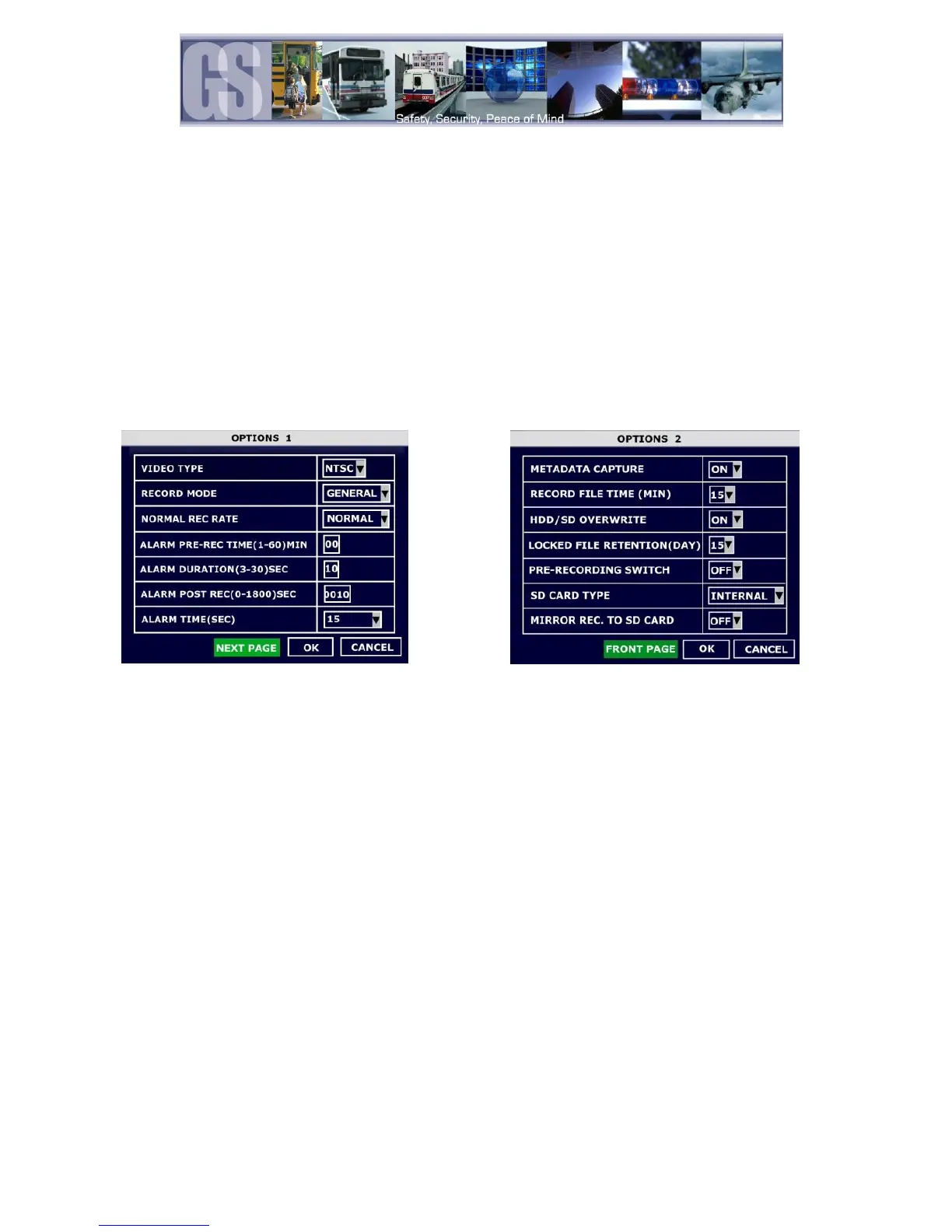
There are two pages of Preferences within the Record Options menu.
Figure 21: Record Options
Options 1.
Options: General; Timer or Event.
The 304-SD will begin recording upon power up.
The 304-SD will begin recording at the time specified in the Timer Record
menu based on the schedule
When an Event has been triggered the 304-SD will record. To set an Event to
record go to Advanced Configuration System Event to set triggers.
Options: Normal or I Frame.
The 304-SD will begin to record according to the configuration of the settings
in the Record Setting menu.
The 304-SD will begin recording at 1 frame per second to conserve disk space,
however, if an event is triggered the 304-SD will record at the frame rate
specified within the Record Setting menu.
Determines the length of the file before and after an Event has been triggered, e.g. if Alarm
Pre-Rec Time is set to 30 minutes an Event which was triggered at 10:00am would
generate a saved file showing video from 9:30am to 10:30am.
Determines the duration for which an Alarm will record.
Determines the duration for how long an Alarm will record for after it has been activated it.
When Alarm has been triggered, duration time of the Alarm.


 To Next Page