36 -
WI-FI
Wi-Fi can be configured for use of an internal Wi-Fi card, if installed, or for when an external Wi-Fi radio is being utilized. If an
external Wi-Fi radio is being used Wi-Fi ENABLE must be set to OFF.
If an internal wireless module is being utilized, please consult with your Information Technology department for all relevant IP;
DNS; Gateway and subnet information.
If Wi-Fi is enabled, I.E. using an internal Wi-Fi card,
there are two options once enable has been selected:
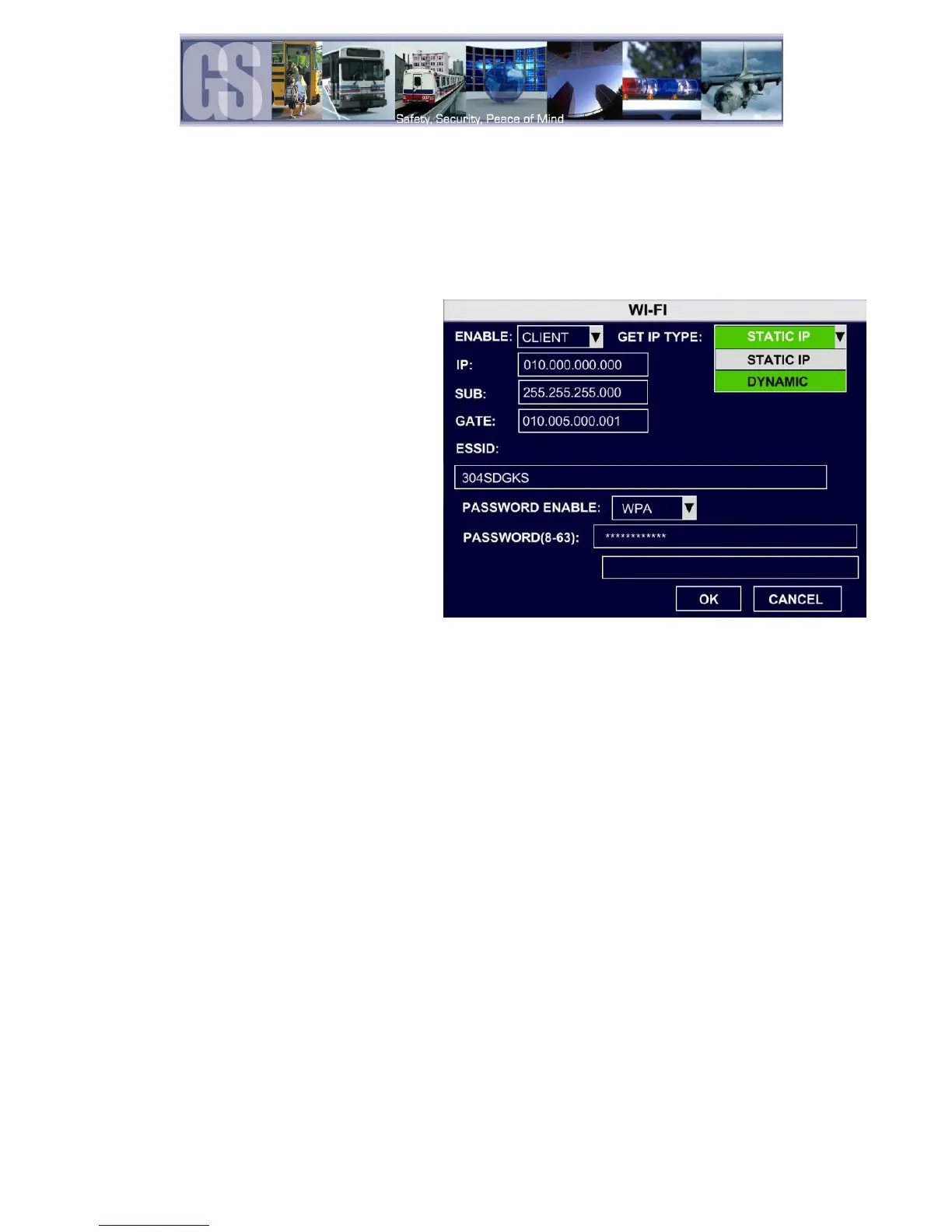
Figure 25: Example WI-FI Configuration.
Sets the 304-SD as a client on the
network. Once selected GET IP Type will
become available with two options; Static
IP and Dynamic IP. If Static is chosen
complete the required fields for IP; SUB;
and Gateway.
When AP is selected only the IP and SUB
fields require population with the required
information.
ESSID only becomes active once the PASSWORD ENABLE option has been chosen. Enter the required
ESSID, network name, for the wireless network.
Mobile Network
Please note: This function is currently reserved for future development.
If a mobile network is to be configured, the 304-SD will require the installation of a SIM card. The installation of the SIM card
must be done at time of system build at the Gatekeeper Systems Facility.
Remove the 4 retaining screws on the base of the 304-SD. The SD card slot located here is for future development.
Make sure to connect the 3G antenna to the rear of the 304-SD.
NONE; CDMA; EVDO; WCDMA; EDGE; TD-SCDMA
If EVDO is chosen, a secondary dialog window will appear with options for
2G3G / 2G / 3G.
Always; Call/SMS; Sensor. If Call/SMS is selected a secondary dialog
window will appear where up-to three phone numbers can be entered.
See Figure 25 for more information
Reserved for future development.


 To Next Page