8/167
EN
8. When you are not using the oxygen concentrator, press the power switch to the O [O]
position to turn o the power.
OPERATION MODES AND LCD DISPLAY GUIDE
MODE GUIDANCE LCD DISPLAY
Start within
5 minutes
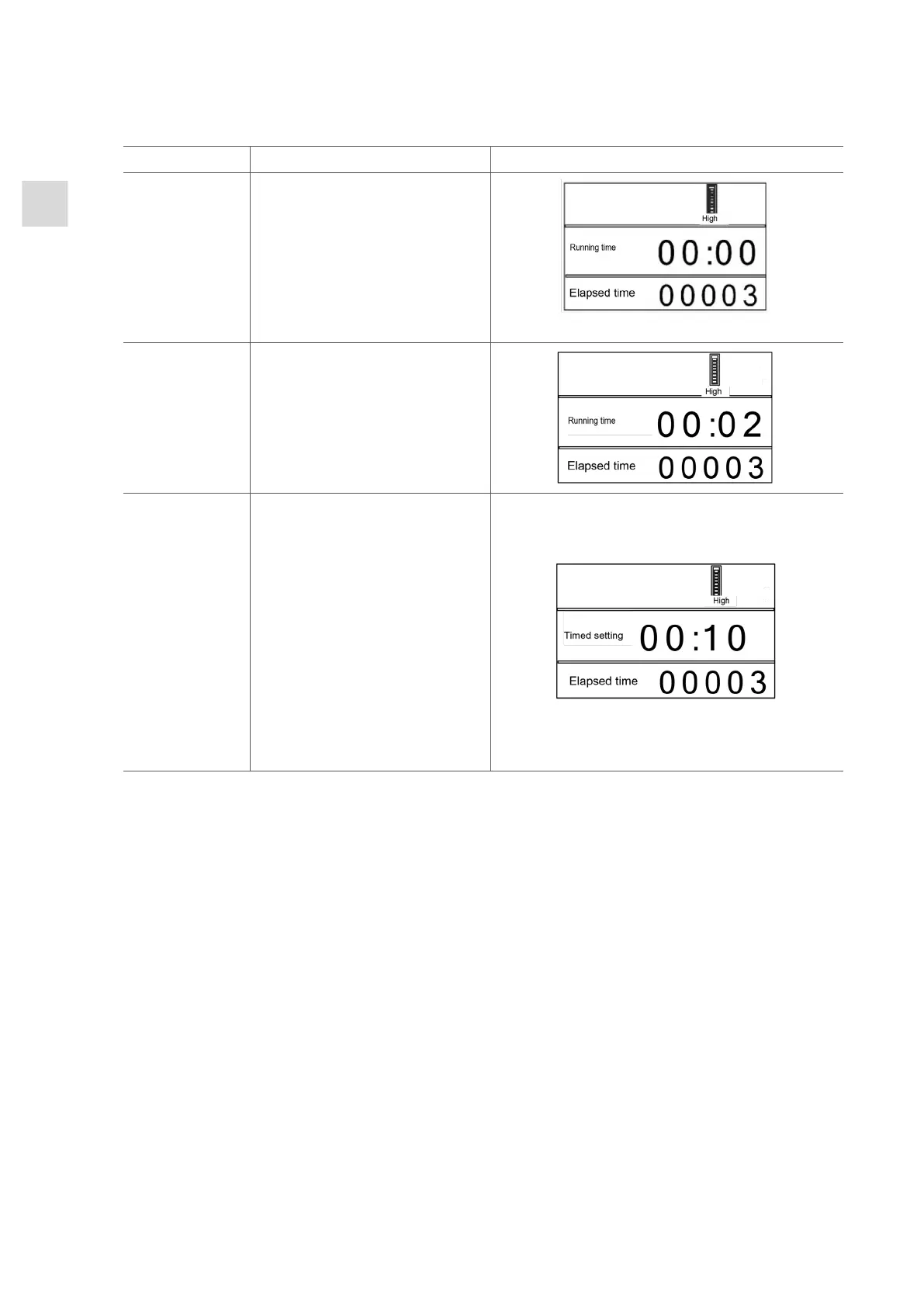
In the first five minutes of
operation, the oxygen purity
indicator, hour, minute and
separator flicker at the same
time.
Model OC-S has no oxygen indicator Model OC-E
Continuous
operation
The LCD indicates elapsed
time and current run time.
Timed setting Set the length of your treat-
ment by pressing the up
and down buttons on the
button board to increase
or decrease the duration in
10-minute increments.
20 seconds after setting
your treatment duration,
the timer will automatically
begin to count down to the
end of your treatment. The
oxygen flow will stop once
the timer runs out.
3. CLEANING, MAINTENANCE AND SERVICING
Always press the power switch to the O [O] position and unplug your OC Series Oxy-
gen Concentrator before cleaning.
The exterior of your oxygen concentrator should be cleaned weekly using a damp cloth
with a mild household cleaner. Always wipe the exterior dry after cleaning.
Your cannula and humidifier must be cleaned and replaced as instructed by the manufac-
turer or your home oxygen provider.
You must clean the air filter in the OC Series Oxygen Concentrator at least once a week.
1. Open the access panel to the air filter to the side of the oxygen concentrator
2. Remove the air filters from the device
3. Rinse and allow to dry naturally
4. Once dry, reinstall the air filters
Maintenance and Servicing
The device has no user-serviceable parts, and must only be serviced by an authorized
provider.



 To Next Page